

Bir rota filtresini (route filter) değiştirdiniz ama XenForo hâlâ eski adresleri üretiyor, yeni adresler 404 veriyor ya da tarayıcı "çok fazla yönlendirme" (too many redirects) hatasıyla duruyor. İlk akla gelen çözüm "route filter cache'ini yeniden oluşturmak" oluyor ve bu konunun ilk sürümü de doğrudan geliştirici moduna (development mode) ve php cmd.php xf-dev:rebuild-caches komutuna gidiyordu. Komut gerçekten var, ama ilk adım değil, son adım olmalı. XenForo, yönetim panelinde bir filtreyi her kaydettiğinizde, kapatıp açtığınızda veya sildiğinizde filtrelerin önbellekteki kopyasını kendisi yeniden oluşturur. Bu yüzden gerçekten bayatlamış (stale) bir filtre önbelleğine nadiren rastlanır; çoğu durumda sorun filtredeki bir yazım hatası, başka bir rotayla çakışma ya da XenForo dışındaki bir önbellek katmanıdır. Bu rehberin kuralı basit: önce teşhis, en son yeniden oluşturma. Komut adları XenForo 2.2 ve 2.3'e göredir; kendi kurulumunuzda php cmd.php list ile doğrulayın.
Rota filtreleri nasıl çalışır?
Filtreler yönetim panelinde (Admin CP) Setup > Route filters altında yönetilir. Rota, adresin forum URL'sinden sonra gelen ve XenForo'nun hangi sayfayı göstereceğine karar verirken kullandığı kısımdır: https://forum.example.com/threads/hosgeldiniz.72/ adresinde rota threads/hosgeldiniz.72/ kısmıdır. Use full friendly URLs (tam kullanıcı dostu URL) seçeneği yalnızca adreste index.php? bölümünün görünüp görünmeyeceğini belirler; rotanın kendisi değişmez.- Find route standart XenForo rotasıdır, Replace with ise ziyaretçinin görmesini istediğiniz biçimdir. Filtre varsayılan olarak iki yönlü çalışır: XenForo ürettiği her bağlantıya yeni biçimi yazar, bu biçimde gelen bir isteği de içeride standart rotaya geri çevirir.
- Eşleştirme rotanın başından başlar ve rotanın tamamını kapsamak zorunda değildir. Rotanın filtreyle eşleşmeyen kısmı olduğu gibi kalır; forums/ → forumlar/ filtresi forums/duyurular.12/page-2 adresini de forumlar/duyurular.12/page-2 yapar.
- İlk eğik çizgiye kadar olan bölümde, yani rotanın ön ekinde (prefix), iki alanda da joker karakter kullanılamaz.
- Incoming URL conversion only seçeneği filtreyi tek yönlü yapar. Bağlantılar standart hâliyle üretilir; Replace with biçimindeki bir adresi isteyen ziyaretçi standart rotaya yönlendirilir. Eski bir filtreden vazgeçerken veya eski adresleri yaşatırken kullanılacak araç budur.
| Joker karakter (wildcard) | Neyle eşleşir | Tipik kullanım |
|---|---|---|
| {name} | / dışındaki her şey | bir bölümün tamamı |
| {name:digit} | yalnızca rakamlar | 72 gibi içerik kimlikleri |
| {name:string} | / ve . dışındaki her şey | .72 öncesindeki başlık kısmı (slug) |
İki alanda da aynı joker karakterler bulunmalıdır. Bu kural biçimsel değil, işlevseldir: XenForo gelen bir adresi standart rotaya geri çevirirken her değere yeniden ihtiyaç duyar. threads/{title:string}.{id:digit}/ rotasını konu/{title:string}/ biçimine çeviren bir filtre çalışamaz, çünkü konuyu bulmaya yarayan kimliği (ID) atar.
XenForo kılavuzundaki temel uyarıyı kendi sözlerimizle özetlersek: rota filtreleri belirsiz adres yapıları oluşturup ziyaretçilerin başka sayfalara ulaşmasını engelleyebilir, bu yüzden her değişiklikten sonra test etmek gerekir. Aynı dikkat sayfa düğümleri (page node) için de gerekir: standart bir adresle çakışan bir sayfa adı, XenForo'nun başka bölümlerine erişimi engelleyebilir.
| Amaç | Find route | Replace with | Dikkat |
|---|---|---|---|
| Ön eki Türkçeleştirmek | forums/ | forumlar/ | sondaki eğik çizgi iki tarafta da olmalı |
| Tek bir foruma kısa adres | forums/xenforo.347/ | xenforo/ | xenforo/ mevcut bir rota veya klasör olmamalı; forumun adı değişirse slug değişir ve filtre eşleşmez |
| pages/ ön eki olmadan sayfa | pages/hakkimizda/ | hakkimizda/ | sayfa adı yerleşik bir adresi gölgelememeli |
| Eski bir filtreden vazgeçmek | threads/ | konu/ | Incoming URL conversion only işaretlenir |
Önbelleği yeniden oluşturmak neden nadiren işe yarar?
XenForo etkin filtrelerin hazırlanmış bir listesini dahili veri deposunda (data registry) tutar; Redis gibi bir önbellek sunucusu tanımlıysa listenin bir kopyası oradaki registry bağlamında (context) da durur. Yönetim panelinde bir filtreyi kaydetmek, kapatıp açmak veya silmek bu listeyi anında yeniden yazar. Gerçekten bayat bir listenin nedenleri bu yüzden sınırlıdır: Ya biri xf_route_filter tablosunu doğrudan değiştirmiştir (phpMyAdmin, bir taşıma betiği, veritabanı geri yüklemesi) ya da önbellek sunucusu eski bir kopyayı tutuyordur; örneğin bir geri yüklemeden sonra veya test (staging) ve canlı site aynı Redis'i aynı ad alanıyla (namespace) paylaşıyorsa. Doğrudan veritabanı düzenlemeleri XenForo'nun kendi yeniden oluşturma mantığını hiç tetiklemez; XenForo'da phpMyAdmin üzerinden çeviri metni değiştirme konusunda aynı durum ifadeler (phrase) için de geçerlidir. Geri kalan her şey aşağıdaki nedenlerden birine girer.Belirtiler ve olağan nedenleri: kontrol sırası
- Filtrede yazım hatası veya eğik çizgi uyumsuzluğu. İki alanı karakter karakter karşılaştırın ve eğik çizgi düzenini aynı tutun: forums/ → forumlar/ doğru, forums/ → forumlar yanlış. Find route'taki bir yazım hatası (örneğin forum/) bağlantıları hiç değiştirmez, yeni biçimde gelen istekleri ise var olmayan bir rotaya çevirir; sonuç 404 olur. Ayrıca şunlara bakın: baştaki eğik çizgi, alana yapıştırılmış tam alan adı, büyük harfler, kapalı kalmış filtre, forumun adı veya sayfanın URL kısmı (URL portion) değiştiği için artık eşleşmeyen sabit bir Find route ve yanlışlıkla işaretlenmiş Incoming URL conversion only. Sonuncusu bağlantıları standart hâlinde bırakır.
- Yerleşik, sayfa veya eklenti (add-on) rotalarıyla çakışma. Yeni ön ek zaten başka bir şeye aitse XenForo ziyaretçinin hangisini kastettiğini ayırt edemez. members/ rotasını account/ yapmak hesap ayarları sayfalarıyla çakışır; downloads/ bir eklentiye ait olabilir; pages/help/ adresini help/ yapan bir filtre XenForo'nun yardım sayfalarıyla çakışır. Filtreyi oluşturmadan önce https://forum.example.com/yenionek/ adresini açın ve şu anda 404 verdiğinden emin olun.
- Tarayıcı, CDN veya tam sayfa önbelleği (full-page cache). Tarayıcılar 301 yanıtlarını bazen uzun süre önbellekte tutar; bu yüzden kendi tarayıcınız güvenilir bir test aracı değildir, gizli pencere veya curl kullanın. Cloudflare varsayılan olarak HTML'i önbelleğe almaz; bir forum sayfasında cf-cache-status başlığı HIT gösteriyorsa sayfaları önbelleğe alan bir kural vardır ve önbelleğin temizlenmesi (purge) gerekir. XenForo'nun misafir sayfa önbelleği (config.php'deki pageCache) yalnızca misafirlere hizmet eder ve sayfaları varsayılan olarak 300 saniye tutar; "yöneticiler yeni bağlantıları görüyor, misafirler görmüyor" durumunun açıklaması çoğunlukla budur. Bu önbellekten gelen yanıtta X-XF-Cache-Status: HIT başlığı bulunur. LiteSpeed'in sayfa önbelleğini (LSCache) kullanıyorsanız o da temizlenene kadar eski sayfaları sunabilir.
- validate_timestamps=0 ayarlı OPcache. Filtreler veritabanında durduğundan OPcache'te yer almaz; ancak src/config.php dosyası ve eklenti kodu OPcache'te tutulur. opcache.validate_timestamps=0 iken PHP, OPcache sıfırlanana kadar dosya değişikliklerini görmez. Sayfa önbelleğini kapatan bir config değişikliği ya da aşağıdaki geliştirici modu satırı bu durumda web tarafında hiç etkili olmayabilir.
- Sunucu yeniden yazma (rewrite) ve yönlendirme kuralları. Önceki bir adres düzeninden kalan .htaccess veya nginx kuralları ya da Cloudflare yönlendirme kuralları filtreyle çatışabilir. /konu/ adresini /threads/ adresine gönderen bir sunucu kuralı ile /threads/ adresini /konu/ yapan bir filtre birlikte kaçınılmaz olarak döngü üretir. Belge kökünde (document root) yeni ön ekle aynı adı taşıyan gerçek bir klasör varsa öncelik onundur, çünkü XenForo'nun standart rewrite kuralları var olan dosya ve dizinleri doğrudan sunar.
Geliştirici modu olmadan güvenli çözümler
- Filtreyi yeniden kaydedin. Setup > Route filters sayfasını açın, iki alanı karakter karakter kontrol edip kaydedin. Filtreyi listede kapatıp yeniden açmak da aynı işi görür. Tek bir filtreyi kaydetmek önbellekteki listenin tamamını yeniden oluşturur; doğrudan veritabanı düzenlemesinden sonraki onarım da budur.
- Adreslere bağlı olanları yeniden oluşturun. Filtrenin kendisi için Tools > Rebuild caches sayfasına (güncel kılavuzdaki yol: Tools > Data maintenance > Rebuild caches) gerek yoktur; o işi kaydetme adımı zaten yaptı. Adresler doğru çıktıktan sonra aynı sayfadaki site haritası (sitemap) yeniden oluşturma işini çalıştırın.
- Dış önbellekleri temizleyin. CDN yalnızca HTML'i önbelleğe alıyorsa temizlik gerekir (Cloudflare: Caching > Configuration sayfasındaki Purge Cache bölümü; Custom Purge ile adrese göre ya da Purge Everything ile tamamı). LSCache kullanıyorsanız onu da temizleyin. XenForo'nun misafir sayfa önbelleği için süresinin dolmasını bekleyin veya önbellek sunucusundaki page bağlamının (context) kayıtlarını silin.
- Dosya değiştiyse PHP'yi yeniden yükleyin. PHP-FPM servisini yeniden yükleyin (reload). Servis adı sisteme göre değişir: AlmaLinux ve diğer RHEL tabanlı sistemlerde php-fpm, Debian ve Ubuntu'da php8.3-fpm gibi sürüm numaralı bir ad, cPanel'de ea-php83-php-fpm, DirectAdmin'de php-fpm83 (sayı kurulu PHP sürümüne göre değişir). LiteSpeed Web Server 5.3 ve sonrasında PHP bağımsız (detached) modda çalışır ve web sunucusuyla birlikte yeniden başlatılmaz: LiteSpeed'in kontrol paneli eklentisindeki Restart Detached PHP Processes düğmesini ya da WebAdmin konsolunun Actions sayfasını kullanın veya yeniden başlatma dosyasını touch komutuyla güncelleyin. Komut satırından çalıştırılan opcache_reset() yalnızca komut satırı (CLI) sürecinin kendi önbelleğini temizler, web tarafındaki önbelleğe dokunmaz.
- curl ile test edin. curl çerez göndermez, yani misafirin gördüğünü görür.
Bash:
# PHP-FPM servis adını bulun ve o adla yeniden yükleyin (örnekte php-fpm)
systemctl list-units --type=service | grep -i fpm
sudo systemctl reload php-fpm

# LiteSpeed: tüm hesaplarda detached PHP'yi yeniden başlatın (root yetkisi gerekir)
# (tek bir cPanel hesabı için, o kullanıcıyla: touch ~/.lsphp_restart.txt)
sudo touch /usr/local/lsws/admin/tmp/.lsphp_restart.txt

# yeni adres 200 dönmeli (GET isteği, yalnızca başlıklar yazdırılır);
# X-XF-Cache-Status: HIT, yanıtın misafir sayfa önbelleğinden geldiğini gösterir
curl -s -D - -o /dev/null https://forum.example.com/forumlar/duyurular.12/ | grep -iE '^(HTTP|cf-cache-status|x-xf-cache-status)'

# eski adres, yeni adrese giden bir 301 dönmeli
curl -sI https://forum.example.com/forums/duyurular.12/ | grep -iE '^(HTTP|location)'

# tüm adımları izleyin; döngü varsa curl "Maximum (10) redirects followed" hatasıyla durur
curl -sSIL --max-redirs 10 https://forum.example.com/forums/duyurular.12/ | grep -iE '^(HTTP|location)'

# hâlâ eski ön eki kullanan bağlantılar (forum alt klasördeyse yolu uyarlayın)
curl -s https://forum.example.com/ | grep -o 'href="/forums/[^"]*"' | head
Sorun giderme tablosu
| Belirti | Olası neden | Çözüm |
|---|---|---|
| Herkes eski bağlantıları görüyor | filtre kapalı, yazım hatası, incoming-only işaretli, tablo SQL ile değiştirilmiş | alanları düzeltip kaydedin |
| Yalnızca misafirler eski bağlantıları görüyor | misafir sayfa önbelleği (X-XF-Cache-Status: HIT) veya CDN | önbellek süresini bekleyin (pageCache için varsayılan 5 dakika) veya önbelleği temizleyin |
| Sorun yalnızca sizin tarayıcınızda | önbelleğe alınmış 301 | gizli pencere, tarayıcı önbelleğini temizleme |
| Yeni adres 404 veriyor | Find route'ta yazım hatası, alanlar arasında eğik çizgi uyumsuzluğu, sunucu kuralı | alanları düzeltin, kuralı düzeltin |
| Yeni adres 403 veya ilgisiz bir içerik gösteriyor | belge kökünde ön ekle aynı adı taşıyan gerçek klasör | ön eki değiştirin veya klasörü taşıyın |
| Başka bir sayfa bozuldu | ön ek çakışması | filtreyi kapatın, boşta olan bir ön ek seçin |
| Çok fazla yönlendirme | filtreyle ters yönde çalışan eski bir sunucu veya CDN yönlendirmesi | kuralı kaldırın veya filtreyle uyumlu hâle getirin |
| Eski adres 301 yerine 200 veriyor | kanonik yönlendirmesi olmayan rota | önemliyse sunucu düzeyinde 301 ekleyin |
| config.php değişikliği yok sayılıyor | OPcache, detached lsphp | PHP'yi yeniden yükleyin |
CLI yolu: yalnızca yukarıdaki kontroller sonuç vermezse
XenForo kök dizininde, yani cmd.php dosyasının bulunduğu klasörde (çoğunlukla public_html) çalışın. Komutları root olarak değil, sitenin kullanıcısıyla çalıştırın (VPS'te sudo -u siteKullanicisi php cmd.php ...; cPanel'de SSH kullanıcısı zaten site kullanıcısıdır). Aksi hâlde komutun internal_data altına yazdığı dosyalar root'a ait olur ve sitenin PHP süreçleri onları sonradan güncelleyemez. Önce sürümünüzün neler sunduğuna bakın:
Bash:
cd /home/kullanici/public_html
php cmd.php list
php cmd.php list xf-rebuild
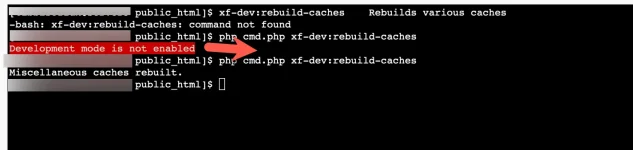
xf-rebuild komutları (search, threads, sitemap ve diğerleri) ile xf:rebuild-master-data geliştirici modu olmadan çalışır; XenForo Similar Threads ve XFES çözümü xf-rebuild:search ve xf:rebuild-master-data komutlarını uygulamada gösteriyor. Hiçbiri bir rota filtresi aracı değildir; xf:rebuild-master-data ise çekirdek veriler için daha ağır bir onarım işidir. xf-dev:rebuild-caches 2.2 ve 2.3'te bulunur ve XenForo'nun dahili önbelleklerinin geniş bir bölümünü tek seferde yeniden oluşturur; tam kapsamı site sahipleri için belgelenmemiştir. Diğer xf-dev komutları gibi geliştirici modu ister; mod kapalıyken ya listede görünmez ya da çalıştırılması reddedilir. Gerçekten gerekiyorsa:
- Veritabanı yedeği alın ve trafiğin az olduğu bir saat seçin.
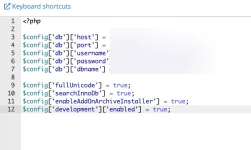
- src/config.php dosyasını açın ve mevcut $config satırlarının altına aşağıdaki satırı ekleyin. Bu rehberin ilk sürümündeki ekran görüntüleri yazının altındaki ek listesinde duruyor.
Varsayılan OPcache ayarlarıyla web sunucusu bu satırı birkaç saniye içinde görür; yani satır dosyada durduğu sürece canlı site de geliştirici modundadır. Yalnızca komut satırında geçerli olan şu biçim aynı işi ziyaretçileri etkilemeden yapar. php -v çıktısında "(cli)" ibaresini görmelisiniz; bazı sunucularda php komutu CGI sürümüne bağlıdır ve o durumda koşul hiç sağlanmaz:PHP:$config['development']['enabled'] = true;
PHP:if (PHP_SAPI === 'cli') { $config['development']['enabled'] = true; } - Sözdizimini kontrol edin, çünkü config.php'deki bir sözdizimi hatası (parse error) forumun tamamını erişilemez hâle getirir. Sonra komutun listede göründüğünü doğrulayıp çalıştırın:
Bash:php -l src/config.php php cmd.php list xf-dev php cmd.php xf-dev:rebuild-caches - Satırı silin ve php -l komutunu tekrar çalıştırın. validate_timestamps=0 kullanıyorsanız PHP'yi yeniden yükleyin; aksi hâlde web sunucusu geliştirici modunda kalabilir.
- curl kontrollerini tekrarlayın.
Geliştirici modu neden hemen kapatılmalı? Bu mod hata ayıklama modunu (debug mode) da açar; hata ayıklama modu her sayfanın altına sayfa süresi, sorgu sayısı ve bellek kullanımı bilgisi ekler. XenForo ekibi, getirdiği ek yük ve sorguları görünür kılması nedeniyle bu modu canlı sitede önermiyor. Geliştirici modu ayrıca yönetim panelinde geliştirici araçlarını açar ve eklentilerin _output klasörlerine geliştirme dosyaları yazabilir. En sık görülen kazalar unutulan bir satır ve config.php'deki bir yazım hatasıdır.
Düzeltmeden sonra: bağlantılar, canonical, 301 ve site haritası
- Üretilen bağlantılar: Yukarıdaki curl ve grep komutunu çalıştırın (curl misafir olarak bağlanır); eski ön ek görünmemeli.
- Canonical etiketi: Bir konu adresinin çıktısını curl -s ile alıp grep -i 'rel="canonical"' ile süzün; yeni adres görünmeli. Etiketteki adresin protokol ve alan adı kısmı Board URL seçeneğinden (Setup > Options > Basic board information) gelir; bu değerin gerçekten sunduğunuz adresle (https, www'li veya www'siz) aynı olduğunu da kontrol edin.
- 301 yönlendirmeleri: Konular, forumlar ve diğer ana sayfalar kanonik adres kontrolünden geçer; XenForo eski adrese yenisini gösteren bir 301 ile cevap verir. Bu forumdaki /threads/72/ adresinin başlıklı tam adrese yönlenmesi de aynı mekanizmadır. Her rota bu kontrolü yapmaz; bazı eski adresler 301 yerine 200 vermeye devam edebilir. Önemli adresleri curl -I ile tek tek deneyin; arama açısından önemli olup hâlâ 200 verenler için sunucu düzeyinde 301 ekleyin.
- Site haritası: Yeniden oluşturun (Tools > Rebuild caches ya da php cmd.php xf-rebuild:sitemap; komut adını kendi sürümünüzde list ile doğrulayın), robots.txt dosyasında belirtilen site haritası adresini açıp yeni yolları kontrol edin, ardından Google Search Console'a yeniden gönderin.
- İç bağlantılar: Mesajlardaki adresler metin olarak saklanır ve değişmez. 301 sayesinde çalışmaya devam ederler; yine de adresi elle yazılmış gezinme (navigation) girdilerini, duyuruları (notice), widget'ları ve şablonları, ayrıca en çok okunan mesajlarınızı elle güncelleyin. Mesaj içeriğinde körlemesine SQL REPLACE çalıştırmayın.
Önleme
- Her filtreyi belgeleyin: find, replace, incoming-only durumu, tarih, gerekçe ve değişikliği yapan kişi.
- Aynı XenForo sürümünü ve eklentileri taşıyan bir test ortamında (staging) deneyin, curl kontrollerini çalıştırın, sonra canlı sitede tekrarlayın.
- Yerleşik, eklenti veya sayfa rotası olan, gerçek bir klasörle aynı adı taşıyan ya da XenForo'nun standart .htaccess kurallarının index.php'ye göndermeden doğrudan sunduğu yollardan (data/, js/, styles/, install/) birini yeni ön ek olarak seçmeyin. Yeni bir eklenti kurduktan sonra yeniden kontrol edin.
- Her ön ek için tek filtre kullanın ve örtüşen filtrelerden kaçının; kılavuz hangisinin önce uygulanacağını tanımlamıyor.
- xf_route_filter tablosunu SQL ile düzenlemeyin; düzenlendiyse ardından herhangi bir filtreyi kaydedin.
- Test ortamı ile canlı site aynı önbellek sunucusunu kullanıyorsa her birine ayrı ad alanı verin.
Sık sorulan sorular
Rota filtresi önbelleğini yeniden oluşturmak için geliştirici modu gerekir mi?Hayır. Setup > Route filters altında herhangi bir filtreyi kaydetmek ya da kapatıp açmak önbelleği yeniden oluşturur. Geliştirici modu yalnızca xf-dev komutları için gerekir.
Artık istemediğim bir filtreyi doğrudan silebilir miyim?
Silebilirsiniz, ama yeni biçimdeki adresler bundan sonra 404 verir. Filtreyi önce birkaç ay Incoming URL conversion only durumunda tutmak, ziyaretçileri ve arama motorlarını standart adreslere taşır.
Neden ben yeni bağlantıları görürken misafirler eskilerini görüyor?
Giriş yapmış üyeler XenForo'nun misafir sayfa önbelleğine takılmaz; misafirler önbellekteki sayfayı yapılandırılan süre boyunca (varsayılan 300 saniye) görebilir. HTML'i önbelleğe alan bir CDN eski sayfaları daha uzun tutabilir. Bekleyin ya da önbelleği temizleyin.
xf-dev:rebuild-caches ile Tools > Rebuild caches aynı şey mi?
Hayır. Yönetim panelindeki sayfa konular, kullanıcılar, arama indeksi ve site haritası gibi alanlar için yeniden oluşturma işleri çalıştırır. xf-dev komutu ise dahili önbellekler için bir geliştirici aracıdır ve geliştirici modu ister.
Rota filtreleri SEO'ya zarar verir mi?
Adres değişikliğinin arama motorlarınca yeniden taranması (crawl) ve işlenmesi zaman alır. Çalışan 301'ler, doğru canonical etiketleri ve güncel site haritasıyla arama motorları yeni adreslere geçer; asıl zarar sık değişiklikten ve eksik yönlendirmelerden gelir.
Sonuç ve sonraki adımlar
Bir rota filtresi takılmış görünüyorsa suçlu nadiren önbellektir. Filtre alanlarını ve eğik çizgileri kontrol edin, çakışan rotaları arayın, tarayıcı, CDN ve sayfa önbelleklerini eleyin, dosya değişikliğinden sonra PHP'yi yeniden yükleyin ve her şeyi curl ile doğrulayın. Geliştirici modu ve xf-dev:rebuild-caches kısa ve bilinçli bir son adım olarak kalsın. Ardından site haritasını yeniden oluşturun, canonical etiketlerini ve 301'leri kontrol edin, kendi iç bağlantılarınızı güncelleyin ve filtreyi kayda geçirin. PHP-FPM, OPcache ve CDN katmanlarını başkasına bırakmak isterseniz AIOR'un Linux sunucu yönetimi hizmeti seçeneklerden biri.You changed a route filter and XenForo keeps generating the old URLs. Or the new addresses return 404, or the browser gives up with "too many redirects". The natural reaction is to "rebuild the route filter cache", and the first version of this thread went straight to development mode and php cmd.php xf-dev:rebuild-caches. That command is real, but it belongs at the end of the process, not the start. XenForo rebuilds its cached copy of the filters every time you save, toggle or delete one in the Admin CP, so a genuinely stale route filter cache is rare. Most cases turn out to be a typo in the filter, a clash with another route, or a cache layer outside XenForo. This guide follows one rule: diagnose first, rebuild last. Command names refer to XenForo 2.2 and 2.3; confirm them on your own install with php cmd.php list.
How route filters work
Route filters live under Setup > Route filters in the Admin CP. A route is the part of the address after the board URL that XenForo uses to decide which page to show: in https://forum.example.com/threads/welcome.72/ the route is threads/welcome.72/. The Use full friendly URLs option only controls whether index.php? appears in the address; the route itself does not change.- Find route is the standard XenForo route; Replace with is the form you want visitors to see. By default a filter works in both directions: XenForo writes the new form into every link it generates, and when a request arrives in the new form, it translates it back to the standard route internally.
- Matching starts at the beginning of the route and does not have to cover all of it. Whatever the filter does not match stays as it is, so forums/ → forumlar/ also turns forums/news.12/page-2 into forumlar/news.12/page-2.
- The first segment, everything before the first slash, cannot contain a wildcard in either field.
- Incoming URL conversion only makes the filter one-way. Links keep their standard form, and a visitor who requests an address in the Replace with form is sent on to the standard route. This is the tool for retiring an old filter or keeping legacy addresses alive.
| Wildcard | Matches | Typical use |
|---|---|---|
| {name} | anything except / | a whole segment |
| {name:digit} | digits only | content IDs such as 72 |
| {name:string} | anything except / and . | the slug in front of .72 |
The same wildcards must appear in both fields. The rule is functional, not cosmetic: XenForo needs every value back when it converts an incoming URL. A filter from threads/{title:string}.{id:digit}/ to konu/{title:string}/ cannot work, because the replacement throws away the ID that identifies the thread.
The manual's central warning, in our own words: route filters can make URLs ambiguous and lock visitors out of other pages, so test after every change. Page nodes need the same care, since a page name that matches a standard URL can cut off access to other parts of XenForo.
| Goal | Find route | Replace with | Watch out for |
|---|---|---|---|
| Translate a prefix | forums/ | forumlar/ | keep the trailing slash on both sides |
| Short address for one forum | forums/xenforo.347/ | xenforo/ | xenforo/ must not be an existing route or folder; renaming the forum changes the slug and the filter stops matching |
| Page without the pages/ prefix | pages/about/ | about/ | the page name must not shadow a built-in URL |
| Retire an old filter | threads/ | konu/ | tick Incoming URL conversion only |
Why a cache rebuild rarely helps
XenForo keeps a prepared list of the enabled filters in its internal data registry; when a cache backend such as Redis is configured, a copy also sits in that backend's registry context. Saving, toggling or deleting a filter in the Admin CP rewrites the list immediately. A genuinely stale list therefore has only a few causes: someone changed the xf_route_filter table directly (phpMyAdmin, a migration script, a database restore), or a cache server still holds an old copy, for example after a restore, or because staging and production share one Redis instance with the same namespace. Direct database edits never trigger XenForo's own rebuild logic; the thread on replacing XenForo phrases via phpMyAdmin runs into the same effect with phrases. Everything else falls under the causes below.Symptoms and usual causes, in the order to check
- A typo or slash mismatch in the filter. Compare both fields character by character and keep the slash pattern identical: forums/ → forumlar/, not forums/ → forumlar. A typo in Find route (forum/, say) leaves the links unchanged and translates requests in the new form to a route that does not exist, so they end in a 404. Also look for a leading slash, the full domain pasted into a field, capital letters, a disabled filter, a fixed Find route that stopped matching because the forum title or the page's URL portion changed, and Incoming URL conversion only ticked by mistake. That last one keeps links in their standard form.
- A clash with built-in, page or add-on routes. If the replacement prefix already belongs to something else, XenForo cannot tell which one a visitor means. Mapping members/ to account/ would collide with the account settings pages; downloads/ may already belong to an add-on; a filter that turns pages/help/ into help/ would collide with XenForo's help pages. Before you create a filter, open https://forum.example.com/newprefix/ and make sure it currently returns 404.
- Browser, CDN or full-page cache. Browsers cache 301 responses, sometimes for a long time, so your own browser is an unreliable test; use a private window or curl. Cloudflare does not cache HTML by default; if the cf-cache-status header shows HIT on a forum page, a cache rule is caching pages and needs a purge. XenForo's guest page cache (pageCache in config.php) serves guests only and keeps pages for 300 seconds by default, which usually explains "admins see the new links, guests don't". Responses served from it carry the header X-XF-Cache-Status: HIT. If you run LiteSpeed's page cache (LSCache), it can also keep serving old pages until purged.
- OPcache with validate_timestamps=0. Filters live in the database, so OPcache does not hold them, but it does hold src/config.php and add-on code. With opcache.validate_timestamps=0, PHP ignores file changes until OPcache is reset. A config change that disables the page cache, or the development mode line further below, may then never take effect for web requests.
- Server rewrite and redirect rules. Old .htaccess or nginx rules, or Cloudflare redirect rules left over from an earlier URL scheme, can fight the filter. A server rule that sends /konu/ to /threads/ combined with a filter that sends /threads/ to /konu/ is a guaranteed loop. A real folder in the document root with the same name as the new prefix also takes precedence, because XenForo's standard rewrite rules serve existing files and directories directly.
Safe fixes without development mode
- Re-save the filter. Open Setup > Route filters, check both fields character by character and save. Toggling the filter off and on in the list does the same job. Saving any single filter rebuilds the whole cached list, which is also the repair after a direct database edit.
- Rebuild what depends on URLs. You don't need Tools > Rebuild caches (Tools > Data maintenance > Rebuild caches in the current manual) for the filter itself; saving already took care of that. Once the URLs are right, run the sitemap rebuild on that page.
- Purge the outer caches. The CDN only needs a purge if it caches HTML (Cloudflare: the Purge Cache section of Caching > Configuration, with Custom Purge by URL or Purge Everything). Purge LSCache if you use it. For XenForo's guest page cache, wait out the lifetime or delete the page context's entries on the cache server.
- Reload PHP when files changed. Reload the PHP-FPM service. Its name varies: php-fpm on AlmaLinux and other RHEL-based systems, a versioned name such as php8.3-fpm on Debian and Ubuntu, ea-php83-php-fpm on cPanel and php-fpm83 on DirectAdmin (the number follows the installed PHP version). On LiteSpeed Web Server 5.3 and later, PHP runs in detached mode and is not restarted together with the web server: use the Restart Detached PHP Processes button in LiteSpeed's control panel plugin, the Actions page of the WebAdmin console, or touch the restart file. Running opcache_reset() from the command line only clears the CLI's own cache, not the web server's.
- Test with curl. curl sends no cookies, so it gets the guest view.
Bash:
# find the PHP-FPM service name, then reload it under that name (php-fpm here)
systemctl list-units --type=service | grep -i fpm
sudo systemctl reload php-fpm

# LiteSpeed: restart detached PHP for all accounts (needs root)
# (for a single cPanel account, as that user: touch ~/.lsphp_restart.txt)
sudo touch /usr/local/lsws/admin/tmp/.lsphp_restart.txt

# the new URL must answer 200 (a GET request, headers only);
# X-XF-Cache-Status: HIT means XenForo's guest page cache served it
curl -s -D - -o /dev/null https://forum.example.com/forumlar/news.12/ | grep -iE '^(HTTP|cf-cache-status|x-xf-cache-status)'

# the old URL must answer a 301 to the new address
curl -sI https://forum.example.com/forums/news.12/ | grep -iE '^(HTTP|location)'

# follow every hop; on a loop curl stops with "Maximum (10) redirects followed"
curl -sSIL --max-redirs 10 https://forum.example.com/forums/news.12/ | grep -iE '^(HTTP|location)'

# links still using the old prefix (adjust the path for a forum in a subfolder)
curl -s https://forum.example.com/ | grep -o 'href="/forums/[^"]*"' | head
Troubleshooting table
| Symptom | Likely cause | Fix |
|---|---|---|
| Everyone still gets old links | filter disabled, typo, incoming-only ticked, table edited in SQL | correct the fields and save |
| Only guests get old links | guest page cache (X-XF-Cache-Status: HIT) or CDN | wait out the cache lifetime (5 minutes by default for pageCache) or purge |
| Only your own browser misbehaves | cached 301 | private window, clear the browser cache |
| New URL returns 404 | typo in Find route, slash mismatch between the fields, server rule | correct the fields, fix the rule |
| New URL shows a 403 or unrelated content | a real folder in the document root with the same name as the prefix | rename the prefix or move the folder |
| Another page broke | prefix clash | disable the filter, pick a free prefix |
| Too many redirects | legacy server or CDN redirect working against the filter | remove the rule or align it with the filter |
| Old URL answers 200, not 301 | route without a canonical redirect | add a server-level 301 if it matters |
| config.php change ignored | OPcache, detached lsphp | reload PHP |
The CLI route: only when the checks above fail
Work in the XenForo root, the folder that contains cmd.php (often public_html). Run commands as the site user rather than root (on a VPS: sudo -u siteuser php cmd.php ...; on cPanel, the SSH user already is the site user). Otherwise files the command writes under internal_data end up owned by root, and the site's PHP processes cannot update them later. First see what your version offers:
Bash:
cd /home/username/public_html
php cmd.php list
php cmd.php list xf-rebuild
The xf-rebuild commands (search, threads, sitemap and others) and xf:rebuild-master-data work without development mode; the XenForo Similar Threads and XFES fix shows xf-rebuild:search and xf:rebuild-master-data in action. None of them is a route filter tool, and xf:rebuild-master-data is a heavier repair job for core data. xf-dev:rebuild-caches exists on 2.2 and 2.3 and rebuilds a broad set of XenForo's internal caches in one run; its exact scope is not documented for site owners. Like the other xf-dev commands, it requires development mode: while the mode is off, it is either missing from the list or refused. If you really need it:
- Take a database backup and pick a quiet hour.
- Open src/config.php and add the line below under the existing $config lines. The screenshots from the first version of this guide are in the attachment list under this post.
With default OPcache settings the web server picks this line up within a few seconds, so the live site runs in development mode for as long as the line is there. A CLI-only variant does the same job without touching web visitors. php -v should report "(cli)"; on some hosts php points to the CGI binary, and then the condition never matches:PHP:$config['development']['enabled'] = true;
PHP:if (PHP_SAPI === 'cli') { $config['development']['enabled'] = true; } - Check the syntax, because a parse error in config.php takes the whole forum offline. Then confirm the command is listed and run it:
Bash:php -l src/config.php php cmd.php list xf-dev php cmd.php xf-dev:rebuild-caches - Remove the line and run php -l again. If you use validate_timestamps=0, reload PHP, or the web server may stay in development mode.
- Repeat the curl checks.
Why the hurry to switch it off? Development mode turns on debug mode as well, which adds timing, query and memory information to the bottom of pages. XenForo staff advise against debug mode on production sites because of the overhead and because queries become viewable. Development mode also unlocks developer tools in the Admin CP and can write development files to add-on _output folders. The usual accidents are a forgotten line and a typo in config.php.
After the fix: links, canonical tags, 301s and the sitemap
- Generated links: run the curl and grep pipeline above (curl connects as a guest); the old prefix should not appear.
- Canonical tag: fetch a thread with curl -s and filter it through grep -i 'rel="canonical"'; it must show the new address. The scheme and host in that tag come from the Board URL option (Setup > Options > Basic board information), so also confirm that it matches the address you actually serve: https, with or without www.
- 301s: threads, forums and other main public pages go through a canonical URL check, so XenForo answers an old address with a 301 to the current one. This forum's /threads/72/ redirects to its full slug through the same mechanism. Not every route performs this check, so some old addresses may keep answering 200. Test the ones that matter with curl -I, and where an address that matters for search still answers 200, add a server-level 301.
- Sitemap: rebuild it (Tools > Rebuild caches, or php cmd.php xf-rebuild:sitemap; confirm the command name on your version with list), open the sitemap address listed in robots.txt and check the new paths, then resubmit it in Google Search Console.
- Internal links: URLs inside posts are stored as text and do not change. They keep working through the 301, but update navigation entries, notices, widgets and templates that contain hard-coded URLs, plus your most-visited posts, by hand. Do not run a blind SQL REPLACE over post content.
Prevention
- Document every filter: find, replace, the incoming-only flag, date, reason and who made the change.
- Test on a staging copy with the same XenForo version and add-ons, run the curl checks, then repeat on production.
- Never pick a replacement prefix that is already a built-in, add-on or page route, matches a real folder, or is one of the paths XenForo's standard .htaccess serves directly instead of passing them to index.php (data/, js/, styles/, install/). Check again after installing a new add-on.
- Keep one filter per prefix and avoid overlapping filters; the manual does not define which one applies first.
- Do not edit xf_route_filter in SQL; if it happened anyway, save any filter afterwards.
- Give staging and production separate cache namespaces if they share a cache server.
Frequently asked questions
Do I need development mode to rebuild the route filter cache?No. Saving or toggling any filter under Setup > Route filters rebuilds it. Development mode is only needed for the xf-dev commands.
Can I simply delete a filter I no longer want?
You can, but addresses in its replacement form will start returning 404. Keeping it in Incoming URL conversion only mode for a few months first moves visitors and search engines to the standard addresses.
Why do I see the new links while guests see old ones?
Logged-in members bypass XenForo's guest page cache, so guests can see a cached page for the configured lifetime (300 seconds by default). A CDN that caches HTML can hold old pages longer. Wait it out or purge.
Is xf-dev:rebuild-caches the same as Tools > Rebuild caches?
No. The Admin CP page runs rebuild jobs for things such as threads, users, the search index and the sitemap. The xf-dev command is a developer tool for internal caches and requires development mode.
Do route filters hurt SEO?
Search engines need time to recrawl and process changed URLs. With working 301s, correct canonical tags and a fresh sitemap, search engines move over to the new addresses; the damage comes from frequent changes and missing redirects.
Conclusion and next steps
When a route filter seems stuck, the cache is rarely the culprit. Check the filter fields and slashes, look for clashing routes, rule out browser, CDN and page caches, reload PHP after file changes, and confirm everything with curl. Development mode and xf-dev:rebuild-caches remain a short, deliberate last step. Afterwards, rebuild the sitemap, check canonical tags and 301s, update your own internal links and write the filter down. If you would rather hand the PHP-FPM, OPcache and CDN layers to someone else, AIOR's Linux server management service is one option.Attachments
Last edited:


