

Bu konu, XenForo Enhanced Search (XFES) için Elasticsearch 8 kurulumunda AIOR ekibinin başvuru rehberidir. Hedef şu: Elasticsearch, Elastic'in resmî deposundan kurulsun, yalnızca forum sunucusundan erişilebilsin; XenForo da ona yalnızca forum indeksinde değişiklik yapabilen bir kullanıcıyla bağlansın. Konunun ilk sürümü aramayı çalıştırıyordu; ancak Elasticsearch'ün hiç kullanmadığı Java 11'i kurduruyor, XenForo'ya elastic süper kullanıcısını (superuser) veriyor ve sertifika doğrulamasını kapatıyordu. Bu yeniden yazım üçünü de düzeltiyor ve her kurulumdan sonra yaptığımız kontrolleri ekliyor.
İlgili konular: Aynı yapının bakım ve snapshot yedekleme notlarını da içeren daha kısa bir özeti XenForo Enhanced Search'in Elasticsearch 8 ile yapılandırılması konusunda, AlmaLinux'a özgü hata notları ise AlmaLinux'a ElasticSearch kurulumu ve sorun giderme notları konusunda yer alıyor. İndeksleme bittiği hâlde Benzer Konular (Similar Threads) bloğu boş kalıyorsa XenForo Similar Threads görünmüyor konusuna bakın.
Başlamadan önce: sürüm uyumu, RAM ve disk
Önce XFES uyumluluğunu kontrol edin. XenForo kılavuzu bu eklenti için yalnızca "Elasticsearch 2.0 veya daha yenisi" şartını yazıyor. Bu bir alt sınırdır, test edilmiş sürümlerin listesi değildir. Yönetim panelindeki Add-ons listesinden XFES sürümünüzü bulun ve Elasticsearch ana sürümünü seçmeden önce XenForo'nun o sürüm için yayımladığı duyuruyu okuyun. Bu rehber 8.x serisini kullanıyor; eski ekran görüntüsünde de elasticsearch-8.18.1 kuruluyor. Elasticsearch 9 desteğini doğrulayan bir XenForo sürüm notu bulamadık. "Yenisi nasılsa çalışır" diyerek canlı forumu 9.x sürümüne taşımayın; önce bir test (staging) kopyasında deneyin. Takvimi de göz önünde bulundurun: Elastic'in ürün ömrü (end-of-life) sayfasına göre 8.x serisinin bakım süresi 15 Ocak 2027'de, destek süresi 15 Temmuz 2027'de sona eriyor. Bugün 8.x kuruyorsanız, XFES sürüm notları 9.x desteğini doğrular doğrulamaz geçişi planlayın.RAM. Elasticsearch, JVM yığın belleğini (heap) varsayılan olarak kendisi boyutlandırır. Varsayılan rollere sahip ve en az 1 GB belleği olan bir düğümde (node) gördüğü belleğin yarısını, en fazla 31 GB olmak üzere heap'e ayırır. Yalnızca aramaya ayrılmış bir sunucuda bu mantıklıdır; MySQL, PHP-FPM ve Redis'in de çalıştığı tek bir VPS'te ise gereğinden fazladır. JVM heap dışında da bellek kullanır (doğrudan tamponlar, iş parçacıkları, sınıf meta verisi) ve Lucene işletim sisteminin dosya önbelleğine dayanır; bu yüzden heap'i belirlerken makinede ayrıca yeterli boş bellek bırakın. Heap'i sınırlamayı 4. adımda gösteriyoruz.
Disk. /var/lib/elasticsearch dizinini SSD üzerinde tutun. Elasticsearch disk kullanımını üç eşikle (disk watermark) izler. Varsayılan değerlerle %85'te o diske yeni parça (shard) yerleştirmeyi bırakır, %90'da parçaları başka yere taşımaya çalışır, %95'te (flood stage) ise o diskteki bütün indeksleri salt okunur yapar. Yaklaşık 1,3 TB üzerindeki disklerde 200, 150 ve 100 GB'lık yerleşik boş alan sınırları bu eşikleri yukarı çeker; tipik bir VPS diskinde yüzdeler geçerlidir. Küçük bir VPS'te forum ekleri, MySQL ikili günlükleri (binary log) ve log dosyaları diski bu eşiklere kadar doldurabilir. İndeksi ilk kez doldurduktan sonra boyutunu ölçün (7. adım) ve kullanımı %85'in epey altında tutun.
Komut yazmadan önce kontrol listesi:
- 64 bit AlmaLinux/Rocky Linux veya Debian/Ubuntu sunucuda root ya da sudo yetkisi.
- XenForo'da kurulu XFES ve sürüm notlarıyla karşılaştırılmış sürüm numarası.
- MySQL ve PHP-FPM'in yanında Elasticsearch'e ayrılacak bellek miktarı.
- İndeks oluştuktan sonra da %85 eşiğinin rahatça altında kalacak boş disk.
- Önceden seçilmiş bir indeks adı, örneğin xf_forum (yalnızca küçük harf, rakam ve alt çizgi).
1. Adım: Elastic deposundan kurulum
Java adımı yok. Paket, kendi OpenJDK'sını /usr/share/elasticsearch/jdk altında getirir ve otomatik olarak onu kullanır. Elasticsearch için Java 11 ya da 17 kurmayın; belirli bir nedeniniz yoksa ES_JAVA_HOME da tanımlamayın. Yanlış bir ES_JAVA_HOME servisin hiç açılmamasına yol açabilir.AlmaLinux / Rocky Linux (RPM)
Elastic'in imza anahtarını içe aktarın, ardından /etc/yum.repos.d/elasticsearch.repo dosyasını (örneğin sudo nano ile) şu içerikle oluşturun:
INI:
[elasticsearch]
name=Elasticsearch repository for 8.x packages
baseurl=https://artifacts.elastic.co/packages/8.x/yum
gpgcheck=1
gpgkey=https://artifacts.elastic.co/GPG-KEY-elasticsearch
enabled=0
autorefresh=1
type=rpm-md
Bash:
sudo rpm --import https://artifacts.elastic.co/GPG-KEY-elasticsearch
sudo nano /etc/yum.repos.d/elasticsearch.repo
sudo dnf install --enablerepo=elasticsearch elasticsearchDebian / Ubuntu (APT)
Bash:
wget -qO - https://artifacts.elastic.co/GPG-KEY-elasticsearch | sudo gpg --dearmor -o /usr/share/keyrings/elasticsearch-keyring.gpg
sudo apt-get install apt-transport-https
echo "deb [signed-by=/usr/share/keyrings/elasticsearch-keyring.gpg] https://artifacts.elastic.co/packages/8.x/apt stable main" | sudo tee /etc/apt/sources.list.d/elastic-8.x.list
sudo apt-get update && sudo apt-get install elasticsearch
sudo apt-mark hold elasticsearchvm.max_map_count. Elasticsearch, çekirdeğin varsayılan değeri olan 65530'dan daha yüksek bir bellek eşleme (memory map) sınırına ihtiyaç duyar. RPM ve DEB paketleri bu değeri systemd kullanan sistemlerde bir sysctl dosyasıyla kendileri ayarlar; yukarıda sysctl adımı olmamasının nedeni bu. Değeri sysctl vm.max_map_count ile kontrol edin. 8.x paketleri 262144 yazar; bu, Elasticsearch'ün açılış kontrolünün kabul ettiği en düşük değerdir. Elle ayar yalnızca tar.gz veya zip kurulumlarında gerekir ve Elastic'in güncel belgeleri bu durumda 1048576 değerini önerir. Günlükte "max virtual memory areas vm.max_map_count [65530] is too low" mesajını görüyorsanız yüksek değer hiç uygulanmamış demektir.
Servisi başlatın ve yanıt verdiğini kontrol edin:
Bash:
sudo systemctl daemon-reload
sudo systemctl enable --now elasticsearch.service
sudo systemctl status elasticsearch.service --no-pager
sudo curl --cacert /etc/elasticsearch/certs/http_ca.crt -u elastic https://localhost:92002. Adım: Güvenlik otomatik yapılandırmasının çıktısını okuyun
Paket kurulurken ekrana "Security autoconfiguration information" başlıklı bir blok yazdırılır. Bu blok yalnızca bir kez görünür; servisi sonradan başlatmak ekrana hiçbir şey yazdırmaz. İçinde şunlar bulunur:- elastic yerleşik süper kullanıcısı için üretilen parola. Bir parola yöneticisine kaydedin. Yalnızca yönetim içindir ve XenForo'ya asla girilmez.
- Kimlik doğrulamanın açık olduğu, HTTP ve transport katmanlarında TLS şifrelemesinin yapılandırıldığı bilgisi.
- Belirteç değil, komutlar: mevcut bir kümeye katılmak için elasticsearch-reconfigure-node --enrollment-token, gerçekten ihtiyaç duyduğunuzda kayıt belirteci (enrollment token) üretmek için elasticsearch-create-enrollment-token -s kibana (ya da -s node). Belirteçler kısa ömürlüdür ve XenForo bunları hiç kullanmaz; Kibana ve ek düğümler içindir.
Parolayı kaçırdınız mı? Yeniden kurmanız gerekmez:
Bash:
# elastic için yeni, rastgele bir parola üretip yazdırır
sudo /usr/share/elasticsearch/bin/elasticsearch-reset-password -u elastic
# ya da parolayı kendiniz girin
sudo /usr/share/elasticsearch/bin/elasticsearch-reset-password -u elastic -iCA parmak izi (fingerprint), kopyaladığınız dosyanın doğru CA olduğunu teyit etmenizi sağlar; Elastic'in kendi istemcileri (Beats, Elastic Agent, Logstash) CA'yı bu değerle sabitleyebilir:
Bash:
sudo openssl x509 -fingerprint -sha256 -noout -in /etc/elasticsearch/certs/http_ca.crt3. Adım: Yalnızca localhost, güvenlik duvarının arkasında
Otomatik yapılandırma, /etc/elasticsearch/elasticsearch.yml dosyasına http.host: 0.0.0.0 satırını yazar. Yani Elasticsearch, 9200 portunda internete açık olanlar dâhil bütün ağ arayüzlerini dinler. Kimlik doğrulama ve TLS açık olsa da bir arama altyapısının internette işi yoktur. Pek çok rehberin yaptığı gibi yalnızca network.host: 127.0.0.1 yazmak yetmez, çünkü HTTP trafiği için http.host ayarı network.host ayarını geçersiz kılar. XenForo ile Elasticsearch aynı sunucudaysa o satırı değiştirin:
Bash:
sudo sed -i 's/^http.host: 0.0.0.0/http.host: 127.0.0.1/' /etc/elasticsearch/elasticsearch.yml
grep -nE '^(network|http|transport)\.host' /etc/elasticsearch/elasticsearch.yml
sudo systemctl restart elasticsearch
sudo ss -ltnp | grep -E '9200|9300'Güvenlik duvarını (firewall) da buna uydurun. XenForo aynı sunucudaysa 9200 ve 9300 portları için hiçbir gelen trafik (inbound) kuralı gerekmez:
Bash:
# AlmaLinux / Rocky (firewalld): ports altında 9200/9300 olmamalı,
# services listesinde de elasticsearch bulunmamalı
sudo firewall-cmd --list-all
# Debian / Ubuntu (ufw): uzak sunucuda ufw'yi açmadan önce SSH erişimine izin verin
sudo ufw allow OpenSSH
sudo ufw allow 80,443/tcp
sudo ufw enable
sudo ufw status verboseElasticsearch ayrı bir makinede çalışıyorsa http.host değeri olarak o makinenin özel (private) IP adresini yazın ve güvenlik duvarında yalnızca web sunucusunun IP adresine izin verin (10.0.0.12 örnektir). Sağlayıcınızın ayrıca bir bulut güvenlik duvarı varsa aynı kuralı orada da tanımlayın. Sunucunun kendisinde:
Bash:
# firewalld
sudo firewall-cmd --permanent --add-rich-rule='rule family="ipv4" source address="10.0.0.12/32" port port="9200" protocol="tcp" accept'
sudo firewall-cmd --reload
# ufw
sudo ufw allow from 10.0.0.12 to any port 9200 proto tcp4. Adım: Heap boyutu ve tek düğüm ayarları
Yalnızca aramaya ayrılmış bir sunucuda otomatik heap ayarını koruyun. Elasticsearch makineyi forumla paylaşıyorsa, küçük bir VPS üzerinde öngörülebilir bellek kullanımı istiyorsanız ya da izleme araçlarınız heap'in sürekli sınıra yakın durduğunu gösteriyorsa değeri kendiniz belirleyin. Elastic'in kuralları şunlar: Xms ve Xmx eşit olmalı, toplam belleğin %50'sini geçmemeli ve yaklaşık 26 GB'ın altında kalmalı. Değerleri jvm.options.d altında, adı .options ile biten bir dosyaya yazın; ana jvm.options dosyasını asla düzenlemeyin:
Bash:
printf '%s\n' -Xms2g -Xmx2g | sudo tee /etc/elasticsearch/jvm.options.d/heap.options
sudo systemctl restart elasticsearchTek düğümde replika. Yeni indeksler varsayılan olarak bir replika (replica) ile oluşturulur. Replika, birincil parçasıyla (primary shard) aynı düğümde duramaz; tek düğümlü kümede atanmamış (unassigned) kalır ve küme sağlığı sarıya (yellow) döner. Arama yine çalışır, ama izleme araçları uyarı verir ve gerçek sorunlar bu rengin arkasında gözden kaçar. Forum indeksinde replika sayısını 0 yapın ve "Delete the index before rebuilding" ile yeniden oluşturulan indeksin de aynı ayarı alması için bir indeks şablonu (index template) ekleyin:
Bash:
CA=/etc/elasticsearch/certs/http_ca.crt
ES=https://localhost:9200
sudo curl --cacert $CA -u elastic -X PUT "$ES/xf_forum/_settings" \
  -H 'Content-Type: application/json' -d '{"index":{"number_of_replicas":0}}'
sudo curl --cacert $CA -u elastic -X PUT "$ES/_index_template/xf_forum_single_node" \
  -H 'Content-Type: application/json' \
-d '{"index_patterns":["xf_forum*"],"template":{"settings":{"number_of_replicas":0}}}'5. Adım: XenForo için en az yetkili kullanıcı
XFES bağlantı ayarlarını, parola dâhil, XenForo veritabanında saklar; dolayısıyla veritabanı dökümünü (dump) ya da yedeğini ele geçiren, bu bilgileri de ele geçirmiş olur. Bilgiler elastic kullanıcısına aitse bu, kümenin tam denetimi demektir: indeks silmek, kullanıcı açmak, güvenlik ayarlarını değiştirmek. Ayrı bir kullanıcı olası zararı tek bir indeksle sınırlar; buna en az yetki ilkesi (least privilege) denir. İndeksin kendisi de hassastır: XenForo izinleri indeksleme sırasında değil arama sırasında uygular, dolayısıyla personel ve özel forumlardaki mesajlar da indekstedir. Erişimi localhost ile sınırlamak için bir neden daha.Role küme düzeyinde monitor yetkisini de veriyoruz; böylece XFES, Elasticsearch sürümü gibi temel küme bilgilerini okuyabilir (GET / isteği monitor yetkisi ister). İndekslerde tam yetki gerekir, ama yalnızca forumun indeks deseninde:
Bash:
CA=/etc/elasticsearch/certs/http_ca.crt
ES=https://localhost:9200

# 1) rol: kümede monitor, yalnızca xf_forum* üzerinde tam yetki
sudo curl --cacert $CA -u elastic -X PUT "$ES/_security/role/xenforo_search" \
  -H 'Content-Type: application/json' -d '{
  "cluster": ["monitor"],
  "indices": [ { "names": ["xf_forum*"], "privileges": ["all"] } ]
}'

# 2) kullanıcı: geçici, rastgele bir parolayla; kabuk geçmişine gizli bir şey yazılmaz
sudo curl --cacert $CA -u elastic -X PUT "$ES/_security/user/xenforo" \
  -H 'Content-Type: application/json' \
  -d "{\"password\":\"$(openssl rand -hex 24)\",\"roles\":[\"xenforo_search\"],\"full_name\":\"XenForo Enhanced Search\"}"

# 3) bu kullanıcı için yeni ve güçlü bir parola yazdırır; XenForo'ya girilecek parola budur
sudo /usr/share/elasticsearch/bin/elasticsearch-reset-password -u xenforoKullanıcının istediğiniz gibi olduğunu kontrol edin:
Bash:
sudo curl --cacert $CA -u xenforo "$ES/_security/_authenticate?pretty"   # xenforo_search rolünü listeler
sudo curl --cacert $CA -u xenforo "$ES/_security/user?pretty"            # 403 ile reddedilmeli
curl yerine Kibana ile: Stack Management → Security → Roles → Create role; ad xenforo_search, küme yetkisi monitor, xf_forum* için indeks yetkisi all. Ardından Users → Create user ile bu role sahip xenforo kullanıcısını oluşturun. XenForo'nun Kibana'ya ihtiyacı yoktur; yalnızca arayüz istiyorsanız kurun.
Mevcut kurulumu elastic kullanıcısından yeni kullanıcıya taşımak: Mevcut indeksinizi _cat/indices ile bulun. XFES ayarlarında indeks adını boş bıraktıysanız indeks genellikle XenForo veritabanının adını taşır. Bu adı ya da onu kapsayan bir deseni role yazın, XFES bağlantısını yeni kullanıcıya geçirin; yeniden oluşturmaya gerek kalmaz. Ya da yeni bir ad seçin, "Delete the index before rebuilding" ile yeniden oluşturun ve eski indeksi elastic ile silin. Her iki durumda da sonrasında elastic parolasını sıfırlayın, çünkü eski parola XenForo veritabanında ve onun yedeklerinde duruyor.
Parola yerine API anahtarı? Elasticsearch aynı sınırlarla bir API anahtarı (API key) üretebilir: yukarıdaki rolle aynı role_descriptors bloğunu içeren bir POST /_security/api_key isteği yeterlidir; yanıttaki encoded değeri "Authorization: ApiKey …" başlığında kullanılır. Bunu yalnızca XFES bağlantı formunuzda bunun için bir alan varsa kullanın. API anahtarı desteğini doğrulayan bir XenForo sürüm notu bulamadık; toplulukta bu yönde bir istek var ve belgelenmiş kurulumlar kullanıcı adı ile parola kullanıyor.
6. Adım: XenForo Enhanced Search bağlantısı
Önce CA sertifikasını PHP'nin okuyabileceği bir yere koyun. /etc/elasticsearch dizinini normalde yalnızca root ve elasticsearch grubu okuyabilir, dolayısıyla PHP-FPM asıl dosyayı açamaz. CA sertifikası gizli değildir (özel anahtar içermez), bu yüzden herkesin okuyabildiği bir kopya sorun yaratmaz. PHP, open_basedir kısıtlamasıyla çalışıyorsa kopyayı izin verilen bir yola koyun:
Bash:
sudo install -d -m 755 /etc/ssl/elasticsearch
sudo install -m 644 /etc/elasticsearch/certs/http_ca.crt /etc/ssl/elasticsearch/http_ca.crt
Bash:
# AlmaLinux / Rocky
sudo cp /etc/elasticsearch/certs/http_ca.crt /etc/pki/ca-trust/source/anchors/elasticsearch-http-ca.crt
sudo update-ca-trust
# Debian / Ubuntu (dosya adı .crt ile bitmeli)
sudo cp /etc/elasticsearch/certs/http_ca.crt /usr/local/share/ca-certificates/elasticsearch-http-ca.crt
sudo update-ca-certificatesArdından yönetim panelinde Setup → Enhanced search ekranını açın; bazı sürümlerde Search options sayfasındaki "Configure Enhanced Search" düğmesi de aynı forma götürür. Etiketler XFES sürümleri arasında biraz farklı olabilir; önemli olan değerlerdir:
| Alan | Değer | Neden |
|---|---|---|
| Host (Elasticsearch sunucusu) | localhost | Sertifikadaki bir adla eşleşmeli; otomatik üretilen sertifika localhost adını kapsar |
| Port | 9200 | HTTP API portu |
| Use HTTPS | Açık | Elasticsearch 8, 9200 portunda varsayılan olarak yalnızca HTTPS kabul eder |
| Username / Password | xenforo / 5. adımdaki parola | Asla elastic değil |
| SSL sertifika doğrulaması | Açık; XFES 2.3 ve sonrasında özel CA paketi olarak /etc/ssl/elasticsearch/http_ca.crt | Yalnızca localhost üzerinde kısa bir test için kapatın |
| Index name | xf_forum | Rol deseniyle eşleşmeli; boş bırakılırsa eklenti sizin seçmediğiniz bir varsayılanı kullanır |
Bash:
echo | openssl s_client -connect 127.0.0.1:9200 2>/dev/null | openssl x509 -noout -text | grep -A1 'Subject Alternative Name'- Stop words (etkisiz kelimeler) çok sık geçen kelimeleri indeksin dışında bırakır ve indeksi küçültür.
- Word stemming (kök bulma) aynı kökten türeyen farklı biçimleri aynı kelime sayar. Kök bulma kuralları dile özgüdür; Türkçe ya da karma dilli bir forumda XFES sürümünüzün hangi dilin kurallarını uyguladığını kontrol edin ve önce kendi içeriğinizle test edin.
- Accent removal and character simplification (aksan kaldırma ve karakter sadeleştirme) aksanlı ve özel karakterleri indekslemeden önce sadeleştirir. Türkçe bir forumda, Türkçe harfler kullanılmadan yazılan "sogutucu" aramasının "soğutucu" kelimesini de bulmasını sağlayan seçenek budur; kendi mesajlarınızdan birkaç kelimeyle deneyin.
Şimdi indeksi doldurun: Tools → Rebuild caches → Rebuild search index. Formda Content type ("(All)" olarak bırakın), "Delete the index before rebuilding" kutusu (indeks ayarlarını ya da indeks adını değiştirdikten sonra işaretleyin, olağan bir yenilemede gerekmez) ve "Items to process per page" (varsayılan 500) bulunur. "Rebuild now" düğmesine basın. Büyük forumlarda komut satırı, tarayıcı zaman aşımlarından (timeout) kurtarır:
Bash:
cd /path/to/xenforo
sudo -u DOSYA_SAHIBI php cmd.php xf-rebuild:search
# XenForo sürümünüzdeki seçenekleri gösterir
php cmd.php help xf-rebuild:search7. Adım: Doğrulama
Kontrolleri bir Linux hesabıyla değil, 5. adımda oluşturduğunuz xenforo Elasticsearch kullanıcısıyla çalıştırın; böylece rolün çalıştığını da kanıtlamış olursunuz:
Bash:
CA=/etc/ssl/elasticsearch/http_ca.crt
ES=https://localhost:9200
curl --cacert $CA -u xenforo "$ES/_cluster/health?pretty"
curl --cacert $CA -u xenforo "$ES/_cat/indices/xf_forum*?v&h=health,status,index,docs.count,store.size"
curl --cacert $CA -u xenforo "$ES/xf_forum/_count?pretty"
curl --cacert $CA -u xenforo "$ES/_cat/nodes?v&h=name,heap.max,heap.percent,ram.percent"- _cluster/health: "status" : "green", "number_of_nodes" : 1 ve "unassigned_shards" : 0.
- _cat/indices: indeksiniz green ve open durumda; store.size, diskte gerçekte ne kadar yer kapladığını gösterir.
- _count: mesaj, konu ve diğer aranabilir içeriklerinizin toplamıyla aynı mertebede bir sayı. Tamamlanmış bir yeniden oluşturmadan sonra sıfır görüyorsanız işlem başka bir indekse yazmıştır ya da hiç çalışmamıştır.
- _cat/nodes: tepeye yapışık kalmayan, inip çıkan bir heap.percent değeri.
- Son olarak forumda yeni bir mesajdan bir ifade aratın.
Sorun giderme tablosu
| Belirti | Olası neden | Çözüm |
|---|---|---|
| Servis açılmıyor, durum "failed" | Gerçekte boş olan bellekten büyük heap; sahipliği değiştirilmeden taşınmış veri veya log dizini; YAML söz dizimi ya da girinti hatası; cluster.initial_master_nodes yanında discovery.type: single-node; unutulmuş bir ES_JAVA_HOME. Başarısız açılış kontrolleri (bootstrap checks: Xms ≠ Xmx, systemd sınırı olmadan bootstrap.memory_lock, düşük vm.max_map_count) düğümü yalnızca üretim kipinde (production mode), yani transport geri döngü dışı bir adrese bağlıyken durdurur; bu rehberdeki geri döngü kurulumunda günlüğe yalnızca uyarı olarak düşer | journalctl -u elasticsearch -n 50 --no-pager systemd tarafını gösterir, ama servis varsayılan olarak systemd günlüğüne (journal) ayrıntı yazmaz; asıl nedeni /var/log/elasticsearch/elasticsearch.log dosyasında arayın. Bellek kilidi için sudo systemctl edit elasticsearch ile LimitMEMLOCK=infinity ekleyin; taşınmış dizin için chown -R elasticsearch:elasticsearch |
| HTTP 401: "unable to authenticate user" ya da "missing authentication credentials" | Yanlış kullanıcı veya parola, hiç oluşturulmamış kullanıcı ya da boş bırakılmış alanlar | curl -u xenforo ile test edin; elasticsearch-reset-password -u xenforo ile yeni parola belirleyin; sonunda boşluk kalmadan yapıştırın |
| HTTP 403: "action [...] is unauthorized for user ..." | İndeks adı rol deseninin dışında kalıyor ya da bir yetki eksik | Mesaj, işlemi ve indeksi adıyla verir; XFES indeks adını ya da rol desenini düzeltin |
| cURL error 60: "self-signed certificate in certificate chain" ya da "unable to get local issuer certificate" | PHP, Elasticsearch CA'sına güvenmiyor | Özel CA paketini girin (XFES 2.3+) ya da CA'yı işletim sistemi deposuna ekleyin; PHP-FPM kullanıcısının dosyayı okuyabildiğinden emin olun |
| "no alternative certificate subject name matches target host name" | XFES ayarına girilen host sertifikada yok | localhost kullanın ya da adları 6. adımdaki openssl komutuyla kontrol edin |
| cURL error 7: connection refused | Servis kapalı, port yanlış ya da Elasticsearch, XenForo'nun çağırdığından farklı bir adrese bağlı | systemctl status elasticsearch; sudo ss -ltnp | grep 9200; http.host ile XFES host değerini eşleştirin |
| Boş yanıt ya da kapanan bağlantı; Elasticsearch log dosyasında "received plaintext http traffic on an https channel" | XFES düz HTTP ile bağlanıyor | XFES ayarında HTTPS seçeneğini açın |
| Küme sağlığı sarı (yellow) | Tek düğüme yerleştirilemeyen replika | number_of_replicas 0 ve 4. adımdaki şablon |
| Yazma istekleri TOO_MANY_REQUESTS/12/disk usage exceeded flood-stage watermark, index has read-only-allow-delete block hatasıyla reddediliyor; eski sürümler ve rehberler FORBIDDEN/12/index read-only / allow delete (api) gösterir | Disk %95 taşma eşiğine (flood stage) ulaştı ve Elasticsearch indeksi salt okunur yaptı | Önce yer açın (eski loglar, yedekler, kullanılmayan indeksler). Kullanım %90'lık yüksek eşiğin altına inince engel kendiliğinden kalkar; hemen kaldırmak için aşağıdaki komutu çalıştırın |
Bash:
sudo curl --cacert /etc/elasticsearch/certs/http_ca.crt -u elastic -X PUT \
  "https://localhost:9200/xf_forum*/_settings" -H 'Content-Type: application/json' \
-d '{"index.blocks.read_only_allow_delete": null}'Sık yapılan hatalar
- "Şimdilik çalışsın" diye XenForo'ya elastic süper kullanıcısını girip bir daha değiştirmemek.
- PHP'ye CA dosyasını vermek yerine sertifika doğrulamasını kalıcı olarak kapatmak.
- http.host hâlâ 0.0.0.0 iken işleri "basitleştirmek" için xpack.security.enabled: false yazmak. 9200 portunu bir güvenlik duvarı kapatmıyorsa bu, kimlik doğrulaması olmayan bir arama motorunu internete açar.
- Otomatik yapılandırmanın yazdığı http.host: 0.0.0.0 satırı dururken network.host: 127.0.0.1 ayarına güvenmek.
- Eski bir rehber öyle dedi diye ayrıca Java kurmak ya da ES_JAVA_HOME tanımlamak.
- Otomatik güncellemelerin Elasticsearch'ü habersizce yeni bir sürüme yükseltmesine izin vermek. Depoyu kapalı ya da paketi hold durumunda tutun, yükseltmeyi bilerek yapın.
- Taşma eşiği engeli indekslemeyi durdurana kadar disk kullanımını görmezden gelmek.
Ek listesindeki ekran görüntüleri
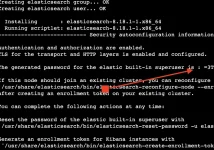
Konunun ilk sürümünde üç ekran görüntüsü vardı; artık mesajın altında ek listesi olarak duruyorlar:- dnf ile elasticsearch-8.18.1 kurulumunun terminal çıktısı; sonunda 2. adımda anlatılan "Security autoconfiguration information" bloğu yer alıyor.
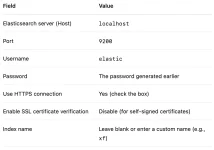
- İlk sürümde kullanılan bağlantı değerleri: host localhost, port 9200, kullanıcı elastic, HTTPS açık ve sertifika doğrulaması kapalı. 6. adımdaki tablo bunların yerini alıyor: ayrı bir kullanıcı ve açık doğrulama.
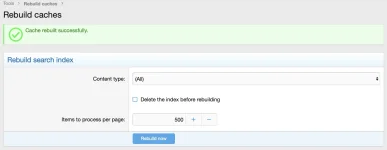
- XenForo'nun Tools → Rebuild caches sayfasındaki Rebuild search index formu: Content type "(All)", "Delete the index before rebuilding", 500 olarak ayarlı "Items to process per page" ve "Rebuild now" düğmesi.
Sık sorulan sorular
XFES, Elasticsearch 9 ile çalışır mı?Bunu doğrulayan bir XenForo sürüm notu bulamadık. XFES sürümünüzün notları aksini söyleyene kadar canlı ortamda 8.x'te kalın ve her ana sürüm yükseltmesini önce test kopyasında deneyin. Yine de geçişi şimdiden planlayın: Elastic, 8.x serisinin bakımını 15 Ocak 2027'de sonlandırıyor.
Java kurmam gerekiyor mu?
Hayır. Elasticsearch 8 kendi OpenJDK'sıyla gelir ve varsayılan olarak onu kullanır.
Elasticsearch yalnızca localhost'ta dinlediğine göre güvenliği kapatabilir miyim?
Kapatabilirsiniz, ama kazancınız çok azdır; ileride dikkatsizce değiştirilen tek bir http.host satırı, veritabanınızı parolasız olarak internete açar. Güvenlik 8.x'te varsayılandır ve açık tutmanın bedeli bir CA dosyası ile bir paroladan ibarettir.
Bir forum için Elasticsearch'e ne kadar RAM gerekir?
İçerik miktarına ve arama trafiğine bağlıdır, bu yüzden ölçün. Varsayılan olarak heap belleğin yarısını alır; paylaşılan sunucuda jvm.options.d ile sınırlayın ve heap.percent değerini izleyin.
elastic parolasını kaybettim. Yeniden kurmam gerekir mi?
Hayır. Düğüm çalışırken sudo /usr/share/elasticsearch/bin/elasticsearch-reset-password -u elastic yeni bir parola yazdırır.
XenForo'yu yeni kullanıcıya geçirdikten sonra yeniden oluşturma gerekir mi?
İndeks adı aynı kalıyor ve rol onu kapsıyorsa gerekmez. Yeni bir indeks adı ya da değişen indeks ayarları yeniden oluşturma gerektirir.
Sonuç ve sonraki adımlar
Güvenli bir XFES kurulumu birkaç karara dayanır: Elastic deposundan kurun ve paketle gelen JDK'yı kullanın; 9200 portunu geri döngü adresinde ve güvenlik duvarının arkasında tutun; paylaşılan sunucuda heap'i sınırlayın; tek düğümde replika sayısını 0 yapın; XenForo'ya yalnızca kendi indeksine erişebilen bir kullanıcı verin ve sertifika doğrulamasını açık tutun. Sonra bunu _cluster/health, _cat/indices ve _count ile kanıtlayın. Asıl veri kaynağı XenForo veritabanı olduğundan kaybolan bir indeks veri kaybı değil, yalnızca bir zahmettir: yeniden oluşturursunuz.Sonraki adımlar: Benzer Konular bloğunun dolduğunu 85 numaralı konu ile kontrol edin, 9.x geçişini Elastic'in 8.x bakım süresi bitmeden planlayın ve sürüm yükseltirken yukarıdaki sorun giderme tablosunu el altında tutun. Tam yeniden oluşturmanın saatler sürebildiği büyük forumlarda Elasticsearch anlık yedekleri (snapshot) kurtarmayı kısaltır; 81 numaralı konu bunlara da kısaca değiniyor. Kurulumu başkasına bırakmayı tercih ederseniz AIOR'un forum ve topluluk hizmetleri XenForo kurulumunu ve eklentilerini kapsıyor. Kendi kurulumunuzla ilgili sorularınızı bu konuya yazabilirsiniz.
This is the AIOR team's reference for running Elasticsearch 8 as the back end of XenForo Enhanced Search (XFES): installed from Elastic's own repository, reachable only from the forum server, and connected with a user that can change nothing except the forum index. The first version of this thread produced a working search, but it installed Java 11 (Elasticsearch never uses it), gave XenForo the elastic superuser and turned certificate verification off. This rewrite fixes all three and adds the checks we run after every install.
Where the related threads fit: a shorter overview of the same stack, with notes on maintenance and snapshot backups, is in Configuring XenForo Enhanced Search with Elasticsearch 8; AlmaLinux-specific error notes are in Installing ElasticSearch on AlmaLinux for XenForo; and if the Similar Threads block stays empty after indexing, go to XenForo Similar Threads Not Showing.
Before you start: versions, RAM and disk
Check XFES compatibility first. The XenForo manual only says XFES requires "Elasticsearch 2.0 or newer". That is a minimum, not a list of tested versions. Find your XFES version under Add-ons in the admin control panel and read XenForo's release announcement for that version before you pick an Elasticsearch major version. This guide uses the 8.x line, and the original screenshot shows elasticsearch-8.18.1 being installed. We have not found a XenForo release note that confirms Elasticsearch 9, so do not move a live forum to 9.x because "newer should work"; try it on a staging copy first. Keep the calendar in mind too: Elastic's end-of-life page lists 15 January 2027 as the end of maintenance for the 8.x series and 15 July 2027 as the end of support. If you install 8.x now, plan the move to 9.x as soon as your XFES release notes confirm support.RAM. By default Elasticsearch sizes its own JVM heap. On a node with the default roles and at least 1 GB of RAM it takes half of the memory it can see, up to 31 GB. That is reasonable on a dedicated search server and greedy on a single VPS that also runs MySQL, PHP-FPM and Redis. The JVM also needs memory outside the heap (direct buffers, threads, class metadata), and Lucene relies on the operating system's file cache, so leave real headroom. Step 4 shows how to cap the heap.
Disk. Keep /var/lib/elasticsearch on SSD. Elasticsearch watches disk usage with three watermarks. With the defaults it stops allocating shards to a disk at 85%, tries to move shards away at 90%, and at 95% (the flood stage) makes every index on that disk read-only. On disks larger than roughly 1.3 TB, built-in free-space caps of 200, 150 and 100 GB move these thresholds higher; on a typical VPS disk the percentages apply. On a small VPS, forum attachments, MySQL binary logs and log files can push you there. Measure the index after the first rebuild (Step 7) and keep usage well below 85%.
Checklist before you type anything:
- Root or sudo on a 64-bit AlmaLinux/Rocky Linux or Debian/Ubuntu server.
- XFES installed in XenForo, with its version checked against the release notes.
- A RAM budget for Elasticsearch next to MySQL and PHP-FPM.
- Enough free disk to stay well under the 85% watermark once the index is built.
- An index name chosen up front, for example xf_forum (lowercase letters, digits and underscores only).
Step 1: Install from Elastic's repository
There is no Java step. The packages ship their own OpenJDK in /usr/share/elasticsearch/jdk and use it automatically. Do not install Java 11 or 17 for Elasticsearch, and do not set ES_JAVA_HOME without a specific reason; a wrong ES_JAVA_HOME can keep the service from starting at all.AlmaLinux / Rocky Linux (RPM)
Import Elastic's signing key, then create /etc/yum.repos.d/elasticsearch.repo (for example with sudo nano) with this content:
INI:
[elasticsearch]
name=Elasticsearch repository for 8.x packages
baseurl=https://artifacts.elastic.co/packages/8.x/yum
gpgcheck=1
gpgkey=https://artifacts.elastic.co/GPG-KEY-elasticsearch
enabled=0
autorefresh=1
type=rpm-md
Bash:
sudo rpm --import https://artifacts.elastic.co/GPG-KEY-elasticsearch
sudo nano /etc/yum.repos.d/elasticsearch.repo
sudo dnf install --enablerepo=elasticsearch elasticsearchDebian / Ubuntu (APT)
Bash:
wget -qO - https://artifacts.elastic.co/GPG-KEY-elasticsearch | sudo gpg --dearmor -o /usr/share/keyrings/elasticsearch-keyring.gpg
sudo apt-get install apt-transport-https
echo "deb [signed-by=/usr/share/keyrings/elasticsearch-keyring.gpg] https://artifacts.elastic.co/packages/8.x/apt stable main" | sudo tee /etc/apt/sources.list.d/elastic-8.x.list
sudo apt-get update && sudo apt-get install elasticsearch
sudo apt-mark hold elasticsearchvm.max_map_count. Elasticsearch needs a higher memory-map limit than the kernel default of 65530. On systemd systems the RPM and DEB packages set it themselves through a sysctl file, which is why there is no sysctl step above; check it with sysctl vm.max_map_count. The 8.x packages write 262144, the lowest value Elasticsearch's startup check accepts. Only tar.gz or zip installs need it set by hand, and for those Elastic's current documentation recommends 1048576. If the log shows "max virtual memory areas vm.max_map_count [65530] is too low", the higher value was never applied.
Start the service and check that it answers:
Bash:
sudo systemctl daemon-reload
sudo systemctl enable --now elasticsearch.service
sudo systemctl status elasticsearch.service --no-pager
sudo curl --cacert /etc/elasticsearch/certs/http_ca.crt -u elastic https://localhost:9200Step 2: Read the security auto-configuration output
The package installer prints a block titled "Security autoconfiguration information". It appears once, during installation; starting the service later prints nothing. It contains:- The generated password for the elastic built-in superuser. Put it in a password manager. It is for administration only and never goes into XenForo.
- Confirmation that authentication is on and that TLS is configured for the HTTP and transport layers.
- Commands rather than tokens: elasticsearch-reconfigure-node --enrollment-token for joining an existing cluster, and elasticsearch-create-enrollment-token -s kibana (or -s node) for creating an enrollment token when you actually need one. Tokens are short-lived and XenForo never uses them; they exist for Kibana and for additional nodes.
Missed the password? You do not have to reinstall:
Bash:
# generate and print a new random password for elastic
sudo /usr/share/elasticsearch/bin/elasticsearch-reset-password -u elastic
# or type your own
sudo /usr/share/elasticsearch/bin/elasticsearch-reset-password -u elastic -i
The CA fingerprint lets you confirm that a copied file is the right CA, and Elastic's own clients (Beats, Elastic Agent, Logstash) can pin the CA by it:
Bash:
sudo openssl x509 -fingerprint -sha256 -noout -in /etc/elasticsearch/certs/http_ca.crtStep 3: Keep it on localhost, behind the firewall
The auto-configuration writes http.host: 0.0.0.0 into /etc/elasticsearch/elasticsearch.yml, so Elasticsearch listens on port 9200 on every interface, public ones included. Authentication and TLS are on, but a search back end has no business on the internet. Setting only network.host: 127.0.0.1, as many guides do, is not enough, because http.host overrides network.host for HTTP traffic. When XenForo and Elasticsearch share a server, change that line:
Bash:
sudo sed -i 's/^http.host: 0.0.0.0/http.host: 127.0.0.1/' /etc/elasticsearch/elasticsearch.yml
grep -nE '^(network|http|transport)\.host' /etc/elasticsearch/elasticsearch.yml
sudo systemctl restart elasticsearch
sudo ss -ltnp | grep -E '9200|9300'Make the firewall agree. With XenForo on the same server, ports 9200 and 9300 need no inbound rule at all:
Bash:
# AlmaLinux / Rocky (firewalld): 9200/9300 must not be listed under ports,
# and services must not include elasticsearch
sudo firewall-cmd --list-all
# Debian / Ubuntu (ufw): allow SSH before you enable ufw on a remote server
sudo ufw allow OpenSSH
sudo ufw allow 80,443/tcp
sudo ufw enable
sudo ufw status verbose
If Elasticsearch runs on its own machine, set http.host to that machine's private IP address and let only the web server's IP through the firewall (10.0.0.12 is an example). If your provider also has a cloud firewall, add the same rule there. On the server itself:
Bash:
# firewalld
sudo firewall-cmd --permanent --add-rich-rule='rule family="ipv4" source address="10.0.0.12/32" port port="9200" protocol="tcp" accept'
sudo firewall-cmd --reload
# ufw
sudo ufw allow from 10.0.0.12 to any port 9200 proto tcpStep 4: Heap size and single-node settings
On a dedicated search server, keep the automatic heap. Set it yourself when Elasticsearch shares the machine with the forum, when a small VPS needs predictable memory use, or when monitoring shows the heap sitting near its limit. Elastic's rules: Xms and Xmx must be equal, no more than 50% of RAM, and under roughly 26 GB. Put them in a file under jvm.options.d whose name ends in .options, and never edit the main jvm.options file:
Bash:
printf '%s\n' -Xms2g -Xmx2g | sudo tee /etc/elasticsearch/jvm.options.d/heap.options
sudo systemctl restart elasticsearchReplicas on a single node. New indices get one replica by default. A replica cannot sit on the same node as its primary shard, so on a one-node cluster it stays unassigned and health turns yellow. Search still works, but monitoring complains and real problems hide behind the colour. Set replicas to 0 on the forum index, and add an index template so an index recreated with "Delete the index before rebuilding" gets the same setting:
Bash:
CA=/etc/elasticsearch/certs/http_ca.crt
ES=https://localhost:9200
sudo curl --cacert $CA -u elastic -X PUT "$ES/xf_forum/_settings" \
  -H 'Content-Type: application/json' -d '{"index":{"number_of_replicas":0}}'
sudo curl --cacert $CA -u elastic -X PUT "$ES/_index_template/xf_forum_single_node" \
  -H 'Content-Type: application/json' \
-d '{"index_patterns":["xf_forum*"],"template":{"settings":{"number_of_replicas":0}}}'Step 5: A least-privilege user for XenForo
XFES keeps its connection settings, password included, in XenForo's database, so anyone who gets hold of a database dump or backup gets those credentials too. If they belong to elastic, that means full control of the cluster: deleting indices, creating users, changing security settings. A dedicated user limits the damage to one index. The index itself is still sensitive: XenForo checks permissions when it searches, not when it indexes, so posts from staff and private forums are in there too. That is one more reason to keep it on localhost.The role also gets the cluster-level monitor privilege, so that XFES can read basic cluster information such as the Elasticsearch version (GET / requires monitor). On indices it needs full rights, but only on the forum's index pattern:
Bash:
CA=/etc/elasticsearch/certs/http_ca.crt
ES=https://localhost:9200

# 1) role: cluster monitor + everything on xf_forum* and nothing else
sudo curl --cacert $CA -u elastic -X PUT "$ES/_security/role/xenforo_search" \
  -H 'Content-Type: application/json' -d '{
  "cluster": ["monitor"],
  "indices": [ { "names": ["xf_forum*"], "privileges": ["all"] } ]
}'

# 2) user with a throwaway random password, so nothing secret lands in your history
sudo curl --cacert $CA -u elastic -X PUT "$ES/_security/user/xenforo" \
  -H 'Content-Type: application/json' \
  -d "{\"password\":\"$(openssl rand -hex 24)\",\"roles\":[\"xenforo_search\"],\"full_name\":\"XenForo Enhanced Search\"}"

# 3) print a fresh strong password for that user; this is what XenForo gets
sudo /usr/share/elasticsearch/bin/elasticsearch-reset-password -u xenforoCheck that the user is what you meant it to be:
Bash:
sudo curl --cacert $CA -u xenforo "$ES/_security/_authenticate?pretty"   # lists role xenforo_search
sudo curl --cacert $CA -u xenforo "$ES/_security/user?pretty"            # must fail with 403
With Kibana instead of curl: Stack Management → Security → Roles → Create role, name xenforo_search, cluster privilege monitor, index privileges all on xf_forum*. Then Users → Create user, xenforo, with that role. XenForo does not need Kibana; install it only if you want the interface.
Moving an existing setup off elastic: find your current index with _cat/indices. If you left the index name blank in XFES, the index usually carries the XenForo database name. Put that exact name, or a pattern that matches it, in the role, switch XFES to the new user, and you are done without a rebuild. Or choose a new name, rebuild with "Delete the index before rebuilding" and remove the old index as elastic. Either way, reset the elastic password afterwards, because the old one sits in XenForo's database and its backups.
An API key instead of a password? Elasticsearch can issue a key with the same limits: POST /_security/api_key with a role_descriptors block identical to the role above, and the encoded value from the response goes into an "Authorization: ApiKey …" header. Use it only if your XFES connection form has a field for it. We found no XenForo release note that confirms API-key support; there is a community request for it, and the documented setups use a username and password.
Step 6: Connect XenForo Enhanced Search
First make the CA certificate readable for PHP. /etc/elasticsearch is normally readable only by root and the elasticsearch group, so PHP-FPM cannot open the original. The CA certificate is public (it holds no private key), so a world-readable copy is fine. If PHP runs with open_basedir, put the copy inside an allowed path instead:
Bash:
sudo install -d -m 755 /etc/ssl/elasticsearch
sudo install -m 644 /etc/elasticsearch/certs/http_ca.crt /etc/ssl/elasticsearch/http_ca.crt
Bash:
# AlmaLinux / Rocky
sudo cp /etc/elasticsearch/certs/http_ca.crt /etc/pki/ca-trust/source/anchors/elasticsearch-http-ca.crt
sudo update-ca-trust
# Debian / Ubuntu (the file name must end in .crt)
sudo cp /etc/elasticsearch/certs/http_ca.crt /usr/local/share/ca-certificates/elasticsearch-http-ca.crt
sudo update-ca-certificatesNext, open Setup → Enhanced search in the admin control panel; in some versions the Search options page also has a "Configure Enhanced Search" button that leads to the same form. Labels differ slightly between XFES versions; the values are what matter:
| Field | Value | Why |
|---|---|---|
| Host (Elasticsearch server) | localhost | Must match a name in the certificate; the auto-generated one covers localhost |
| Port | 9200 | The HTTP API port |
| Use HTTPS | On | Elasticsearch 8 accepts only HTTPS on 9200 by default |
| Username / Password | xenforo / the password from Step 5 | Never elastic |
| SSL certificate verification | On; on XFES 2.3+ with the custom CA bundle /etc/ssl/elasticsearch/http_ca.crt | Off only for a short test on localhost |
| Index name | xf_forum | Must match the role pattern; left blank, XFES picks a default you did not choose |
Bash:
echo | openssl s_client -connect 127.0.0.1:9200 2>/dev/null | openssl x509 -noout -text | grep -A1 'Subject Alternative Name'- Stop words leaves very common words out of the index, which makes it smaller.
- Word stemming treats different forms of the same root word as identical. Stemming rules are language-specific, so on a Turkish or mixed-language forum check which language your XFES version applies and test it on your own content first.
- Accent removal and character simplification simplifies accented and special characters before indexing. On a Turkish forum this is the option that lets a search typed without Turkish letters, such as "sogutucu", also find "soğutucu"; try a few words from your own posts.
Now fill it: Tools → Rebuild caches → Rebuild search index. The form has Content type (leave it at "(All)"), the "Delete the index before rebuilding" checkbox (tick it after changing index settings or the index name, not for a routine refresh) and "Items to process per page" (500 by default). Press "Rebuild now". On large forums the command line avoids browser timeouts:
Bash:
cd /path/to/xenforo
sudo -u FILE_OWNER php cmd.php xf-rebuild:search
# show the options your XenForo version offers
php cmd.php help xf-rebuild:searchStep 7: Verify
Run the checks with the xenforo Elasticsearch user from Step 5, not a Linux account; that also proves the role works:
Bash:
CA=/etc/ssl/elasticsearch/http_ca.crt
ES=https://localhost:9200
curl --cacert $CA -u xenforo "$ES/_cluster/health?pretty"
curl --cacert $CA -u xenforo "$ES/_cat/indices/xf_forum*?v&h=health,status,index,docs.count,store.size"
curl --cacert $CA -u xenforo "$ES/xf_forum/_count?pretty"
curl --cacert $CA -u xenforo "$ES/_cat/nodes?v&h=name,heap.max,heap.percent,ram.percent"- _cluster/health: "status" : "green", "number_of_nodes" : 1 and "unassigned_shards" : 0.
- _cat/indices: your index is green and open, and store.size shows how much disk it really uses.
- _count: a number in the same range as your posts, threads and other searchable content combined. Zero after a finished rebuild means the rebuild wrote to another index or never ran.
- _cat/nodes: a heap.percent that rises and falls instead of staying pinned near the top.
- Last, search the forum for a phrase from a recent post.
Troubleshooting
| Symptom | Likely cause | Fix |
|---|---|---|
| Service will not start, status "failed" | Heap larger than the RAM that is actually free; data or log path moved without changing ownership; a YAML syntax or indentation error; discovery.type: single-node next to cluster.initial_master_nodes; a stray ES_JAVA_HOME. Failed bootstrap checks (Xms ≠ Xmx, bootstrap.memory_lock without a systemd limit, a low vm.max_map_count) stop the node only in production mode, when transport is bound to a non-loopback address; on the loopback setup in this guide they appear as warnings in the log | journalctl -u elasticsearch -n 50 --no-pager shows the systemd side, but the service does not log to the journal by default, so read /var/log/elasticsearch/elasticsearch.log. Memory lock needs LimitMEMLOCK=infinity via sudo systemctl edit elasticsearch; a moved path needs chown -R elasticsearch:elasticsearch |
| HTTP 401: "unable to authenticate user" or "missing authentication credentials" | Wrong user or password, user never created, or the fields left empty | Test with curl -u xenforo; set a new password with elasticsearch-reset-password -u xenforo; paste it without trailing spaces |
| HTTP 403: "action [...] is unauthorized for user ..." | The index name is not covered by the role pattern, or a privilege is missing | The message names the action and the index; correct the XFES index name or the role pattern |
| cURL error 60: "self-signed certificate in certificate chain" or "unable to get local issuer certificate" | PHP does not trust the Elasticsearch CA | Set the custom CA bundle (XFES 2.3+) or add the CA to the OS store; make sure the PHP-FPM user can read the file |
| "no alternative certificate subject name matches target host name" | The host entered in XFES is not in the certificate | Use localhost, or check the names with the openssl command in Step 6 |
| cURL error 7: connection refused | Service down, wrong port, or Elasticsearch bound to a different address than the one XenForo calls | systemctl status elasticsearch; sudo ss -ltnp | grep 9200; make http.host and the XFES host agree |
| Empty reply or connection closed; the Elasticsearch log says "received plaintext http traffic on an https channel" | XFES is talking plain HTTP | Turn HTTPS on in XFES |
| Cluster health yellow | A replica that cannot be placed on a single node | number_of_replicas 0 plus the template from Step 4 |
| Writes fail with TOO_MANY_REQUESTS/12/disk usage exceeded flood-stage watermark, index has read-only-allow-delete block; older versions and guides show FORBIDDEN/12/index read-only / allow delete (api) | The disk reached the 95% flood stage and Elasticsearch made the index read-only | Free space first (old logs, backups, unused indices). The block lifts by itself once usage drops below the 90% high watermark; to clear it at once, run the command below |
Bash:
sudo curl --cacert /etc/elasticsearch/certs/http_ca.crt -u elastic -X PUT \
  "https://localhost:9200/xf_forum*/_settings" -H 'Content-Type: application/json' \
-d '{"index.blocks.read_only_allow_delete": null}'Common mistakes
- Entering the elastic superuser in XenForo "just to get it working" and never replacing it.
- Switching certificate verification off for good instead of giving PHP the CA file.
- Setting xpack.security.enabled: false to "simplify" things while http.host is still 0.0.0.0. Unless a firewall blocks port 9200, that puts a search engine with no authentication at all on the internet.
- Relying on network.host: 127.0.0.1 while the auto-configured http.host: 0.0.0.0 still overrides it.
- Installing a separate Java or setting ES_JAVA_HOME because an old guide said so.
- Letting unattended upgrades jump Elasticsearch versions. Keep the repository disabled or the package on hold, and upgrade on purpose.
- Ignoring disk usage until the flood-stage block stops indexing.
About the screenshots in the attachment list
The first version of this thread had three screenshots; they are now listed as attachments under the post:- Terminal output of dnf installing elasticsearch-8.18.1, ending with the "Security autoconfiguration information" block described in Step 2.
- The connection values used in the first version: host localhost, port 9200, user elastic, HTTPS on and certificate verification disabled. The table in Step 6 replaces them with a dedicated user and verification on.
- XenForo's Tools → Rebuild caches page with the Rebuild search index form: Content type "(All)", "Delete the index before rebuilding", "Items to process per page" set to 500, and the "Rebuild now" button.
FAQ
Does XFES work with Elasticsearch 9?We have not found a XenForo release note that confirms it. Stay on 8.x in production until the release notes for your XFES version say otherwise, and test any major upgrade on a staging copy. Plan for the switch anyway: Elastic ends maintenance of the 8.x series on 15 January 2027.
Do I need to install Java?
No. Elasticsearch 8 ships with its own OpenJDK and uses it by default.
Can I turn security off, since Elasticsearch only listens on localhost?
You can, but you gain very little, and one careless http.host change later leaves an open database on the internet. Security is the default in 8.x, and keeping it on costs you no more than a CA file and a password.
How much RAM does Elasticsearch need for a forum?
It depends on how much content you have and how much search traffic you get, so measure it. By default the heap takes half the RAM; on a shared server cap it in jvm.options.d and watch heap.percent.
I lost the elastic password. Do I have to reinstall?
No. While the node is running, sudo /usr/share/elasticsearch/bin/elasticsearch-reset-password -u elastic prints a new one.
Do I need a rebuild after moving XenForo to the new user?
Not if the index name stays the same and the role covers it. A new index name or changed index settings call for a rebuild.
Conclusion and next steps
A secure XFES setup comes down to a few decisions: install from Elastic's repository and use the bundled JDK, keep port 9200 on loopback and closed in the firewall, cap the heap on a shared server, set replicas to 0 on a single node, and give XenForo a user that can reach only its own index, with certificate verification on. Then prove it with _cluster/health, _cat/indices and _count. Since XenForo's database stays the source of truth, a lost index is an inconvenience rather than data loss: you rebuild it.Next steps: make sure Similar Threads fills in with thread 85, plan the move to 9.x before Elastic's 8.x maintenance ends, and keep the troubleshooting table above at hand when you upgrade. On a large forum, where a full rebuild can take hours, Elasticsearch snapshots shorten recovery; thread 81 touches on them. If you would rather hand the installation to someone else, AIOR's forum and community services cover XenForo setup and add-ons. Questions about your own setup are welcome in this thread.
Attachments
Last edited:


