

Bu başlık, DirectAdmin kullanan pek çok yöneticinin tanıdığı bir arızayla açıldı. Başka bir sorunu gidermek için çalıştırılan tam bir CustomBuild güncellemesi (update_all) PHP'yi yeniden derledi; ardından Phalcon ortadan kalktı ve site şu hatayla durdu:
Fatal error: Uncaught Error: Class "Phalcon\Mvc\Model" not found in /home/sikayetlerim/domains/sikayetlerim.com/public_html/public/index.php:5 Stack trace: #0 {main} thrown in /home/sikayetlerim/domains/sikayetlerim.com/public_html/public/index.php on line 5
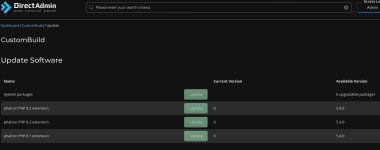
Yazının ilk sürümü PHP 8.1 için birkaç CustomBuild komutundan ibaretti ve bunların bir kısmı bugünkü DirectAdmin'e artık uymuyor. Bu sürüm hatanın ne söylediğini çözümlüyor, Phalcon 5'i DirectAdmin'in PHP 8.x sürümlerine desteklenen yoldan kuruyor, CustomBuild'in karşılamadığı durumlar için PIE ile ve kaynaktan derlemeyi anlatıyor; her CustomBuild güncellemesinden sonra çalıştıracağınız bir kontrolle de bitiyor. Komutların hepsi SSH üzerinden root olarak çalıştırılır. İlk sürümdeki iki ekran görüntüsü bu iletinin altındaki ekler bölümünde duruyor: yukarıda metnini verdiğimiz hata sayfası ve DirectAdmin'in CustomBuild > Update Software sayfası. İkincisinde her PHP sürümü için ayrı bir "phalcon PHP 8.x extension" satırı, 0 görünen mevcut sürüm ve bir Update düğmesi var.
Kısa cevap: Siteyi çalıştıran PHP sürümünde Phalcon eklentisi (extension) yüklü değil. Eklentiyi da build set php_phalcon yes ile açın, da build php_phalcon ile derleyin, o sürümün PHP-FPM servisini yeniden başlatın (PHP 8.4 için systemctl restart php-fpm84), ardından hem /usr/local/php84/bin/php --ri phalcon çıktısını hem de alan adının kendisindeki bir test sayfasını kontrol edin. Hata bunun yerine Phalcon\Loader ya da Phalcon\Di gibi üst düzey bir sınıfı gösteriyor ve --ri çıktısı 5.x bir sürüm bildiriyorsa modülde sorun yoktur; kod Phalcon 3 veya 4 için yazılmıştır.
1. Hata ne söylüyor?
Phalcon 5 bir C eklentisidir. Sınıfları phalcon.so dosyasının içinde derlenmiş olarak gelir ve PHP açılırken kaydedilir; bu sınıflar Composer'ın otomatik yükleyicisinden (autoloader) gelmez. Bu yüzden bir Phalcon sınıfı için verilen "Class not found" hatası iki şeyden birini gösterir: isteği karşılayan PHP sürecinde Phalcon eklentisi yoktur ya da yüklü Phalcon'un sınıf adları kodun beklediğinden farklıdır. Mesajın kendisi iki ipucu taşır:- Tırnak işaretleri. PHP 8, Class "Ad" not found yazar; PHP 7 ise Class 'Ad' not found yazıyordu. Yani yukarıdaki hata PHP 8'den geliyor.
- Sınıfın kendisi. Phalcon\Mvc\Model, Phalcon 3, 4 ve 5'in hepsinde vardır. Bu sınıf bile bulunamıyorsa eklenti hiç yüklenmemiştir; bir sürüm uyuşmazlığı onu gizlemezdi.
- Eklenti, siteye hizmet veren PHP sürümünde ya da işleyicide (handler) yüklü değil. Bir yeniden derleme (rebuild) elle kurulmuş modülü silmiş, CustomBuild seçeneği hiç açılmamış ya da o sürüm için derlenmemiş, alan adı başka bir PHP sürümüne geçirilmiş veya değişiklikten sonra PHP-FPM yeniden başlatılmamış olabilir.
- Phalcon 5 üzerinde Phalcon 3 veya 4 kodu. Phalcon 5 üst düzey sınıflarını ad alanlarına (namespace) taşıdı. Bu yüzden 4.x için yazılmış kod, Phalcon\Mvc\Model sorunsuz yüklenirken Class "Phalcon\Loader" not found ya da Class "Phalcon\Di" not found hatası verir. PHP 8'de geri dönmek de mümkün değil: 4.x serisi yalnızca PHP 7.2–7.4 aralığını destekler.
- Başka bir PHP sürümü için derlenmiş modül. Başka bir sürümün phpize aracıyla derlenen modül farklı bir modül API numarası taşır. PHP onu yüklemeyi reddeder, açılışta bir uyarı basar ve site yine aynı "class not found" hatasını gösterir.
Bash:
# CustomBuild'in yönettiği PHP sürümleri (yuva, slot) ve işleyiciler
grep -E '^php[1-9]_(release|mode)=' /usr/local/directadmin/custombuild/options.conf
# alan adının kullandığı yuva: php1_select=2 ise php2_release, satır yoksa 1. yuva
# (kendi sürümü olan bir alt alan adı için: example.com.subdomains.docroot.override)
grep '^php1_select' /usr/local/directadmin/data/users/USER/domains/example.com.conf
# Phalcon bu sürümde yüklü mü, PHP açılışta uyarı veriyor mu?
/usr/local/php84/bin/php --ri phalcon | grep -E 'enabled|^Version|not present'
/usr/local/php84/bin/php -m 2>&1 | grep -i -E 'phalcon|warning'2. Hangi Phalcon hangi PHP ile çalışır?
Bir Phalcon modülü tek bir PHP sürümü için derlenir ve her Phalcon sürümü desteklediği PHP aralığını bildirir. Aşağıdaki aralıklar sürümlerin paket bilgilerinden ve Phalcon belgelerinden alındı:| Phalcon | PHP | Not |
|---|---|---|
| 3.4.x | 7.3'e kadar | 3.4.5 (Ekim 2019) son 3.x sürümü; yalnızca eski kurulumlar için |
| 4.0–4.1 | 7.2–7.4 | phalcon.so'dan önce yüklenmesi gereken ayrı PSR eklentisini ister |
| 5.0–5.8 | sürüme göre 7.4.1–8.3 | PSR gerekmez; 5.2.0 PHP 8.2'yi ekledi, 5.5.0 PHP 8.3'ü ekleyip alt sınırı 8.0'a çıkardı |
| 5.9–5.10 | 8.1–8.4 | 5.9.0 PHP 8.4'ü ekledi; belgeler alt sınırı 8.1 olarak veriyor, PECL paket bilgisi ise 8.0'ı hâlâ kabul ediyordu |
| 5.11 ve sonrası | 8.1 ve üzeri | güncel seri; PIE desteği 5.11.0 ile geldi |
Tablodan bir DirectAdmin sunucusu için üç sonuç çıkıyor:
- PSR yalnızca Phalcon 4'ün gereksinimi. Phalcon 4'ün yükseltme rehberi psr.so'nun phalcon.so'dan önce yüklenmesini şart koşar; Phalcon 5 bu bağımlılığı kaldırdı. Eski bir not Phalcon 5 için PSR kurmanızı söylüyorsa o adımı atlayın.
- PECL'in devri kapanıyor. pecl.php.net artık kendini kullanımdan kaldırılmış (deprecated) olarak işaretliyor ve PHP Foundation'ın resmî eklenti kurucusu PIE'yi öneriyor; Phalcon belgeleri de tercih edilen yöntem olarak PIE'yi veriyor. Phalcon 5.13.0, PECL paketini kullanıcılara geçiş için zaman tanımak amacıyla yalnızca "birkaç sürüm daha" geri getirdi.
- Geleceği olan bir PHP sürümü seçin. php.net'e göre PHP 8.1'in desteği 31 Aralık 2025'te sona erdi. PHP 8.2'ye 31 Aralık 2026'ya, 8.3'e 31 Aralık 2027'ye, 8.4'e 31 Aralık 2028'e, 8.5'e ise 31 Aralık 2029'a kadar güvenlik düzeltmesi geliyor. Bugün taşıdığınız bir site için güvenli hedef 8.4'tür: DirectAdmin, CustomBuild'in bu sürüm için Phalcon derlediğini 1.677 sürümünde duyurdu. 8.5'i ise önce kendi sunucunuzda deneyin (SSS'ye bakın).
3. Phalcon 5'i CustomBuild ile kurmak (önerilen yol)
PHP sürümünüzü kapsadığı sürece CustomBuild'in kendi eklentisini kullanın. Ayar options.conf dosyasında durur, CustomBuild modülü desteklediği her kurulu PHP sürümü için derler, da build versions Phalcon güncellemelerini her PHP sürümü için ayrı ayrı listeler (DirectAdmin 1.654'ten beri) ve PHP sonradan yeniden derlendiğinde CustomBuild modülü unutmaz.Önce CustomBuild'inizin seçeneğe hangi adı verdiğine ve değerine bakın:
Bash:
da build opt_help | grep -i phalcon
grep -i phalcon /usr/local/directadmin/custombuild/options.conf /usr/local/directadmin/custombuild/php_extensions.conf 2>/dev/nullGüncel DirectAdmin'de:
Bash:
da build set php_phalcon yes
da build php_phalcon          # kurulu bütün PHP sürümleri
da build php_phalcon 8.4      # yalnızca PHP 8.4 (DirectAdmin 1.654 ve sonrası)
Bash:
cd /usr/local/directadmin/custombuild
./build update
./build set_php phalcon yes
./build php_phalconYönetici panelinde aynı iş CustomBuild'in güncelleme sayfasında görünür (ekran görüntüsünde Update Software). Seçenek açıldıktan sonra sayfa her PHP sürümü için bir "phalcon PHP 8.x extension" satırı listeler; modül derlenene kadar mevcut sürüm 0 görünür, Update düğmesi de onu derler.
Phalcon büyük bir C eklentisidir; derleme zaman alır ve bol bellek ister. Phalcon belgeleri PIE ile derleme için en az 4 GB RAM istiyor. Küçük bir VPS'te önce geçici takas alanı (swap) ekleyin: derleyicinin yarı yolda sonlandırılması (killed) yetersiz belleğin bilinen işaretidir.
Ardından servisi yeniden başlatıp derlediğiniz her sürümü kontrol edin:
Bash:
systemctl restart php-fpm84
/usr/local/php84/bin/php --ri phalcon | grep -E 'enabled|^Version|not present'
4. Alternatif: PIE ya da kaynaktan derleme
Phalcon'u ancak CustomBuild yardımcı olamadığında kendiniz derleyin: belirli bir Phalcon sürümüne ihtiyacınız vardır ya da CustomBuild PHP sürümlerinizden biri için Phalcon derlemiyordur. Bir kurala sıkı sıkıya uyun: her PHP sürümünde tek kurulum yöntemi. Aynı sürümde CustomBuild modülüyle elle kurulan bir modül bir arada olursa Phalcon iki kez yüklenir ve PHP Module "phalcon" is already loaded uyarısı verir. Elle kurmadan önce onu henüz hiçbir dosyanın yüklemediğinden emin olun:
Bash:
grep -l phalcon /usr/local/php84/lib/php.ini /usr/local/php84/lib/php.conf.d/*.iniPIE ile
PIE bir PHAR dosyasıdır. Çalışmak için PHP 8.1 ya da daha yeni bir sürüme ve zip eklentisine (ya da git'e) ihtiyaç duyar; kurulu herhangi bir PHP sürümü için derleme yapabilir. Onu hedef PHP ile başlatın ve o sürümün araçlarını gösterin:
Bash:
curl -fL -o /root/pie.phar https://github.com/php/pie/releases/latest/download/pie.phar
# isteğe bağlı, GitHub CLI kuruluysa: indirilen dosyayı doğrulayın
gh attestation verify --owner php /root/pie.phar
/usr/local/php84/bin/php /root/pie.phar install \
  --with-php-config=/usr/local/php84/bin/php-config \
  --with-phpize-path=/usr/local/php84/bin/phpize \
  phalcon/cphalcon
systemctl restart php-fpm84PIE olmadan kaynaktan derleme
Her sürüm etiketi (tag) üretilmiş C kaynaklarını içerdiği için Zephir gerekmez. Phalcon'un build/install betiği hangi phpize ve php-config araçlarının kullanılacağını parametre olarak alır; birden çok PHP sürümü olan bir sunucunun ihtiyacı da tam olarak budur:
Bash:
cd /usr/local/src
git clone --depth 1 --branch v5.23.0 https://github.com/phalcon/cphalcon.git cphalcon-5.23.0
cd cphalcon-5.23.0/build
./install --phpize /usr/local/php84/bin/phpize --php-config /usr/local/php84/bin/php-config
echo 'extension=phalcon.so' > /usr/local/php84/lib/php.conf.d/90-phalcon.ini
systemctl restart php-fpm84Elle derlenen modül PHP yeniden derlenince neden kaybolur?
İlk iletideki durumun en olası açıklaması budur. CustomBuild, options.conf dosyasında listelenenleri derler. Sizin derlediğiniz modül bu listede olmadığı için hiçbir yeniden derleme onu geri getirmez. PHP'nin yeniden derlenmesi o sürümü /usr/local/phpXY altına yeniden kurar ve oraya elle koyduğunuz dosyaların bu işlemden sağ çıkacağının bir garantisi yoktur; DirectAdmin'in derlemeleri özelleştirmek için belgelediği yollar custom/ dizini ve kancalardır (hook). Bir yuva yeni bir ara sürüme geçtiğinde, örneğin 8.3'ten 8.4'e, modül API numarası (20230831'den 20240924'e) eklenti diziniyle birlikte değişir; eski phalcon.so zaten yüklenemez.Elle derlemeyi tekrarlanabilir kılmak için kaynak ağacını ve ini dosyanızın bir kopyasını saklayın, her PHP derlemesinden sonra install komutunu (ya da PIE'yi) her sürüm için yeniden çalıştırın ve 7. bölümdeki betikle doğrulayın. CustomBuild, bir komut başarıyla bittiğinde custom/hooks/KOMUT/post/ altındaki betikleri çalıştırır; böylece bu işi otomatikleştirebilirsiniz. Yukarıda bağlantısını verdiğimiz Phalcon 3.4.5 rehberinde bir yeniden kurulum betiği ve derlemeyi asla durdurmayan bir kanca var. DirectAdmin forumundaki yanıtlara göre kanca yalnızca yolunda adı geçen komut için çalışır; aynı derleme update_versions gibi başka bir komutun ya da panelden başlatılan bir güncellemenin içinde yapılırsa çalışmaz. Bu yüzden kullandığınız her komut için bir kopya ekleyin. Ya da sorunu baştan önleyip CustomBuild seçeneğini kullanın.
5. Birden çok PHP sürümü: site doğru sürümü alıyor mu?
DirectAdmin aynı anda dokuz PHP sürümüne kadar çalıştırabilir (options.conf içinde php1_release'ten php9_release'e). İlki varsayılandır ve phpMyAdmin, Roundcube gibi web uygulamalarını da o çalıştırır. Kullanıcılar sürümü her alan adı için Domain Setup sayfasından seçer; bunun için php_version_selector değerinin 1 olması gerekir (da config-get php_version_selector ile bakabilirsiniz). Alt alan adları (subdomain) Document Root Override bölümünden kendi sürümlerini alabilir. Bunun üç sonucu var:- Phalcon sürüme özeldir: 8.4 için açmak, 8.3 üzerindeki bir siteye hiçbir şey kazandırmaz.
- PATH'teki php genellikle php1_release'tir. Testi her zaman sitenin kullandığı sürümün tam yoluyla yapın.
- Bir değişiklikten sonra o yuvada PHP'yi gerçekten çalıştıran servisi yeniden başlatın:
| phpN_mode | Yeniden başlatma komutu |
|---|---|
| php-fpm (varsayılan; Apache, Nginx, Nginx+Apache) | systemctl restart php-fpm84 |
| lsphp (LiteSpeed, OpenLiteSpeed) | /usr/local/lsws/bin/lswsctrl restart |
| fastcgi (mod_fcgid ile Apache) | systemctl restart httpd |
Komut satırındaki kontrol, web sitesinin neyi çalıştırdığını kanıtlamaz. Sitenin index.php dosyasının yanına (tipik Phalcon düzeninde public_html/public) tahmin edilmesi zor adlı geçici bir dosya koyun, örneğin pc-7f3k.php:
PHP:
<?php
header('Content-Type: text/plain');
echo 'PHP ', PHP_VERSION, ' (', PHP_SAPI, ')', PHP_EOL;
echo 'phalcon ', phpversion('phalcon') ?: 'NOT LOADED', PHP_EOL;
echo 'v5 API: ', class_exists('Phalcon\Autoload\Loader') ? 'yes' : 'no', PHP_EOL;
echo 'v3/v4 API: ', class_exists('Phalcon\Loader') ? 'yes' : 'no', PHP_EOL;
echo 'ini files: ', php_ini_scanned_files(), PHP_EOL;
Bash:
cd /home/USER/domains/example.com/public_html/public
chown USER:USER pc-7f3k.php
curl -s https://example.com/pc-7f3k.php
rm -f pc-7f3k.php6. Uygulamayı Phalcon 3 veya 4'ten 5'e taşımak
Site PHP 8'e geçmek zorundaysa Phalcon 5'e de geçmek zorundadır: Phalcon 4 PHP 7.4'te, Phalcon 3 ise 7.3'te kalır. docs.phalcon.io'daki resmî rehberlerle ilerleyin: 3.x kodu için "Upgrading to V4", ardından "Upgrading to V5". Arada 4.x'i canlıya almanız gerekmez, ancak v5 rehberi v4 değişikliklerinin yapılmış olduğunu varsayar.Geçişten sonraki "class not found" hatalarının çoğu tek bir yapısal değişiklikten gelir. Rehberin ifadesiyle artık üst düzey sınıf yok: Phalcon\Tag dışında hepsi ilgili ad alanlarına taşındı. Rehberin özet tablosundan birkaç satır:
| Phalcon 4 | Phalcon 5 |
|---|---|
| Phalcon\Loader | Phalcon\Autoload\Loader |
| Phalcon\Di | Phalcon\Di\Di |
| Phalcon\Escaper | Phalcon\Html\Escaper |
| Phalcon\Url | Phalcon\Mvc\Url |
| Phalcon\Validation | Phalcon\Filter\Validation |
| Phalcon\Security, Phalcon\Crypt | Phalcon\Encryption\Security, Phalcon\Encryption\Crypt |
| Phalcon\Logger, Phalcon\Config | Phalcon\Logger\Logger, Phalcon\Config\Config |
| Phalcon\Version, Phalcon\Debug | Phalcon\Support\Version, Phalcon\Support\Debug |
| Phalcon\Text | kaldırıldı; yerine Phalcon\Support\Helper |
| Phalcon\Exception | kaldırıldı; catch (\Phalcon\Exception $e) bloğu artık sessizce hiçbir şey yakalamaz |
Bash:
cd /home/USER/domains/example.com/public_html
grep -rnE 'Phalcon\\((Cache|Config|Container|Di|Filter|Logger)([^\\A-Za-z0-9_]|$)|(Collection|Crypt|Debug|Escaper|Exception|Helper|Kernel|Loader|Registry|Security|Text|Url|Validation|Version)\b)' --include='*.php' .5.x içindeki güncellemeler de özen ister. Phalcon anlamsal sürümlemeyi (semantic versioning) izliyor, ama bazı ara sürümler davranış değiştiriyor: örneğin 5.13.0, Phalcon\Events\Event sınıfını final yaptı ve onu genişleten (extends) sınıfları bozdu; 5.14.0 bu değişikliği geri aldı. CustomBuild iki sürümü de sırayla dağıttı (DirectAdmin 1.702 ve 1.704), yani böyle bir değişiklik sıradan bir güncellemeyle sunucunuza gelebilir. Geçtiğiniz her sürümün değişiklik günlüğünü (changelog) ve varsa yükseltme sayfasının başındaki sürüme özel notları okuyun. 5.23 notları, yükseltmeden önce derlenmiş Volt şablonlarının eski çıktıyı koruyabileceğini ve yükseltmeden sonra silinmeleri gerektiğini söylüyor. Her Phalcon güncellemesinden sonra Volt servisinizin path seçeneğinde tanımlı klasörü ve model meta verisi (metadata) gibi Phalcon verisi tutan önbellekleri boşaltın.
7. Her CustomBuild güncellemesinden sonra kontrol
Aşağıdaki betiği /root/bin/phalcon-check.sh olarak kaydedin ve çalıştırılabilir yapın (chmod 700). Betik PHP yuvalarını options.conf dosyasından okur, her sürüm için Phalcon durumunu yazar ve bir sorun olduğunda sıfırdan farklı bir çıkış kodu döndürür:
Bash:
#!/bin/bash
# phalcon-check.sh: CustomBuild'in yönettiği her PHP sürümünde Phalcon durumu
OPT=/usr/local/directadmin/custombuild/options.conf
RC=0
for n in 1 2 3 4 5 6 7 8 9; do
  rel=$(sed -n "s/^php${n}_release=//p" "$OPT")
  if [ -z "$rel" ] || [ "$rel" = "no" ]; then continue; fi
  mode=$(sed -n "s/^php${n}_mode=//p" "$OPT")
  v=${rel//./}
  bin=/usr/local/php${v}/bin/php
  if [ ! -x "$bin" ]; then echo "php${n} ${rel}: $bin not found"; RC=1; continue; fi
  ext=$("$bin" -r 'echo phpversion("phalcon") ?: "MISSING";' 2>&1)
  echo "php${n} ${rel} (${mode:-?}): phalcon ${ext}"
  case "$ext" in *MISSING*|*Warning*) RC=1 ;; esac
  if [ "$mode" = "php-fpm" ] && ! systemctl is-active --quiet "php-fpm${v}"; then
    echo "  php-fpm${v} is not running"; RC=1
  fi
done
exit $RC- Güncellemeden önce da build versions komutunu ve betiği çalıştırıp çıktıyı saklayın. Yedekleri ve güncellemenin kendisini DirectAdmin için SSH üzerinden CustomBuild güncellemesi rehberi anlatıyor.
- Güncellemeyi yapın.
- Betiği yeniden çalıştırıp çıktıları karşılaştırın. Gereken bir sürümde Phalcon eksikse da build php_phalcon komutunu sürüm numarasıyla çalıştırın (örneğin da build php_phalcon 8.4) ya da PIE veya kaynaktan derlemenizi tekrarlayın.
- PHP servisini yeniden başlatın ve 5. bölümdeki test sayfasını her Phalcon sitesinde açın.
- Phalcon'un kendi sürümü değiştiyse o sürümün yükseltme notlarını okuyun, derlenmiş Volt şablonlarını silin ve bir gün boyunca PHP-FPM günlüğünü izleyin.
- Yeni sürüm uygulamayı bozarsa kodu düzeltene kadar önceki sürüme sabitleyin. CustomBuild, custombuild klasöründeki custom_versions.txt dosyasından geçersiz kılma (override) satırlarını okur: DirectAdmin belgelerindeki ad:sürüm: biçimini ve versions.txt dosyasında geçen adı kullanarak php_phalcon:5.22.0: gibi bir satır ekleyin, da build php_phalcon komutunu çalıştırın ve sabitlenen sürümün yüklendiğini betikle doğrulayın. PIE kullanıyorsanız phalcon/cphalcon:5.22.0 kurun. Kod düzelince sabitlemeyi kaldırın.
Sorun giderme
| Belirti | Olası neden | Çözüm |
|---|---|---|
| phpize: command not found ya da Cannot find autoconf | PATH'te olmayan bir phpize çağrılıyor ya da derleme araçları eksik | CustomBuild'in her PHP ile birlikte kurduğu tam yolu kullanın: /usr/local/php84/bin/phpize. gcc, make ve autoconf paketlerini dnf ya da apt ile kurun; configure isterse Phalcon belgelerinin listelediği PCRE başlık dosyalarını da ekleyin (pcre-devel veya libpcre3-dev) |
| PHP Startup: Unable to load dynamic library 'phalcon.so' (tried: …) | Bu sürümün eklenti dizininde phalcon.so yok; çoğunlukla bir yeniden derleme ya da sürüm değişikliğinden sonra görülür | /usr/local/php84/bin/php-config --extension-dir çıktısını dosyanın bulunduğu yerle karşılaştırın; modülü bu sürüm için yeniden kurun ya da CustomBuild seçeneğine geçin |
| phalcon: Unable to initialize module, Module compiled with module API=20230831, PHP compiled with module API=20240924 | Başka bir sürümün phpize ve php-config araçlarıyla derlenmiş (burada 8.3 modülü PHP 8.4'te) | Doğru sürümün tam yollarıyla yeniden derleyin. Modül API numaraları: 8.1 20210902, 8.2 20220829, 8.3 20230831, 8.4 20240924, 8.5 20250925 |
| Module "phalcon" is already loaded | Modülü iki ini dosyası yüklüyor; örneğin CustomBuild'inki ile elle ya da PIE ile eklenen dosya | php.ini ve php.conf.d üzerinde grep -l phalcon çalıştırın, yalnızca birini bırakın |
| Class "Phalcon\Loader" not found, Phalcon\Mvc\Model ise çalışıyor | Phalcon 5 üzerinde Phalcon 3 veya 4 kodu | Kodu taşıyın (6. bölüm) |
| Derleme "incompatible pointer type" hatalarıyla duruyor ya da derleyici sonlandırılıyor (Killed signal terminated program cc1) | Yeni derleyicilerin daha katı varsayılanları ya da yetersiz RAM | CFLAGS="-Wno-incompatible-pointer-types" ayarlayın; swap ekleyin (Phalcon, PIE derlemesi için 4 GB RAM istiyor) |
| Güncellemeden sonra 502 ya da 503; PHP-FPM günlüğünde child … exited on signal 11 (SIGSEGV) | Uyumsuz ya da bayat bir modül, eski sürümün derlediği şablonlar ya da yeni sürümdeki bir gerileme (regression) | Modülü o sürüm için yeniden derleyin, derlenmiş Volt şablonlarını silin, Phalcon'un GitHub sorun kayıtlarında (issues) o sürümü arayın ve bu arada önceki sürüme sabitleyin |
Sık sorulan sorular
Phalcon 5 hâlâ PSR eklentisi istiyor mu?Hayır. PSR, Phalcon 4'ün gereksinimiydi ve Phalcon 5 bu bağımlılığı kaldırdı. DirectAdmin'de PSR, PHP 7.x için derlenen Phalcon 4 kurulumlarına aittir.
php -m çıktısında phalcon var ama site sınıfı hâlâ bulamıyor. Neden?
Komut satırı ile site farklı PHP sürümleri ya da yapılandırmaları kullanıyor. Genellikle alan adı başka bir yuvadadır, PHP-FPM yeniden başlatılmamıştır ya da CloudLinux'ta alan adı bir alt-php sürümünde çalışıyordur. 5. bölümdeki test sayfasını açın.
CustomBuild eski bir uygulama için Phalcon 3.4 ya da 4 kurabilir mi?
Hangi PHP sürümü için hangi Phalcon'un derleneceğine CustomBuild karar verir. Phalcon 5'e geçtiğinde (DirectAdmin 1.646) PHP 7.3 ve 7.4, Phalcon 4.1.2'de kaldı. 3.4.5 için CustomBuild'e güvenmeyin; onu 2. bölümde bağlantısı verilen eski rehberle kendiniz derleyin.
CustomBuild mı, PIE mi?
PHP sürümünüzü desteklediği sürece CustomBuild: ayarı kaydeder, güncellemeleri sürüm sürüm bildirir ve yeniden derlemelerde modülün izini kaybetmez. Belirli bir sürüme ya da CustomBuild'in atladığı bir PHP sürümüne ihtiyacınız varsa PIE; ama o zaman her PHP derlemesinden sonra kurulumu tekrarlamayı göze alırsınız.
PHP 8.5 kullanabilir miyim?
Phalcon 5.11 ve sonrası bir üst PHP sınırı bildirmiyor ve son sürümler PHP 8.5'in kullanımdan kaldırma (deprecation) uyarılarını giderdi. DirectAdmin, CustomBuild'in 8.4 için Phalcon derlediğini değişiklik günlüğünde duyurdu; bu yazı yazılırken 8.5 için benzer bir kayıt yok. 8.5 bir yuvada kuruluysa da build php_phalcon 8.5 komutunu çalıştırıp /usr/local/php85/bin/php --ri phalcon çıktısına bakın, ardından canlıya geçmeden önce uygulamayı test edin.
Apache ya da Nginx'i de yeniden başlatmam gerekir mi?
PHP-FPM kullanıyorsanız gerekmez; PHP eklentilerini web sunucusu değil php-fpmXY servisi yükler. mod_fcgid ile FastCGI'da PHP süreçlerini Apache başlattığı için httpd'yi, lsphp'de ise LiteSpeed'i yeniden başlatın.
Sonuç ve sonraki adımlar
İlk iletideki hata en basit durumdu: Phalcon, siteyi çalıştıran PHP 8'de yüklü değildi. Modülün sorumluluğunu CustomBuild'e bırakın (php_phalcon=yes, ardından da build php_phalcon), her Phalcon sitesini desteklenen bir PHP 8.x sürümünde tutun, her güncellemeden sonra yukarıdaki betikle her sürümü kontrol edin ve sonucu test sayfasıyla alan adının kendisinde doğrulayın. PIE'ye ya da kaynaktan derlemeye yalnızca CustomBuild'in kapsamadığı sürümler için başvurun; Phalcon 3 veya 4 kodunu deneme yanılmayla değil, resmî yükseltme rehberleriyle taşıyın.Sonraki adımlar: betiği bugün sunucunuzda çalıştırın, her Phalcon sitesinin hangi yuvayı kullandığını not edin ve kontrolü güncelleme rutininize ekleyin. Sunucu bakımını başkasına bırakmayı tercih ederseniz AIOR'un Linux sunucu yönetimi hizmetine göz atabilirsiniz. Kendi kurulumunuzla ilgili sorularınızı bu konuya yazabilirsiniz.
This thread started with a failure that many DirectAdmin admins run into. A full CustomBuild update (update_all, run to fix something unrelated) rebuilt PHP. Afterwards Phalcon was gone and the site stopped with this error:
Fatal error: Uncaught Error: Class "Phalcon\Mvc\Model" not found in /home/sikayetlerim/domains/sikayetlerim.com/public_html/public/index.php:5 Stack trace: #0 {main} thrown in /home/sikayetlerim/domains/sikayetlerim.com/public_html/public/index.php on line 5
The first version of this post was a short list of CustomBuild commands for PHP 8.1, and some of them no longer match current DirectAdmin. This version decodes the error, installs Phalcon 5 on DirectAdmin's PHP 8.x the supported way, covers PIE and source builds for the cases CustomBuild does not handle, and ends with a check to run after every CustomBuild update. All commands run as root over SSH. The two screenshots from the first version are in the attachment list below this post: the error page quoted above, and DirectAdmin's CustomBuild > Update Software page with one "phalcon PHP 8.x extension" row per PHP version, each showing current version 0 and an Update button.
Short answer: the PHP version that serves the site has no Phalcon module loaded. Enable it with da build set php_phalcon yes, build it with da build php_phalcon, restart that version's PHP-FPM (for PHP 8.4: systemctl restart php-fpm84), then check both /usr/local/php84/bin/php --ri phalcon and a test page on the domain itself. If the error names a top-level class such as Phalcon\Loader or Phalcon\Di instead and --ri reports a 5.x version, the module is fine: the code was written for Phalcon 3 or 4.
1. What the error is telling you
Phalcon 5 is a C extension. Its classes are compiled into phalcon.so and registered when PHP starts; they never come from Composer's autoloader. "Class not found" for a Phalcon class therefore means one of two things: the PHP process that handled the request has no Phalcon module, or it has a Phalcon whose class names differ from what the code expects. The message carries two clues:- The quotes. PHP 8 prints Class "Name" not found, while PHP 7 printed Class 'Name' not found. The error above came from PHP 8.
- The class. Phalcon\Mvc\Model exists in Phalcon 3, 4 and 5. When even this class is missing, the module is not loaded at all; a version mismatch would not hide it.
- Not loaded in the PHP version or handler that serves the site. A rebuild removed a hand-built module, the CustomBuild option was never enabled or not built for that version, the domain was switched to another PHP version, or PHP-FPM was not restarted after a change.
- Phalcon 3 or 4 code on Phalcon 5. Phalcon 5 moved its top-level classes into namespaces, so code written for 4.x fails with Class "Phalcon\Loader" not found or Class "Phalcon\Di" not found while Phalcon\Mvc\Model loads fine. Going back is not an option on PHP 8: the 4.x line supports PHP 7.2 to 7.4 only.
- A module built for another PHP version. A module compiled with another version's phpize carries a different module API number. PHP refuses to load it, prints a startup warning, and the site shows the same class-not-found error.
Bash:
# PHP versions (slots) and handlers managed by CustomBuild
grep -E '^php[1-9]_(release|mode)=' /usr/local/directadmin/custombuild/options.conf
# slot used by the domain: php1_select=2 means php2_release, no line means slot 1
# (a subdomain with its own version: example.com.subdomains.docroot.override)
grep '^php1_select' /usr/local/directadmin/data/users/USER/domains/example.com.conf
# is Phalcon loaded in that version, and does PHP print startup warnings?
/usr/local/php84/bin/php --ri phalcon | grep -E 'enabled|^Version|not present'
/usr/local/php84/bin/php -m 2>&1 | grep -i -E 'phalcon|warning'2. Which Phalcon runs on which PHP
A Phalcon module is compiled for one PHP version, and every release declares the PHP versions it supports. These ranges come from each release's package metadata and from Phalcon's documentation:| Phalcon | PHP | Notes |
|---|---|---|
| 3.4.x | up to 7.3 | 3.4.5 (October 2019) is the last 3.x release; legacy setups only |
| 4.0 to 4.1 | 7.2 to 7.4 | needs the separate PSR extension, loaded before phalcon.so |
| 5.0 to 5.8 | 7.4.1 to 8.3, depending on the release | no PSR; 5.2.0 added 8.2, 5.5.0 added 8.3 and raised the minimum to 8.0 |
| 5.9 to 5.10 | 8.1 to 8.4 | 5.9.0 added 8.4; the docs give 8.1 as the minimum, the PECL metadata still accepted 8.0 |
| 5.11 and later | 8.1 and newer | current line; PIE support since 5.11.0 |
Three points from the table matter on a DirectAdmin server:
- PSR is a Phalcon 4 requirement only. Phalcon 4's upgrade guide requires psr.so to load before phalcon.so; Phalcon 5 removed that dependency. If an old note tells you to install PSR for Phalcon 5, skip it.
- PECL is on its way out. pecl.php.net now labels itself deprecated and points to PIE, the official extension installer from the PHP Foundation, and Phalcon's documentation names PIE as the preferred method. Phalcon 5.13.0 restored the PECL package only "for a few more versions" to give users time to migrate.
- Pick a PHP version with a future. According to php.net, PHP 8.1 reached end of life on 31 December 2025, 8.2 gets security fixes until 31 December 2026, 8.3 until 31 December 2027, 8.4 until 31 December 2028 and 8.5 until 31 December 2029. For a site you are moving now, 8.4 is the safe target: DirectAdmin announced CustomBuild's Phalcon build for it in version 1.677. Check 8.5 on your own server first (see the FAQ).
3. Install Phalcon 5 with CustomBuild (recommended)
Use CustomBuild's own extension whenever it covers your PHP version. The setting lives in options.conf, CustomBuild builds the module for each installed PHP version it supports, da build versions lists Phalcon updates for each PHP version separately (since DirectAdmin 1.654), and a later PHP rebuild does not lose track of it.First check what your CustomBuild calls the option and how it is set:
Bash:
da build opt_help | grep -i phalcon
grep -i phalcon /usr/local/directadmin/custombuild/options.conf /usr/local/directadmin/custombuild/php_extensions.conf 2>/dev/nullOn current DirectAdmin:
Bash:
da build set php_phalcon yes
da build php_phalcon          # all installed PHP versions
da build php_phalcon 8.4      # only PHP 8.4 (DirectAdmin 1.654 and later)
Bash:
cd /usr/local/directadmin/custombuild
./build update
./build set_php phalcon yes
./build php_phalconIn the admin panel the same thing appears on CustomBuild's update page (Update Software in the screenshot). Once the option is on, the page lists one "phalcon PHP 8.x extension" row per PHP version with current version 0 until the module is built, and the Update button builds it.
Phalcon is a large C extension, so the build takes a while and needs plenty of memory; Phalcon's documentation asks for at least 4 GB of RAM for a PIE build. On a small VPS add temporary swap first: a compiler killed halfway through is the classic sign of too little memory.
Then restart and check each version you built for:
Bash:
systemctl restart php-fpm84
/usr/local/php84/bin/php --ri phalcon | grep -E 'enabled|^Version|not present'
4. Alternative: PIE or a source build
Build Phalcon yourself only when CustomBuild cannot help: you need a particular Phalcon release, or CustomBuild does not build it for one of your PHP versions. Keep to one installation method per PHP version. A CustomBuild module plus a hand-built one in the same version loads Phalcon twice, and PHP warns Module "phalcon" is already loaded. Before a manual install, make sure nothing loads it yet:
Bash:
grep -l phalcon /usr/local/php84/lib/php.ini /usr/local/php84/lib/php.conf.d/*.iniWith PIE
PIE is a PHAR. It needs PHP 8.1 or newer and the zip extension (or git) to run, and it can build for any installed PHP version. Start it with the target PHP and point it at that version's tools:
Bash:
curl -fL -o /root/pie.phar https://github.com/php/pie/releases/latest/download/pie.phar
# optional, if the GitHub CLI is installed: verify the download
gh attestation verify --owner php /root/pie.phar
/usr/local/php84/bin/php /root/pie.phar install \
  --with-php-config=/usr/local/php84/bin/php-config \
  --with-phpize-path=/usr/local/php84/bin/phpize \
  phalcon/cphalcon
systemctl restart php-fpm84Source build without PIE
Every release tag contains the generated C sources, so Zephir is not needed. Phalcon's build/install script accepts the phpize and php-config to use, which is exactly what a server with several PHP versions needs:
Bash:
cd /usr/local/src
git clone --depth 1 --branch v5.23.0 https://github.com/phalcon/cphalcon.git cphalcon-5.23.0
cd cphalcon-5.23.0/build
./install --phpize /usr/local/php84/bin/phpize --php-config /usr/local/php84/bin/php-config
echo 'extension=phalcon.so' > /usr/local/php84/lib/php.conf.d/90-phalcon.ini
systemctl restart php-fpm84Why manual builds vanish after a PHP rebuild
This is the most likely explanation for the first post. CustomBuild builds what options.conf lists. A module you compiled yourself is not on that list, so no rebuild will recreate it. A PHP rebuild also reinstalls that version under /usr/local/phpXY, and nothing guarantees that files you placed there by hand survive; the ways DirectAdmin documents for customising builds are the custom/ directory and hooks. And when a slot moves to a new minor version, say from 8.3 to 8.4, the module API number changes (from 20230831 to 20240924) together with the extension directory, so the old phalcon.so could not load anyway.To make a manual build repeatable, keep the source tree and a copy of your ini file, re-run the install command (or PIE) for every version after each PHP build, and verify with the script in section 7. CustomBuild runs the scripts in custom/hooks/COMMAND/post/ after that command succeeds, so this can be automated; the Phalcon 3.4.5 guide linked above includes a reinstall script and a hook that never blocks the build. According to replies on DirectAdmin's forum, a hook runs only for the command named in its path, not when the same build runs inside another command such as update_versions or an update started from the panel, so add a copy for every command you use. Or avoid the problem altogether with the CustomBuild option.
5. Several PHP versions: make sure the site gets the right one
DirectAdmin can run up to nine PHP versions at once (php1_release to php9_release in options.conf). The first is the default and also runs the webapps such as phpMyAdmin and Roundcube. Users pick a version per domain on the Domain Setup page, which works when php_version_selector is 1 (check with da config-get php_version_selector), and subdomains can get their own version under Document Root Override. Three consequences:- Phalcon is per version. Enabling it for 8.4 does nothing for a site on 8.3.
- The php on your PATH is usually php1_release. Always test with the full path of the version the site uses.
- After a change, restart the service that actually runs PHP for that slot:
| phpN_mode | Restart command |
|---|---|
| php-fpm (default; Apache, Nginx, Nginx+Apache) | systemctl restart php-fpm84 |
| lsphp (LiteSpeed, OpenLiteSpeed) | /usr/local/lsws/bin/lswsctrl restart |
| fastcgi (Apache with mod_fcgid) | systemctl restart httpd |
A CLI check does not prove what the website runs. Put a temporary file with a hard-to-guess name, for example pc-7f3k.php, next to the site's index.php (public_html/public in a typical Phalcon layout):
PHP:
<?php
header('Content-Type: text/plain');
echo 'PHP ', PHP_VERSION, ' (', PHP_SAPI, ')', PHP_EOL;
echo 'phalcon ', phpversion('phalcon') ?: 'NOT LOADED', PHP_EOL;
echo 'v5 API: ', class_exists('Phalcon\Autoload\Loader') ? 'yes' : 'no', PHP_EOL;
echo 'v3/v4 API: ', class_exists('Phalcon\Loader') ? 'yes' : 'no', PHP_EOL;
echo 'ini files: ', php_ini_scanned_files(), PHP_EOL;
Bash:
cd /home/USER/domains/example.com/public_html/public
chown USER:USER pc-7f3k.php
curl -s https://example.com/pc-7f3k.php
rm -f pc-7f3k.php6. Moving an application from Phalcon 3 or 4 to 5
If the site has to move to PHP 8, it has to move to Phalcon 5: Phalcon 4 stops at PHP 7.4 and Phalcon 3 at 7.3. Work from the official guides on docs.phalcon.io, "Upgrading to V4" for 3.x code and "Upgrading to V5" after that. You do not need to deploy 4.x in between, but the v5 guide assumes the v4 changes are done.Most class-not-found errors after the move come from one structural change. In the words of the v5 guide, there are no more top-level classes: all of them moved into namespaces, except Phalcon\Tag. A few rows from the guide's summary table:
| Phalcon 4 | Phalcon 5 |
|---|---|
| Phalcon\Loader | Phalcon\Autoload\Loader |
| Phalcon\Di | Phalcon\Di\Di |
| Phalcon\Escaper | Phalcon\Html\Escaper |
| Phalcon\Url | Phalcon\Mvc\Url |
| Phalcon\Validation | Phalcon\Filter\Validation |
| Phalcon\Security, Phalcon\Crypt | Phalcon\Encryption\Security, Phalcon\Encryption\Crypt |
| Phalcon\Logger, Phalcon\Config | Phalcon\Logger\Logger, Phalcon\Config\Config |
| Phalcon\Version, Phalcon\Debug | Phalcon\Support\Version, Phalcon\Support\Debug |
| Phalcon\Text | removed in favour of Phalcon\Support\Helper |
| Phalcon\Exception | removed; a catch (\Phalcon\Exception $e) block now silently matches nothing |
Bash:
cd /home/USER/domains/example.com/public_html
grep -rnE 'Phalcon\\((Cache|Config|Container|Di|Filter|Logger)([^\\A-Za-z0-9_]|$)|(Collection|Crypt|Debug|Escaper|Exception|Helper|Kernel|Loader|Registry|Security|Text|Url|Validation|Version)\b)' --include='*.php' .Updates within 5.x deserve care as well. Phalcon follows semantic versioning, yet some minor releases change behaviour: 5.13.0, for instance, made Phalcon\Events\Event final, which broke classes that extend it, and 5.14.0 reverted the change. CustomBuild shipped both in turn (DirectAdmin 1.702 and 1.704), so a change like this can reach a server through a routine update. Read the changelog of each release you move to, plus the per-release notes at the top of the upgrade page where there are any. The notes for 5.23 say that Volt templates compiled before the upgrade can keep the old output and should be removed after upgrading. After every Phalcon update, empty the folder in your Volt service's path option and any cache that holds Phalcon data, such as model metadata.
7. A check for every CustomBuild update
Save the script below as /root/bin/phalcon-check.sh and make it executable (chmod 700). It reads the PHP slots from options.conf, reports Phalcon for each version and returns a non-zero exit code when something is wrong:
Bash:
#!/bin/bash
# phalcon-check.sh: Phalcon status for every PHP version managed by CustomBuild
OPT=/usr/local/directadmin/custombuild/options.conf
RC=0
for n in 1 2 3 4 5 6 7 8 9; do
  rel=$(sed -n "s/^php${n}_release=//p" "$OPT")
  if [ -z "$rel" ] || [ "$rel" = "no" ]; then continue; fi
  mode=$(sed -n "s/^php${n}_mode=//p" "$OPT")
  v=${rel//./}
  bin=/usr/local/php${v}/bin/php
  if [ ! -x "$bin" ]; then echo "php${n} ${rel}: $bin not found"; RC=1; continue; fi
  ext=$("$bin" -r 'echo phpversion("phalcon") ?: "MISSING";' 2>&1)
  echo "php${n} ${rel} (${mode:-?}): phalcon ${ext}"
  case "$ext" in *MISSING*|*Warning*) RC=1 ;; esac
  if [ "$mode" = "php-fpm" ] && ! systemctl is-active --quiet "php-fpm${v}"; then
    echo "  php-fpm${v} is not running"; RC=1
  fi
done
exit $RC- Before the update, run da build versions and the script, and keep the output. Running a CustomBuild update over SSH covers backups and the update itself.
- Run the update.
- Run the script again and compare. If Phalcon is missing for a version that needs it, run da build php_phalcon with that version (for example da build php_phalcon 8.4), or repeat your PIE or source build.
- Restart the PHP service and open the test page from section 5 on every Phalcon site.
- If Phalcon itself changed version, read the upgrade notes for that release, clear the compiled Volt templates and watch the PHP-FPM log for a day.
- If a new release breaks the application, pin the previous one while you fix the code. CustomBuild reads overrides from custom_versions.txt in the custombuild folder: following the name:version: format of DirectAdmin's documentation and the name used in versions.txt, add a line such as php_phalcon:5.22.0:, run da build php_phalcon and confirm with the script that the pinned version is loaded. With PIE, install phalcon/cphalcon:5.22.0. Remove the pin once the code is fixed.
Troubleshooting
| Symptom | Likely cause | Fix |
|---|---|---|
| phpize: command not found, or Cannot find autoconf | A phpize that is not on PATH, or missing build tools | Use the full path /usr/local/php84/bin/phpize, which CustomBuild installs with each PHP; install gcc, make and autoconf with dnf or apt, and, if configure asks for them, the PCRE headers Phalcon's docs list (pcre-devel or libpcre3-dev) |
| PHP Startup: Unable to load dynamic library 'phalcon.so' (tried: …) | No phalcon.so in this version's extension directory, typically after a rebuild or a version change | Compare /usr/local/php84/bin/php-config --extension-dir with the file's location; reinstall for this version or use the CustomBuild option |
| phalcon: Unable to initialize module, Module compiled with module API=20230831, PHP compiled with module API=20240924 | Built with another version's phpize and php-config (here an 8.3 module in PHP 8.4) | Rebuild with the full paths of the right version. Module API numbers: 8.1 20210902, 8.2 20220829, 8.3 20230831, 8.4 20240924, 8.5 20250925 |
| Module "phalcon" is already loaded | Two ini files load it, for example CustomBuild's and a manual or PIE file | Run grep -l phalcon on php.ini and php.conf.d, then keep one |
| Class "Phalcon\Loader" not found while Phalcon\Mvc\Model works | Phalcon 3 or 4 code on Phalcon 5 | Port the code (section 6) |
| The build stops with incompatible pointer type errors, or the compiler is killed (Killed signal terminated program cc1) | Stricter defaults in newer compilers, or too little RAM | Set CFLAGS="-Wno-incompatible-pointer-types"; add swap (Phalcon asks for 4 GB of RAM for PIE builds) |
| 502 or 503 after an update; the PHP-FPM log shows child … exited on signal 11 (SIGSEGV) | A mismatched or stale module, templates compiled by the old version, or a regression in the new release | Rebuild the module for that version, clear compiled Volt templates, check Phalcon's GitHub issues for the release and pin the previous version meanwhile |
Frequently asked questions
Does Phalcon 5 still need the PSR extension?No. PSR was a Phalcon 4 requirement and Phalcon 5 removed the dependency. On DirectAdmin, PSR belongs to the Phalcon 4 builds for PHP 7.x.
php -m lists phalcon, but the site still cannot find the class. Why?
The CLI and the site use different PHP versions or configurations. Usually the domain is on another slot, PHP-FPM was not restarted, or on CloudLinux the domain runs an alt-php version. Open the test page from section 5.
Can CustomBuild give me Phalcon 3.4 or 4 for an old application?
CustomBuild decides which Phalcon it builds for each PHP version. When it introduced Phalcon 5 (DirectAdmin 1.646), PHP 7.3 and 7.4 kept Phalcon 4.1.2. Do not count on it for 3.4.5; build that one yourself with the legacy guide linked in section 2.
CustomBuild or PIE?
CustomBuild whenever it supports your PHP version: it records the setting, reports updates per version and keeps track of the module through rebuilds. PIE when you need a specific release or a PHP version CustomBuild skips, accepting that you repeat the install after PHP rebuilds.
Can I use PHP 8.5?
Phalcon 5.11 and later declare no upper PHP limit, and recent releases fixed PHP 8.5 deprecation notices. DirectAdmin announced CustomBuild's Phalcon build for 8.4 in its changelog; at the time of writing there is no such entry for 8.5. With 8.5 in a slot, run da build php_phalcon 8.5 and check /usr/local/php85/bin/php --ri phalcon, then test the application before moving production.
Do I also need to restart Apache or Nginx?
Not with PHP-FPM: the php-fpmXY service loads PHP extensions, not the web server. With FastCGI through mod_fcgid, Apache starts the PHP processes, so restart httpd; with lsphp, restart LiteSpeed.
Conclusion and next steps
The original error was the simplest case: Phalcon was not loaded in the PHP 8 that served the site. Let CustomBuild own the module (php_phalcon=yes, then da build php_phalcon), keep every Phalcon site on a supported PHP 8.x, check each version with the script above after every update, and confirm on the domain with the test page. Use PIE or a source build only for versions CustomBuild does not cover, and port Phalcon 3 or 4 code with the official upgrade guides rather than by trial and error.Next steps: run the script on your server today, note which slot each Phalcon site uses, and add the check to your update routine. If you would rather hand server upkeep to someone else, AIOR offers Linux server management. Questions about a specific setup are welcome in this thread.
Ekler

Son düzenleyen:


