

ScreenPresso ekran görüntüleri için, talimatlar oluşturmak veya bir şeyi açıklamak için mükemmel bir uygulamadır. Bulanıklaştırma efektleri, oklar ve sıralama numaralandırma efektleri bulunur. Mac kullanırken bu işlevsellikleri özlüyorum.
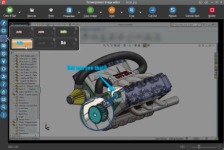
Kısaca Screenpresso popüler bir ekran yakalama ve kayıt yazılımıdır. Mac'te benzer uygulamalar arıyorsanız, işte bazı alternatifler:
1. TechSmith'ten Snagit:
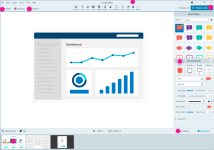
- Hem ekran görüntüsü hem ekran kayıt işlevleri sunar.
- Kullanıcıların görüntüleri ve videoları düzenlemesine izin verir.
- Yakalamaları saklamak için bir kütüphane sunar.
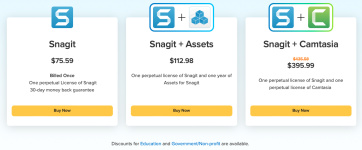
Fiyat:
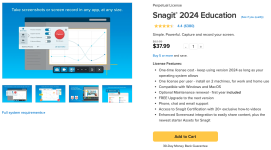
Bir seçenek olarak öğrenci sürümü fiyatı:
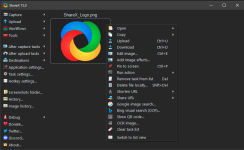
2. ShareX:
- Açık kaynak ve ücretsiz.
- Seçili alanları, tam ekranları veya belirli pencereleri yakalar veya kaydeder.
- Filigran, açıklama ekleme gibi geniş çeşitli yakalama sonrası görevler sunar.
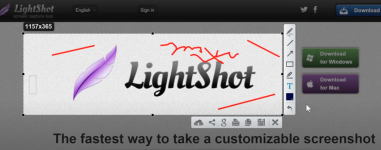
3. LightShot:
- Basit ve hafif.
- Hızlı ekran görüntüsü kabiliyeti sunar.
- Yerleşik düzenleme araçlarına sahip.
4. Greenshot:
- Windows için açık kaynak araç.
- Pencere, bölge veya tam ekran yakalama sunar.
- Bir görüntü editörü ile birlikte gelir.
Fiyat:
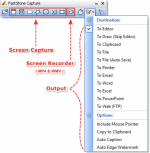
5. FastStone Capture:
- Hafif ve güçlü.
- Hem görüntü hem video yakalama sunar.
- Bir görüntü editörü ve renk seçici içerir.
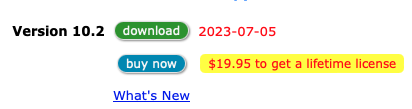
Fiyat:
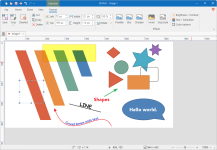
6. PicPick:
- Hepsi-bir-arada tasarım aracı.
- Tam özellikli ekran yakalama, sezgisel görüntü editörü, renk seçici ve daha fazlasını sağlar.
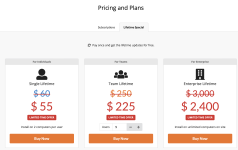
Fiyat:
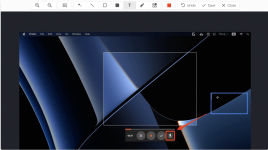
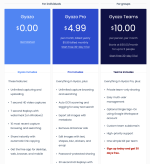
7. Gyazo:
- Hızlı ve kullanımı kolay.
- Görüntüleri, GIF'leri ve videoları yakalar.
- Anlık paylaşım kabiliyetleri.
Fiyat:
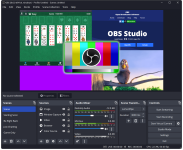
8. OBS Studio:
- Esasen bir video kayıt ve streaming yazılımı.
- Açık kaynak ve ücretsiz.
- Oyun kayıtları, tutorial'lar ve daha fazlası için uygun.
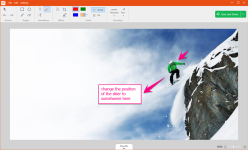
9. TinyTake:
- Ekran görüntüleri ve video yakalar.
- Bulut depolama sunar.
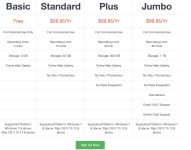
Fiyat:
10. Flameshot:
- Windows, Mac ve Linux için açık kaynak ekran görüntüsü yazılımı.
- Güçlü ve özelleştirilebilir.
- Yerleşik editörle birlikte gelir.
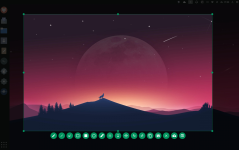
Her birinin kendi özellik ve kabiliyet seti olduğundan, ihtiyaçlarınıza en uygun olanı bulmak için birkaçını keşfetmek isteyebilirsiniz.
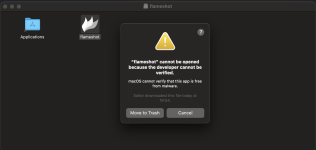
İlk olarak FlameShot ile gitmeye karar verdim.
Sorun Mac'in flameshot'a güvenmemesi ve Apple Store'da kurulum paketi olmamasıydı.
Sonra Snagit ile gitmeye karar verdim.
Web sayfalarından satın almak yerine Apple Store'dan satın almaya karar verdim.
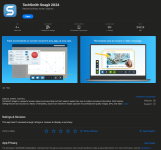
İlk kullanıcı deneyimi olarak mükemmel bir işlevsellik, screenpresso'dan daha iyi olabilir.
ScreenPresso is a perfect application for screen snapshots, creating instructions or explaining something. It has blurring effects, arrows and sequencing bible effects itself. When I use Mac I miss this functionalities.
Briefly Screenpresso is a popular screen capture and recording software. If you're looking for similar applications in Mac, here are some alternatives:
1. Snagit by TechSmith:
- Offers both screenshot and screen recording functionalities.
- Allows users to edit images and videos.
- Offers a library to store captures.
Price:
As an option student edition price:
2. ShareX:
- Open-source and free.
- Captures or records selected areas, full screens, or specific windows.
- Offers a wide variety of post-capture tasks like adding watermarks, annotations, etc.
3. LightShot:
- Simple and lightweight.
- Offers quick screenshot capabilities.
- Has built-in editing tools.
4. Greenshot:
- Open-source tool for Windows.
- Offers capture of windows, region, or full screen.
- Comes with an image editor.
Price:
5. FastStone Capture:
- Lightweight and powerful.
- Offers both image and video capture.
- Includes an image editor and a color picker.
Price:
6. PicPick:
- All-in-one design tool.
- Provides a full-featured screen capture tool, an intuitive image editor, a color picker, and more.
Price:
7. Gyazo:
- Quick and easy to use.
- Captures images, GIFs, and videos.
- Instant sharing capabilities.
Price:
8. OBS Studio:
- Primarily a video recording and streaming software.
- Open-source and free.
- Suitable for game recordings, tutorials, and more.
9. TinyTake:
- Captures screenshots and video.
- Offers cloud storage.
Price:
10. Flameshot:
- Open-source screenshot software for Windows, Mac and Linux.
- Powerful and customizable.
- Comes with a built-in editor.
Each of these tools has its own set of features and capabilities, so you may want to explore a few of them to find the one that best suits your needs.
First I decided to go with FlameShot.
The problem was Mac does not trust flameshot and there is not installation package at Apple Store.
Then I decided to go with Snagit.
Instead of purchasing from their webpage I decided to purchase from Apple Store.
It has a perfect functionality as a first user experience it can be better than screenpresso.
Attachments

Last edited:


