
secretgate
New member
XenForo yönetim panelinde Logs > Server error log altında ErrorException: hCaptcha configuration error: invalid-input-secret kaydı görüyorsanız forumunuz hCaptcha'ya ulaşmış, ancak gönderdiği gizli anahtarı (secret key) hCaptcha geçersiz ya da bozuk bulmuştur. Ziyaretçi tarafındaki belirti şudur: kayıt ve iletişim formları her denemede "You did not complete the CAPTCHA verification properly. Please try again." mesajıyla (Türkçe dil paketinde bu cümlenin çevirisiyle) reddedilir ve pratikte kimse kayıt olamaz. Bu rehberde siteverify uç noktasının (endpoint) belgelenmiş bütün hata kodlarını, anahtarların hCaptcha panelinde nerede durduğunu, sorunun anahtarda mı ağda mı olduğunu sunucudan curl ile nasıl ayırt edeceğinizi, XenForo 2.2 ve 2.3'teki doğru menü yolunu, WordPress ve özel PHP karşılıklarını, ağ tarafındaki engelleri ve gizli anahtarın nasıl korunacağını ele alıyoruz.
Kısa çözüm: beş adımlık kontrol listesi
- hCaptcha panelinde (dashboard.hcaptcha.com) Sites sayfasından forumun site anahtarını (sitekey) kopyalayın. Gizli anahtar profil simgesi > Settings altındadır ve yalnızca üretildiği anda görüntülenir.
- Doğruluğundan emin olduğunuz kayıtlı bir gizli anahtarınız yoksa Generate New Secret ile yenisini üretin ve hemen parola yöneticinize kaydedin. Eski anahtarı kullanan başka sistemleriniz varsa onları da güncellemeniz gerekecek.
- XenForo'da Setup > Options > Basic options sayfasında Enable CAPTCHA for guests bölümünü bulun, Use hCaptcha seçeneğini işaretleyin, iki anahtarı başında ve sonunda boşluk kalmadan kendi alanlarına yapıştırıp kaydedin. Bölüm görünmüyorsa gelişmiş seçenekleri açın (aşağıda anlatılıyor).
- Gizli bir tarayıcı penceresinde misafir olarak /register/ sayfasını açın, CAPTCHA'yı çözüp formu gönderin.
- Form CAPTCHA hatası vermeden gönderiliyor ve Server error log'a yeni kayıt düşmüyorsa sorun çözülmüştür. Yeni hata kayıtları gelmeye devam ediyorsa aşağıdaki curl testleriyle anahtarı XenForo'dan bağımsız olarak sınayın.
invalid-input-secret ne anlama gelir?
hCaptcha doğrulaması iki adımda çalışır. Tarayıcıdaki bileşen (widget), ziyaretçi testi geçince forma h-captcha-response adlı bir doğrulama belirteci (token) ekler. Form gönderildiğinde sunucunuz bu belirteci gizli anahtarla birlikte https://api.hcaptcha.com/siteverify adresine standart form kodlamasıyla (application/x-www-form-urlencoded) POST eder; isteğe ziyaretçinin IP adresi (remoteip) ve beklenen site anahtarı (sitekey) de eklenebilir. hCaptcha, success alanını ve sorun varsa error-codes listesini içeren bir JSON döndürür. Belgelerdeki tanım tek cümledir: invalid-input-secret, gizli anahtarın geçersiz veya hatalı biçimlendirilmiş olduğunu bildirir.Bu kaydın sevindirici bir yanı var: hCaptcha yanıt verdiğine göre sunucunuz ona ulaşabiliyor; DNS, güvenlik duvarı ve TLS bu mesaj için şüpheli değil. İncelediğimiz XenForo 2.2 ve 2.3 sürümleri doğrulamayı hcaptcha.com/siteverify adresine gönderir ve günlüğe yalnızca yapılandırmadan kaynaklanan dört kodu yazar: missing-input-secret, invalid-input-secret, sitekey-secret-mismatch ve invalid-remoteip. Birden fazla kod dönerse aynı satırda virgülle ayrılır. Süresi dolmuş ya da tekrar kullanılmış belirteç gibi kullanıcı kaynaklı hatalar günlüğe hiç düşmez. Sunucu hCaptcha'ya hiç ulaşamadığında ise mesajı "hCaptcha connection error" ile başlayan ve genellikle bir cURL hata numarası içeren ayrı bir kayıt oluşur; o durum ağ bölümünde ele alınıyor.
En sık rastlanan nedenler:
- Görünmeyen karakterler: kopyalarken anahtarın başına veya sonuna eklenen boşluk, sekme ya da satır sonu.
- Eksik kopyalama: anahtarın bir kısmı seçilmemiş. Yeni anahtar yalnızca bir kez gösterildiği için eksik kopya fark edilmeden kalıcı hâle gelebilir.
- Gizli anahtar alanında site anahtarı: site anahtarı gizli anahtar alanına da yapıştırılmış. İki değer tamamen yer değiştirmişse bileşen gizli anahtarı site anahtarı olarak kullanır ve geçerli bir belirteç üretemez; bu durumda formlar günlüğe hiçbir kayıt düşmeden başarısız olur.
- XenForo'da boş ya da yarım doldurulmuş alanlar: kendi anahtarlarınızı girmediyseniz veya iki alandan yalnızca biri doluysa XenForo yerleşik anahtar çiftini gönderir; reddedilen gizli anahtar sizin değil, XenForo'nunkidir. Ayrıntısı aşağıdaki XenForo bölümünde.
- Yenilenmiş anahtar: siz veya bir ekip arkadaşınız anahtarı yenilemiş (rotation) ve eskisini kullanan her sistem bu hatayı vermeye başlamış. Hesap gizli anahtarı hesaptaki bütün site anahtarları için ortaktır; başka bir site için yapılan yenileme forumu da bozar.
- Otomatik doldurma: gizli anahtarın parola alanı olarak gösterildiği sayfalarda (WordPress eklentisi böyledir) tarayıcı ya da parola yöneticisi kayıtlı bir giriş parolasını bu alana yazabilir.
- Özel koddaki yapılandırma hataları: değer yerine açılmamış bir yer tutucunun ("${HCAPTCHA_SECRET}" gibi) gönderilmesi, .env dosyasındaki değerin tırnaklarıyla birlikte okunması veya Windows satır sonundan kalan \r karakteri.
Alan adı (domain) kısıtlaması ve DNS yayılımı (propagation) bu hatanın nedeni olarak sık sık öne sürülür, ama ikisi de hatayı açıklamaz. hCaptcha belgeleri site anahtarı başına isteğe bağlı bir alan adı izin listesi (domain allowlist) tanımlıyor; varsayılan olarak kapalı olan bu özellik, bu yazı hazırlanırken henüz "yakında" olarak duyuruluyordu. Listede olmayan alan adlarından gelen istekler invalid-input-secret ile değil, invalid-input-response ile reddedilir. DNS değişikliği en fazla bağlantı hatasına yol açar, gizli anahtarı geçersiz kılmaz.
Güncel siteverify hata kodları: neden ve çözüm
Tablo, docs.hcaptcha.com'daki güncel listeye dayanır. Eski kütüphanelerde birleşik invalid-or-already-seen-response kodu görülebilir; belgeler artık expired-input-response ve already-seen-response kodlarını ayrı ayrı listeliyor.| Kod | Anlamı | Tipik neden | Çözüm |
|---|---|---|---|
| missing-input-secret | Gizli anahtar gönderilmemiş | Boş ortam değişkeni, okunmayan yapılandırma dosyası, değerin yanlış parametre adıyla gönderilmesi | Değerin gerçekten secret alanında gittiğini kodda veya curl ile doğrulayın |
| invalid-input-secret | Gizli anahtar geçersiz veya bozuk | Boşluk, eksik kopya, site anahtarının yapıştırılması, yenilenmiş anahtar | Anahtarı yeniden kopyalayın; emin değilseniz yenisini üretip her yerde güncelleyin |
| missing-input-response | Doğrulama belirteci gönderilmemiş | Bileşen yüklenmemiş (reklam engelleyici, CSP, JavaScript hatası) veya form belirteç alanını göndermiyor | Tarayıcı konsolunu inceleyin; CSP'de hcaptcha.com ve *.hcaptcha.com adreslerine izin verin |
| invalid-input-response | Belirteç geçersiz veya bozuk | Bot isteği; WAF, giriş filtresi veya uzunluk sınırı yüzünden kesilmiş ya da değiştirilmiş belirteç; açtıysanız site anahtarının alan adı izin listesinde bulunmayan bir alan adı | Belirtecin sunucuya değiştirilmeden ulaştığını ve izin listesini kontrol edin; bot trafiğinde beklenen sonuçtur |
| expired-input-response | Belirtecin süresi dolmuş (varsayılan 120 saniye) | Ziyaretçi testi çözdükten sonra formu geç göndermiş | Bileşenin expired-callback olayını işleyin ve kullanıcıdan CAPTCHA'yı yeniden çözmesini isteyin |
| already-seen-response | Belirteç daha önce doğrulanmış | Çift gönderim, aynı belirteci iki kez doğrulayan kod veya eklenti, sizin curl testiniz | Her gönderimde tek doğrulama yapın; başarısız denemeden sonra bileşeni sıfırlayın |
| bad-request | İstek geçersiz veya bozuk | Uç noktanın çözümleyemediği bir istek; ör. elle oluşturulmuş ya da yarım kalmış bir gövde | Standart bir HTTP istemcisiyle form kodlamalı POST gönderin (belgeler JSON gönderilmemesini söyler) |
| missing-remoteip | remoteip parametresi yok | Kod ziyaretçi IP'sini eklemiyor | Ziyaretçinin IP adresini remoteip alanında gönderin |
| invalid-remoteip | remoteip geçerli bir IP adresi veya maskelenmiş (blinded) değer değil | "1.2.3.4, 10.0.0.1" gibi bütün bir X-Forwarded-For listesi, port eklenmiş adres, IP olmayan metin | Tek ve yalın bir IPv4/IPv6 adresi gönderin; proxy veya CDN arkasında gerçek istemci IP'sini web sunucusu düzeyinde ayarlayın |
| not-using-dummy-passcode | Test site anahtarı, eşleşen test gizli anahtarı olmadan kullanılmış | Bileşende test site anahtarı, sunucuda gerçek gizli anahtar | Test ortamında iki test anahtarını, canlıda iki gerçek anahtarı birlikte kullanın |
| sitekey-secret-mismatch | Site anahtarı bu gizli anahtarla kayıtlı değil | İki değer farklı hesaplardan geliyor (ör. ajans ve müşteri hesabı); Enterprise'da site anahtarına özel gizli anahtar o site anahtarına atanmamış | İki değeri aynı hesaptan alın veya atamayı düzeltin |
Anahtarlar nerede durur?
- Site anahtarı (sitekey): hCaptcha panelinin Sites sayfasında; ihtiyacınız kadar oluşturabilirsiniz (genellikle her forum için bir tane). Herkese açıktır, sayfanızın kaynak kodunda zaten görünür ve 10000000-ffff-ffff-ffff-000000000001 gibi tireli bir UUID biçimindedir.
- Hesap gizli anahtarı (account secret): profil simgesi > Settings altında. Standart bir hesapta tek gizli anahtar, hesaptaki bütün site anahtarlarından gelen belirteçleri doğrular ve yalnızca sunucuda durmalıdır. Generate New Secret yeni değeri bir kez gösterir; hCaptcha onu saklamadığı için sonradan tekrar göremezsiniz. Yenilemeden birkaç saniye sonra onay e-postası gelir. Belgelere göre ücretsiz hesaplar günde bir, Pro hesaplar günde en fazla üç kez yenileme yapabilir.
- Site anahtarına özel gizli anahtarlar (Enterprise sitekey secrets): Enterprise hesaplar birden fazla gizli anahtar oluşturup her birini bir veya birden fazla site anahtarına atayabilir ve isteğe bağlı son kullanma tarihi verebilir. Süresi geçmiş ya da atanmamış bir anahtar da kontrol listenizde yer almalı.
- Nasıl ayırt edilir? Eski gizli anahtarlar aşağıdaki test anahtarı gibi 0x ve ardından gelen 40 onaltılık (hexadecimal) karakterden oluşur; güncel belgelerdeki örnekler ise ES_ ile başlar. Gizli anahtar alanınızdaki değer dört tireli UUID biçimindeyse o bir site anahtarıdır.
- Test anahtarları: site anahtarı 10000000-ffff-ffff-ffff-000000000001, gizli anahtar 0x0000000000000000000000000000000000000000. Bu çift ziyaretçiye hiçbir zaman test (challenge) göstermez, her seferinde 10000000-aaaa-bbbb-cccc-000000000001 belirtecini üretir ve doğrulamada success: true döner. Hiçbir bot koruması sağlamadığı için yalnızca test ortamında kullanın.
Sunucudan curl ile test: sorun anahtarda mı, ağda mı?
Aşağıdaki komutları forumun çalıştığı sunucuda, bir SSH oturumunda çalıştırın. Gizli anahtar read ile alındığı için ekrana ve komut geçmişine yazılmaz. Paylaşımlı barındırmada komut satırı argümanları kısa süreliğine aynı sunucudaki diğer kullanıcılara görünebilir; orada anahtar testini kendi bilgisayarınızdan yapın.1. Erişim testi (gizli anahtar göndermeden):
Bash:
curl -sS -m 10 https://api.hcaptcha.com/siteverify; echo
Code:
{"success":false,"error-codes":["missing-input-response","missing-input-secret"]}2. Resmî test çifti:
Bash:
curl -sS -m 10 https://api.hcaptcha.com/siteverify \
  --data-urlencode "secret=0x0000000000000000000000000000000000000000" \
  --data-urlencode "response=10000000-aaaa-bbbb-cccc-000000000001" \
--data-urlencode "sitekey=10000000-ffff-ffff-ffff-000000000001"; echo3. Kendi gizli anahtarınızı gerçek bir belirteçle sınayın: uydurma bir belirteçle gizli anahtar test edilemez. hCaptcha önce belirtece bakar: denemelerimizde sahte belirteç, hem geçerli test gizli anahtarıyla hem de bizim uydurduğumuz bir anahtarla yalnızca invalid-input-response yanıtı aldı. Bu yüzden forumunuzdaki bileşenden alınmış gerçek bir belirteç gerekir. Belirtecin ömrü varsayılan olarak 120 saniye olduğundan önce gizli anahtarı ve site anahtarını değişkenlere alın:
Bash:
read -rs HC_SECRET; echo    # gizli anahtarı yapıştırıp Enter'a basın (ekranda görünmez)
HC_SITEKEY='forumunuzun-site-anahtari'    # XenForo'daki Site key alanındaki değer
Code:
copy(hcaptcha.getResponse())
Bash:
read -r HC_TOKEN            # belirteci yapıştırıp Enter'a basın
curl -sS -m 10 https://api.hcaptcha.com/siteverify \
  --data-urlencode "secret=${HC_SECRET}" \
  --data-urlencode "response=${HC_TOKEN}" \
  --data-urlencode "sitekey=${HC_SITEKEY}"; echo
unset HC_SECRET HC_TOKEN- "success":true: anahtar çifti sağlamdır, sorun XenForo'da kayıtlı değerdedir (bir sonraki bölümdeki veritabanı kontrolüne bakın).
- invalid-input-secret: hCaptcha gizli anahtarı reddediyor. Anahtarı yeniden kopyalayın ya da yenisini üretin.
- sitekey-secret-mismatch: site anahtarı bu gizli anahtarla kayıtlı değil; iki değer genellikle farklı hesaplardan geliyordur.
- expired-input-response veya already-seen-response: belirteç fazla beklemiş ya da daha önce kullanılmış. Sayfayı yenileyip adımı biraz daha hızlı tekrarlayın.
- invalid-input-response: belirteç bozuk ulaşmış, çoğunlukla eksik kopyalandığı için. Yeni bir belirteç alın.
XenForo 2.2 ve 2.3'te adım adım düzeltme
- Seçeneği bulun: Setup > Options > Basic options sayfasındaki Enable CAPTCHA for guests bölümü. Aynı seçenek Spam management ve User registration gruplarında da listelenir; farklı rehberlerde farklı yollar görmenizin nedeni budur. Resmî kılavuz grubu eski adıyla "Basic board information" olarak anar. Doğrudan adres: admin.php?options/groups/basicBoard/ (Türkçe dil paketinde menü adları çevrilmiş olabilir, konum aynıdır).
- Gelişmiş seçenekleri açın: XenForo 2.3'te ve 2.2'nin son sürümlerinde (2.2.13'te doğruladık) bu seçenek "gelişmiş" olarak işaretlidir ve varsayılan olarak gizlenir. Yönetim panelinin üst çubuğundaki dişli simgesi menüsünün en altında bulunan Show advanced options bağlantısını ya da seçenek grupları sayfasındaki aynı adlı düğmeyi kullanın. Daha eski 2.2 sürümlerinde seçenek doğrudan görünür.
- Anahtarları girin: Use hCaptcha seçeneğini işaretleyip Site key ve Secret key alanlarını doldurun. Her alana tıklayıp Home ve End tuşlarıyla başta ve sonda boşluk kalmadığını kontrol edin. hCaptcha, XenForo 2.2.5'ten bu yana varsayılan CAPTCHA'dır ve seçeneğin altındaki ipucu ek yapılandırma gerekmediğini söyler: iki alan da boşken XenForo yerleşik bir anahtar çiftiyle çalışır, kendi anahtarlarınız ise zorluk ayarı ve istatistik gibi ek özellikler sağlar. İncelediğimiz sürümlerde kendi anahtarlarınız yalnızca iki alan da doluysa kullanılır; tek alan doluysa XenForo sessizce yerleşik çifte döner. Dolayısıyla hata ortaya çıktığında alanlar boş ya da yarım doluysa reddedilen gizli anahtar yerleşik olandır ve çözüm, kendi iki anahtarınızı girmektir. 2026'nın başında XenForo'nun topluluk forumunda, varsayılan ayarlarla çalışan forumlarda üye kaydının durduğu ve kendi anahtarlarını girenlerde sorunun çözüldüğü bildirildi; yerleşik çifte güvenmeyin.
- Kaydedip misafir olarak test edin: gizli pencerede /register/ sayfasını veya iletişim formunu (misc/contact) deneyin. Use invisible hCaptcha açıksa onay kutusu görünmez; bu beklenen davranıştır. Testi canlı alan adında yapın: Board URL localhost veya 127.0.0.1 ise XenForo hCaptcha'yı hiç çalıştırmaz, 2.3 ise .test, .local ve .internal gibi geliştirme alan adlarını da atlar; yerel bir kopyadaki test bu yüzden bir şey kanıtlamaz.
- Günlüğü kontrol edin: Logs > Server error log (admin.php?logs/server-errors/). Bir kayda tıklayınca tam yığın izi (stack trace) ve hata anındaki ek bilgiler açılır. Testten önce eski kayıtları Clear ile temizlemek yenilerini ayırt etmeyi kolaylaştırır.
Kayıtlı değeri görmek için phpMyAdmin'de veya mysql istemcisinde şu salt okunur sorguyu çalıştırın:
Code:
SELECT option_value FROM xf_option WHERE option_id = 'extraCaptchaKeys';Eklentiler: CAPTCHA'yı değiştiren ya da yeni sağlayıcı ekleyen eklentiler kendi anahtar alanlarını kullanabilir. XenForo 2.1'de hCaptcha üçüncü taraf eklentilerle kullanılıyordu, çekirdek desteği 2.2 ile geldi; yükseltilmiş bir forumda kalan eski bir eklenti çekirdek seçenekten farklı anahtarlar okuyabilir. Kayıt, spam veya CAPTCHA ile ilgili eklentileri geçici olarak devre dışı bırakıp test edin, sonra tek tek açın. "hCaptcha configuration error" ifadesi XenForo çekirdeğinin kullandığı metindir; farklı ifadeli bir kayıt büyük olasılıkla bir eklentiden geliyordur.
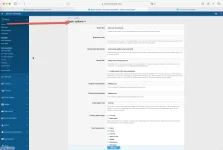
Bu mesajın altındaki ekli ekran görüntüsü, yönetim panelinde Setup > Options yolundan açılan Basic options sayfasını gösteriyor.
WordPress ve özel PHP kodu
WordPress'te resmî hCaptcha for WP eklentisi anahtarları kendi hCaptcha menüsündeki General sayfasında tutar ("Tabs Menu Under Settings" açıksa bu menü Settings altına taşınır). Yeni kurulum önceden tanımlı anahtarlarla bir test modunda başlar; Site Key ve Secret Key alanları ancak aynı sayfanın Appearance bölümündeki Mode ayarı Live yapılınca düzenlenebilir. Anahtarları girdikten sonra örnek hCaptcha'yı çözüp Check Site Config satırındaki Check düğmesine basın; eklenti, kaydetmeden önce yapılandırmayı hCaptcha'ya doğrulatır. WPForms gibi bazı form eklentilerinin ayrı bir CAPTCHA ayar sayfası vardır; formun hangi anahtarları kullandığını orada da kontrol edin. WordPress'teki diğer spam önlemleri için çok katmanlı WordPress spam savunması rehberimize bakabilirsiniz.Kendi uygulamanız için kısa ama doğru bir doğrulama örneği:
PHP:
<?php
function hcaptcha_verify(string $token, string $ip): array
{
    $fields = [
        'secret'   => trim((string) getenv('HCAPTCHA_SECRET')),
        'response' => $token,
    ];
    $sitekey = trim((string) getenv('HCAPTCHA_SITEKEY'));
    if ($sitekey !== '') {
        $fields['sitekey'] = $sitekey;
    }
    if ($ip !== '') {
        $fields['remoteip'] = $ip;
    }

    $ch = curl_init('https://api.hcaptcha.com/siteverify');
    curl_setopt_array($ch, [
        CURLOPT_POST           => true,
        CURLOPT_POSTFIELDS     => http_build_query($fields),
        CURLOPT_RETURNTRANSFER => true,
        CURLOPT_CONNECTTIMEOUT => 5,
        CURLOPT_TIMEOUT        => 10,
    ]);
    $body = curl_exec($ch);
    if ($body === false) {
        return ['success' => false, 'transport_error' => curl_error($ch)];
    }

    $data = json_decode($body, true);
    return is_array($data) ? $data : ['success' => false, 'transport_error' => 'invalid JSON'];
}

$token  = $_POST['h-captcha-response'] ?? '';
$result = hcaptcha_verify(is_string($token) ? $token : '', $_SERVER['REMOTE_ADDR'] ?? '');
if (empty($result['success'])) {
    error_log('hCaptcha: ' . json_encode($result));
    http_response_code(403);
    exit('CAPTCHA doğrulaması başarısız oldu, lütfen tekrar deneyin.');
}
// buradan sonra formu işleyin- CURLOPT_POSTFIELDS'e metin (string) verin: dizi verirseniz cURL isteği multipart/form-data olarak gönderir, hCaptcha ise standart form kodlaması bekler.
- PHP-FPM'in worker süreçleri varsayılan olarak temizlenmiş bir ortamla başlar (clear_env = yes). Değişkenleri havuz (pool) dosyasında env[HCAPTCHA_SECRET] = ... biçiminde tanımlayın; aksi hâlde getenv() boş döner, kod boş bir gizli anahtar gönderir ve hCaptcha missing-input-secret yanıtı verir.
- Her belirteci yalnızca bir kez doğrulayın.
- Gizli anahtarı asla günlüğe yazmayın; bu kod yalnızca hCaptcha'nın yanıtını kaydeder.
- Proxy veya CDN arkasında REMOTE_ADDR ziyaretçinin değil proxy'nin adresidir. Gerçek istemci IP'sini X-Forwarded-For başlığına körü körüne güvenmek yerine web sunucusunda (nginx real_ip, Apache mod_remoteip) ayarlayın.
- Bu kod hCaptcha'ya ulaşılamadığında formu reddeder (fail-closed). XenForo ise aşağıda anlatıldığı gibi tersini yapar; hangisinin uygun olduğuna sitenizin riskine göre karar verin.
Ağ tarafı: giden HTTPS, proxy, IPv6 ve CA paketi
Bu bölüm, günlükte mesajı "hCaptcha connection error" ile başlayan kayıtlar gördüğünüzde ya da birinci curl testi hata verdiğinde geçerlidir. Dikkat: incelediğimiz XenForo sürümleri hCaptcha'ya ulaşamadıklarında CAPTCHA'yı başarılı sayar. Kullanıcılar kilitlenmez ama bu süre boyunca botlar da engellenmez. XenForo hcaptcha.com adresine, belgeler ve bu rehberdeki komutlar ise api.hcaptcha.com adresine bağlanır; bu yazı hazırlanırken ikisi aynı IP adreslerine çözülüyordu, ama proxy veya güvenlik duvarınız alan adına göre izin veriyorsa ikisini de listeye ekleyin.| cURL hatası | Olası neden | Kontrol veya çözüm |
|---|---|---|
| 6: Could not resolve host | Sunucunun DNS çözümlemesi çalışmıyor | dig api.hcaptcha.com; /etc/resolv.conf içeriği |
| 7: Failed to connect | Giden 443 engeli; SELinux kaynaklı "Permission denied" | Güvenlik duvarı çıkış kuralları; getsebool httpd_can_network_connect |
| 28: Operation timed out | Sessizce düşürülen çıkış trafiği, zorunlu proxy | curl -v ile bağlantının hangi aşamada beklediğini görün; sağlayıcınıza çıkış kurallarını sorun |
| 35: SSL connect error | TLS el sıkışması (handshake) kurulamıyor; çok eski OpenSSL veya araya giren bir cihaz | openssl s_client ile el sıkışmayı izleyin; sistem paketlerini güncelleyin |
| 60: SSL certificate problem | Eski CA paketi, PHP'de yanlış CA yolu, yanlış sunucu saati, kendi sertifikasını sunan kurumsal TLS denetim proxy'si | ca-certificates paketini güncelleyin; curl.cainfo ve openssl.cafile ayarlarına bakın; timedatectl ile saati doğrulayın |
Bash:
dig +short A api.hcaptcha.com; dig +short AAAA api.hcaptcha.com
curl -v -m 10 -o /dev/null https://api.hcaptcha.com/siteverify
openssl s_client -connect api.hcaptcha.com:443 -servername api.hcaptcha.com < /dev/null 2>&1 | grep -iE 'depth|verif|error|alert'
php -r 'var_dump(ini_get("curl.cainfo"), ini_get("openssl.cafile"));'
getsebool httpd_can_network_connect # yalnızca SELinux etkin sistemlerde- Güvenlik duvarı: firewalld varsayılan yapılandırmada giden trafiği kısıtlamaz. Çıkış engelleri genellikle nftables/iptables OUTPUT kurallarında, CSF kullanan sunucularda /etc/csf/csf.conf içindeki TCP_OUT listesinde (443 bulunmalı) veya bulut sağlayıcısının güvenlik grubu çıkış kurallarında olur.
- SELinux: AlmaLinux, Rocky ve RHEL'de SELinux enforcing modundayken httpd_can_network_connect kapalıysa (varsayılan durum budur) kabuktaki curl başarılı olur ama PHP-FPM aynı bağlantıda "Permission denied" alır. ausearch -m avc -ts recent çıktısında php-fpm için bir name_connect reddi görüyorsanız giden bağlantılara setsebool -P httpd_can_network_connect 1 ile izin verin.
- Proxy: PHP-FPM ortamı temizlediği için kabukta tanımlı HTTPS_PROXY gibi değişkenler PHP'ye genellikle ulaşmaz; bu yüzden kabuk testi başarılıyken forum bağlanamayabilir. Çıkışın proxy üzerinden yapılması gereken ağlarda XenForo'nun iç HTTP istemcisine (incelediğimiz sürümlerde CAPTCHA doğrulaması da bu istemciyi kullanır) src/config.php içinde adres verilir; örnek aşağıda.
- IPv6: bu yazının hazırlandığı tarihte api.hcaptcha.com ve hcaptcha.com yalnızca IPv4 (A) kaydı yayınlıyor. Yalnızca IPv6 bağlantısı olan bir sunucu NAT64/DNS64 ya da bir çıkış proxy'si olmadan bu adreslere ulaşamaz. İleride AAAA kaydı eklenirse ve sunucunuzun IPv6 yönlendirmesi bozuksa curl -4 ile curl -6 sonuçlarını karşılaştırın.
- CA paketi: hCaptcha birden fazla sertifika ve sertifika otoritesi kullanır, kısa ömürlü sertifikalarını sık döndürür ve belgelerinde sertifika sabitlemeyi (pinning) önermez. SSS sayfası birincil sağlayıcı olarak Let's Encrypt'i (kök: ISRG Root X1) gösterse de kontrol ettiğimizde api.hcaptcha.com bir Google Trust Services zinciri (GTS Root R4) sunuyordu; bu yüzden sunucuda tek bir kök sertifika değil, eksiksiz ve güncel bir CA paketi bulunmalıdır. Yukarıdaki openssl komutu bu zinciri depth= satırlarında gösterir ve sonunda Verify return code: 0 (ok) yazmalıdır. Sistem CA paketini güncel tutun (AlmaLinux/Rocky: dnf update ca-certificates; Debian/Ubuntu: apt install --only-upgrade ca-certificates) ve CLI ile web tarafının farklı php.ini kullanabileceğini unutmayın; web tarafını phpinfo() ile doğrulayın. Doğrulamayı kapatmak (curl -k veya eşdeğeri) çözüm değildir, çünkü gizli anahtar tam da o bağlantıda taşınır.
PHP:
// src/config.php
$config['http']['proxy'] = 'http://proxy.example.local:3128';
Önleme: gizli anahtarı korumak ve sızıntıdan sonra yenilemek
- Site anahtarı herkese açıktır; gizli anahtar yalnızca sunucu tarafında durur. Şablonlara, JavaScript dosyalarına, HTML yorumlarına veya tarayıcıya giden yapılandırmaya yazmayın. XenForo anahtarı veritabanındaki seçeneklerde saklar; şablon düzenlemeye gerek yoktur.
- Kod depolarına (repository) gizli anahtar koymayın: değeri ortam değişkeninde veya bir sır yönetim aracında (secrets manager) tutun, .env dosyalarını .gitignore'a ekleyin ve depoda gizli anahtar taraması (secret scanning) çalıştırın.
- Veritabanı yedekleri ve dökümleri gizli anahtarı içerir; onları da hassas veri olarak saklayın. Destek isterken paylaştığınız ekran görüntülerinde anahtarı karartın.
- Seçenekleri düzenleme yetkisini yalnızca gereken yöneticilere verin ve aynı hesap anahtarını kullanan sistemleri (forum, WordPress siteleri, iç uygulamalar) bir listede tutun.
- Sızıntı şüphesinde (hCaptcha bu konuda e-posta uyarısı da gönderebilir) Settings > Generate New Secret ile yeni anahtar üretin, tek seferlik gösterilen değeri parola yöneticisine kaydedin, listedeki her sistemi güncelleyin, gerçek belirteç testiyle doğrulayın ve hata günlüklerini izleyin. Günlük yenileme sayısı sınırlı olduğundan güncellenecek yerleri önceden hazırlayın.
Alternatif olarak, XenForo 2.2.12'den bu yana aynı seçenekte Use Cloudflare Turnstile de bulunur. Sağlayıcı değiştirmek bir tercih meselesidir; Turnstile'ın da kendi site anahtarı ve gizli anahtarı vardır ve yanlış girildiğinde benzer bir yapılandırma sorunu çıkarır.
Sık sorulan sorular
Anahtarı düzelttim ama günlükte hâlâ kayıt görüyorum. Neden?Eski kayıtlar siz temizleyene kadar durur. Kayıtların saatine bakın ya da günlüğü temizleyip misafir olarak yeniden test edin.
XenForo'daki anahtar alanları boş. Gizli anahtar nereden geliyor?
XenForo'nun kendisinden: kendi anahtarınız yoksa ya da yalnızca bir alan doluysa yerleşik bir çift gönderir; günlükteki hata da o yerleşik gizli anahtarla ilgilidir. Ücretsiz bir hCaptcha hesabı açıp kendi iki anahtarınızı girin.
Gizli anahtarı yeniledim. Başka neyi güncellemeliyim?
Aynı hesap anahtarını kullanan her sistemi: diğer forumlar, WordPress siteleri ve iç uygulamalar. Enterprise'da site anahtarına özel anahtar kullanıyorsanız etki, o anahtarın atandığı site anahtarlarıyla sınırlıdır.
hCaptcha'ya ulaşılamazsa XenForo ne yapar?
İncelediğimiz sürümlerde "hCaptcha connection error" kaydı yazar ve formu geçirir. Kullanıcılar kilitlenmez ama botlar da engellenmez; bu kayıtları hızla ele alın.
Alan adı ayarı bu hataya yol açar mı?
Bu hataya yol açmaz; invalid-input-secret yalnızca gizli anahtarla ilgilidir. Bir site anahtarı için alan adı izin listesini (domain allowlist) açarsanız, listede olmayan alan adlarından gelen istekler invalid-input-response ile reddedilir.
Turnstile'a geçmek sorunu çözer mi?
Bu kaydı ortadan kaldırır, çünkü artık hCaptcha'ya istek gitmez. Ancak Turnstile anahtarları da aynı özenle girilmelidir; geçişi bu hatanın çözümü olarak değil, ayrı bir tercih olarak değerlendirin.
Sonuç ve sonraki adımlar
invalid-input-secret, hCaptcha'nın sunucunuzdan gelen gizli anahtarı tanımadığını söyler. Ağ çalışıyordur; neden neredeyse her zaman kopyalama hatası, gizli anahtar alanına yapıştırılmış site anahtarı, yenilenmiş bir anahtar ya da alanlar boşken XenForo'nun yerleşik çiftidir. Önerilen sıra:- Erişim testi ve resmî test çiftiyle ağın sağlam olduğunu doğrulayın.
- Kendi anahtarınızı gerçek bir belirteçle sınayın.
- XenForo'da gelişmiş seçenekleri açıp anahtarları yeniden girin, misafir olarak test edin ve günlüğü izleyin.
- Aynı hesap anahtarını kullanan sistemlerin listesini çıkarın ve bir sonraki yenilemeyi planlayın.
If the XenForo admin panel shows ErrorException: hCaptcha configuration error: invalid-input-secret under Logs > Server error log, your forum did reach hCaptcha, and hCaptcha rejected the secret key it was sent as invalid or malformed. Visitors see the other half of the problem: every registration or contact attempt fails with "You did not complete the CAPTCHA verification properly. Please try again.", so in practice nobody can sign up. This guide covers every documented siteverify error code, where each key lives in the hCaptcha dashboard, how to isolate the fault from the server shell with curl, the correct admin path on XenForo 2.2 and 2.3, the WordPress and plain-PHP equivalents, network blockers, and how to keep the secret safe.
Quick fix: a five-step checklist
- In the hCaptcha dashboard (dashboard.hcaptcha.com), copy the forum's sitekey from the Sites page. The secret lives under the profile icon > Settings, and a newly generated secret is shown only once.
- If you don't have a stored secret you trust, click Generate New Secret and save the value in a password manager straight away. Anything else that used the old secret will need the new one too.
- In XenForo, open Setup > Options > Basic options, find Enable CAPTCHA for guests, select Use hCaptcha, paste both keys into their own fields with no leading or trailing spaces, and save. If the section is missing, turn on advanced options (explained below).
- Open /register/ as a guest in a private browser window, solve the CAPTCHA and submit the form.
- If the form goes through without a CAPTCHA error and no new entry appears in the Server error log, you're done. If entries keep coming, test the key outside XenForo with the curl steps below.
What invalid-input-secret means
hCaptcha verification has two halves. Once the visitor passes, the widget in the browser adds a verification token named h-captcha-response to the form. When the form is submitted, your server POSTs that token together with the secret to https://api.hcaptcha.com/siteverify as a standard form-encoded body (application/x-www-form-urlencoded), optionally adding the visitor's IP address (remoteip) and the sitekey it expects (sitekey). hCaptcha answers with JSON that contains success and, when something is wrong, an error-codes list. The documentation defines invalid-input-secret in one line: your secret key is invalid or malformed.There is good news hidden in this entry. hCaptcha answered, so your server can reach it, and DNS, the firewall and TLS are not suspects for this particular message. The XenForo 2.2 and 2.3 releases we examined send verification to hcaptcha.com/siteverify and write only four configuration-type codes to the log: missing-input-secret, invalid-input-secret, sitekey-secret-mismatch and invalid-remoteip. Several codes end up comma-separated on one line. User-side failures, such as an expired or reused token, are never logged. When the server cannot reach hCaptcha at all, you get a different entry whose message begins with "hCaptcha connection error" and usually quotes a cURL error number; the network section covers it.
The usual causes:
- Invisible characters: a space, tab or line break picked up before or after the key while copying.
- Truncated copy: part of the key wasn't selected. Because a new secret is shown only once, a short copy can go unnoticed and stay that way.
- Sitekey in the secret field: the sitekey was pasted into the secret field as well. If the two values are swapped completely, the widget runs with the secret as its sitekey and can't produce a valid token, so forms fail without any log entry.
- Empty or half-filled fields in XenForo: with no keys of your own, or only one of the two fields filled, XenForo sends its built-in key pair, so the secret being rejected isn't yours. The XenForo section below explains this.
- Rotated secret: you or a colleague generated a new secret, so every system still using the old one now fails. The account secret is shared by every sitekey on the account, so rotating it for another site breaks the forum as well.
- Autofill: where the secret is a password field, as in the WordPress plugin, a browser or password manager can fill in a saved login password.
- Configuration bugs in custom code: an unexpanded placeholder such as "${HCAPTCHA_SECRET}" sent instead of the value, a .env parser that keeps the quotes around the value, or a trailing \r left over from Windows line endings.
Domain restrictions and DNS propagation are often suggested for this error, but neither explains it. hCaptcha's documentation describes an optional per-sitekey domain allowlist, off by default and still announced as coming soon at the time of writing; requests from hostnames that aren't on the list fail with invalid-input-response, not invalid-input-secret. A DNS change can at most cause a connection error; it cannot make a secret invalid.
Current siteverify error codes: cause and fix
The table follows the current list on docs.hcaptcha.com. Older libraries may still mention a combined invalid-or-already-seen-response code; the documentation now lists expired-input-response and already-seen-response separately.| Code | Meaning | Typical cause | Fix |
|---|---|---|---|
| missing-input-secret | No secret was sent | Empty environment variable, config file not loaded, value sent under the wrong parameter name | Confirm in code or with curl that the value travels in the secret field |
| invalid-input-secret | The secret is invalid or malformed | Whitespace, truncated copy, sitekey pasted instead, rotated secret | Copy it again; if in doubt, generate a new one and update every system that uses it |
| missing-input-response | No token was sent | Widget didn't load (ad blocker, CSP, JavaScript error), or the form doesn't submit the token field | Check the browser console; allow hcaptcha.com and *.hcaptcha.com in your CSP |
| invalid-input-response | The token is invalid or malformed | Bot traffic; a token cut or altered by a WAF, an input filter or a length limit; a hostname missing from the sitekey's domain allowlist, if you enabled one | Make sure the token reaches the server unchanged; check the allowlist; expected for bots |
| expired-input-response | The token expired (120 seconds by default) | The visitor solved the CAPTCHA, then took too long to submit | Handle the widget's expired-callback and have the user solve the CAPTCHA again |
| already-seen-response | The token was already verified once | Double submit, code or plugins verifying the same token twice, your own curl test | Verify once per submission; reset the widget after a failed attempt |
| bad-request | The request is invalid or malformed | A request the endpoint can't parse, such as a hand-built or truncated body | Use a standard HTTP client and send a form-encoded POST (the docs say not to send JSON) |
| missing-remoteip | The remoteip parameter is missing | The code doesn't pass the visitor's IP | Send the visitor's IP address in remoteip |
| invalid-remoteip | remoteip is not a valid IP address or blinded value | A whole X-Forwarded-For list ("1.2.3.4, 10.0.0.1"), an address with a port, text that isn't an IP | Send one bare IPv4 or IPv6 address; behind a proxy or CDN, restore the real client IP at web-server level |
| not-using-dummy-passcode | A test sitekey was used without its matching test secret | Test sitekey in the widget, real secret on the server | Use both test keys in testing and both real keys in production |
| sitekey-secret-mismatch | The sitekey is not registered with this secret | Sitekey and secret come from different accounts (an agency account and a client account, say); on Enterprise, a sitekey secret not assigned to that sitekey | Take both values from the same account, or fix the assignment |
Where the keys live
- Sitekey: on the dashboard's Sites page, where you can create as many as you need (one per forum is typical). It is public, already visible in your page's HTML, and looks like a hyphenated UUID such as 10000000-ffff-ffff-ffff-000000000001.
- Account secret: profile icon > Settings. On a standard account one secret verifies tokens from every sitekey on that account, and it belongs on the server only. Generate New Secret shows the new value once; hCaptcha doesn't retain it, so you can't look it up later. A confirmation email follows within seconds. According to the docs, free accounts can rotate once a day and Pro accounts up to three times a day.
- Sitekey secrets (Enterprise): Enterprise accounts can create several secrets, assign each one to one or more sitekeys and give it an optional expiry, so an expired or unassigned secret belongs on your checklist.
- Telling them apart: older secrets look like the test secret below, 0x followed by 40 hexadecimal characters, and the current documentation shows secrets that begin with ES_. If the value in your secret field has the UUID shape with four hyphens, it is a sitekey.
- Test keys: sitekey 10000000-ffff-ffff-ffff-000000000001 and secret 0x0000000000000000000000000000000000000000. The pair never shows a challenge, always produces the token 10000000-aaaa-bbbb-cccc-000000000001 and verifies with success: true. It provides no bot protection, so keep it to test environments.
Test from the server with curl: key or network?
Run the commands below in an SSH session on the server that hosts the forum. Reading the secret with read keeps it off the screen and out of the shell history. On shared hosting, command-line arguments can be briefly visible to other users of the same machine, so test the key from your own computer there.1. Reachability, without sending a secret:
Bash:
curl -sS -m 10 https://api.hcaptcha.com/siteverify; echo
Code:
{"success":false,"error-codes":["missing-input-response","missing-input-secret"]}2. The official test pair:
Bash:
curl -sS -m 10 https://api.hcaptcha.com/siteverify \
  --data-urlencode "secret=0x0000000000000000000000000000000000000000" \
  --data-urlencode "response=10000000-aaaa-bbbb-cccc-000000000001" \
--data-urlencode "sitekey=10000000-ffff-ffff-ffff-000000000001"; echo3. Your own secret, tested with a real token: a made-up token can't test the secret. hCaptcha looks at the token first: in our checks, a dummy token got only invalid-input-response, both with the valid test secret and with a secret we had invented. You need a real token from your forum's widget, and it expires after 120 seconds by default, so put the secret and the sitekey into variables first:
Bash:
read -rs HC_SECRET; echo    # paste the secret and press Enter (not echoed)
HC_SITEKEY='your-forum-sitekey'    # the value in XenForo's Site key field
Code:
copy(hcaptcha.getResponse())
Bash:
read -r HC_TOKEN            # paste the token and press Enter
curl -sS -m 10 https://api.hcaptcha.com/siteverify \
  --data-urlencode "secret=${HC_SECRET}" \
  --data-urlencode "response=${HC_TOKEN}" \
  --data-urlencode "sitekey=${HC_SITEKEY}"; echo
unset HC_SECRET HC_TOKEN- "success":true: the key pair is sound, and the fault sits in the value XenForo stores (see the database check in the next section).
- invalid-input-secret: hCaptcha rejects the secret. Copy it again, or generate a new one.
- sitekey-secret-mismatch: the sitekey isn't registered with this secret; the two usually come from different accounts.
- expired-input-response or already-seen-response: the token was too old or had already been used. Reload the page and repeat a little faster.
- invalid-input-response: the token arrived damaged, usually because it was copied incompletely. Take a fresh one.
Fixing it in XenForo 2.2 and 2.3
- Find the option: Setup > Options > Basic options, section Enable CAPTCHA for guests. The same option is also listed in the Spam management and User registration groups, which is why different guides give different paths. The official manual still uses the group's older name, "Basic board information". Direct URL: admin.php?options/groups/basicBoard/
- Show advanced options: on XenForo 2.3 and late 2.2 releases (we confirmed 2.2.13) this option is classed as advanced and hidden by default. Use Show advanced options at the bottom of the gear menu in the admin header, or the button of the same name on the option groups page. Earlier 2.2 releases show it directly.
- Enter the keys: select Use hCaptcha and fill in Site key and Secret key. Click into each field and press Home and End to check for stray spaces. hCaptcha has been XenForo's default CAPTCHA since 2.2.5, and the hint under the option says no extra configuration is required: with both fields empty, XenForo uses a built-in key pair, and your own keys add features such as difficulty preferences and analytics. In the releases we examined, your keys are used only when both fields are filled; with just one filled, XenForo silently falls back to the built-in pair. So if the fields were empty or half-filled when the error appeared, the rejected secret is the built-in one, and the fix is to enter both of your own keys. In early 2026, users on XenForo's community forum also reported that registration had stopped working on forums with the default settings and that their own keys fixed it, so don't rely on the built-in pair.
- Save and test as a guest: try /register/ or the contact form (misc/contact) in a private window. With Use invisible hCaptcha enabled you won't see a checkbox; that's expected. Test on the live domain: XenForo skips hCaptcha when the Board URL points to localhost or 127.0.0.1, and 2.3 also skips development domains such as .test, .local and .internal, so a local copy proves nothing.
- Check the log: Logs > Server error log (admin.php?logs/server-errors/). Clicking an entry shows the full stack trace and whatever extra information was available at the time. Clearing old entries before you test makes new ones easy to spot.
To see exactly what is stored, run this read-only query in phpMyAdmin or the mysql client:
Code:
SELECT option_value FROM xf_option WHERE option_id = 'extraCaptchaKeys';Add-ons: add-ons that replace the CAPTCHA or add providers can keep their own key fields. On XenForo 2.1, hCaptcha came from third-party add-ons and core support arrived with 2.2, so a leftover add-on on an upgraded forum may read different keys from the core option. Disable add-ons that touch registration, spam or CAPTCHA, test, then re-enable them one at a time. "hCaptcha configuration error" is the wording XenForo core uses; an entry worded differently probably comes from an add-on.
The screenshot attached below this post shows the Basic options page, opened from Setup > Options in the admin panel.
WordPress and custom PHP
On WordPress, the official hCaptcha for WP plugin keeps its keys on the General page of its own hCaptcha menu (the menu moves under Settings when "Tabs Menu Under Settings" is on). A new install starts in a test mode with predefined keys, so the Site Key and Secret Key fields become editable only after you set Mode, in the Appearance section of the same page, to Live. After entering the keys, solve the sample hCaptcha and press Check in the Check Site Config row; the plugin has hCaptcha check the configuration before you save. Some form plugins, WPForms for example, have their own CAPTCHA settings page, so check which keys the form actually uses. For the other layers of WordPress spam defence, see our multi-layered WordPress spam guide.A minimal, correct verification for your own application:
PHP:
<?php
function hcaptcha_verify(string $token, string $ip): array
{
    $fields = [
        'secret'   => trim((string) getenv('HCAPTCHA_SECRET')),
        'response' => $token,
    ];
    $sitekey = trim((string) getenv('HCAPTCHA_SITEKEY'));
    if ($sitekey !== '') {
        $fields['sitekey'] = $sitekey;
    }
    if ($ip !== '') {
        $fields['remoteip'] = $ip;
    }

    $ch = curl_init('https://api.hcaptcha.com/siteverify');
    curl_setopt_array($ch, [
        CURLOPT_POST           => true,
        CURLOPT_POSTFIELDS     => http_build_query($fields),
        CURLOPT_RETURNTRANSFER => true,
        CURLOPT_CONNECTTIMEOUT => 5,
        CURLOPT_TIMEOUT        => 10,
    ]);
    $body = curl_exec($ch);
    if ($body === false) {
        return ['success' => false, 'transport_error' => curl_error($ch)];
    }

    $data = json_decode($body, true);
    return is_array($data) ? $data : ['success' => false, 'transport_error' => 'invalid JSON'];
}

$token  = $_POST['h-captcha-response'] ?? '';
$result = hcaptcha_verify(is_string($token) ? $token : '', $_SERVER['REMOTE_ADDR'] ?? '');
if (empty($result['success'])) {
    error_log('hCaptcha: ' . json_encode($result));
    http_response_code(403);
    exit('CAPTCHA verification failed, please try again.');
}
// continue processing the form here- Give CURLOPT_POSTFIELDS a string. With an array, cURL sends multipart/form-data, while hCaptcha expects a standard form-encoded body.
- PHP-FPM workers start with a cleared environment by default (clear_env = yes). Define the variables in the pool file (for example env[HCAPTCHA_SECRET] = ...); otherwise getenv() returns nothing, the code sends an empty secret and hCaptcha answers missing-input-secret.
- Verify each token exactly once.
- Never log the secret; this code logs only hCaptcha's answer.
- Behind a proxy or CDN, REMOTE_ADDR holds the proxy's address. Restore the real client IP in the web server (nginx real_ip, Apache mod_remoteip) instead of trusting X-Forwarded-For blindly.
- This code rejects the form when hCaptcha can't be reached (fail-closed). XenForo does the opposite, as the next section explains; choose based on your site's risk.
Network side: outbound HTTPS, proxies, IPv6 and the CA bundle
This section applies when the log shows entries whose message begins with "hCaptcha connection error", or when the first curl test fails. Be aware that the XenForo releases we examined treat the CAPTCHA as passed when they can't reach hCaptcha. Users aren't locked out, but bots aren't stopped either while it lasts. XenForo connects to hcaptcha.com, while the docs and the commands in this guide use api.hcaptcha.com. At the time of writing both resolve to the same addresses, but if your proxy or firewall allow-lists by hostname, add both.| cURL error | Likely cause | Check or fix |
|---|---|---|
| 6: Could not resolve host | The server's DNS resolution is broken | dig api.hcaptcha.com; contents of /etc/resolv.conf |
| 7: Failed to connect | Outbound 443 blocked; SELinux "Permission denied" | Firewall egress rules; getsebool httpd_can_network_connect |
| 28: Operation timed out | Egress silently dropped, mandatory proxy | Use curl -v to see where it stalls; ask your provider about outbound rules |
| 35: SSL connect error | TLS handshake fails; very old OpenSSL or a device in the path | Watch the handshake with openssl s_client; update system packages |
| 60: SSL certificate problem | Outdated CA bundle, wrong CA path in PHP, wrong server clock, a corporate TLS-inspection proxy presenting its own certificate | Update ca-certificates; check curl.cainfo and openssl.cafile; verify the clock with timedatectl |
Bash:
dig +short A api.hcaptcha.com; dig +short AAAA api.hcaptcha.com
curl -v -m 10 -o /dev/null https://api.hcaptcha.com/siteverify
openssl s_client -connect api.hcaptcha.com:443 -servername api.hcaptcha.com < /dev/null 2>&1 | grep -iE 'depth|verif|error|alert'
php -r 'var_dump(ini_get("curl.cainfo"), ini_get("openssl.cafile"));'
getsebool httpd_can_network_connect # only on systems with SELinux enabled- Firewall: firewalld does not restrict outbound traffic in its default configuration. Egress blocks usually sit in nftables or iptables OUTPUT rules, in the TCP_OUT list in /etc/csf/csf.conf on servers running CSF (443 must be there), or in the cloud provider's security-group egress rules.
- SELinux: on AlmaLinux, Rocky and RHEL with SELinux enforcing and httpd_can_network_connect off (the default), curl from the shell succeeds while PHP-FPM gets "Permission denied" on the same connection. If ausearch -m avc -ts recent shows a name_connect denial for php-fpm, allow outbound connections with setsebool -P httpd_can_network_connect 1.
- Proxy: because PHP-FPM clears its environment, variables such as HTTPS_PROXY set in your shell usually never reach PHP, so the shell test can pass while the forum can't connect. On networks where outbound traffic must go through a proxy, give the address to XenForo's internal HTTP client (which handles CAPTCHA verification in the releases we examined) in src/config.php; an example follows the list.
- IPv6: at the time of writing, api.hcaptcha.com and hcaptcha.com publish only IPv4 (A) records. An IPv6-only server can't reach them without NAT64/DNS64 or an outbound proxy. If AAAA records appear later and your server's IPv6 routing is broken, compare curl -4 with curl -6.
- CA bundle: hCaptcha uses several certificates and issuers, rotates its short-lived certificates often, and its documentation advises against certificate pinning. The FAQ names Let's Encrypt (root: ISRG Root X1) as the primary issuer, yet when we checked, api.hcaptcha.com presented a Google Trust Services chain (GTS Root R4), so the server needs a complete, current CA bundle rather than one particular root. The openssl command above prints that chain in its depth= lines and should report Verify return code: 0 (ok). Keep the system CA bundle current (AlmaLinux/Rocky: dnf update ca-certificates; Debian/Ubuntu: apt install --only-upgrade ca-certificates), and remember that the CLI and the web server can use different php.ini files, so confirm the web side with phpinfo(). Turning verification off (curl -k or an equivalent) is not a fix, because that connection is exactly where the secret travels.
PHP:
// src/config.php
$config['http']['proxy'] = 'http://proxy.example.local:3128';
Prevention: protect the secret, rotate after a leak
- The sitekey is public; the secret stays server-side. Never put it in templates, JavaScript files, HTML comments or any configuration sent to the browser. XenForo stores the key in its options in the database, so no template edit is ever needed.
- Keep secrets out of repositories: hold the value in an environment variable or a secrets manager, add .env files to .gitignore, and run secret scanning on the repository.
- Database backups and dumps contain the secret, so treat them as sensitive. Blur the key in screenshots you share when asking for help.
- Give option-editing rights only to the admins who need them, and keep a list of every system that uses the same account secret (forum, WordPress sites, internal apps).
- If you suspect a leak (hCaptcha may also email you about an exposed secret), generate a new one under Settings > Generate New Secret, save the one-time value in a password manager, update every system on the list, confirm with the real-token test and watch the error logs. Daily rotations are limited, so prepare the places to update before you rotate.
As an alternative, XenForo has offered Use Cloudflare Turnstile in the same option since 2.2.12. Switching provider is a matter of preference; Turnstile has its own sitekey and secret, and entering them wrongly causes a similar configuration problem.
FAQ
I fixed the key but still see entries in the log. Why?Old entries stay until you clear them. Check their timestamps, or clear the log and test again as a guest.
The key fields in XenForo are empty. Where does the secret come from?
From XenForo itself: with no keys of your own, or only one field filled, it sends a built-in pair, so the log entry concerns that built-in secret. Create a free hCaptcha account and enter both of your own keys.
I rotated the secret. What else needs updating?
Every system that uses the same account secret: other forums, WordPress sites and internal apps. With Enterprise sitekey secrets, the impact is limited to the sitekeys that secret is assigned to.
What does XenForo do when hCaptcha is unreachable?
In the releases we examined, it logs an "hCaptcha connection error" entry and lets the form through. Users aren't locked out, but bots aren't blocked either, so deal with these entries quickly.
Can a domain setting cause this error?
Not this one: invalid-input-secret concerns the secret alone. If you turn on the domain allowlist for a sitekey, requests from hostnames that aren't listed fail with invalid-input-response instead.
Will switching to Turnstile solve it?
It removes this entry, because no request goes to hCaptcha any more. Turnstile keys need the same care, though, so treat the switch as a separate choice rather than the fix for this error.
Conclusion and next steps
invalid-input-secret means hCaptcha doesn't recognise the secret your server sent. The network works; the cause is almost always a copying mistake, the sitekey in the secret field, a rotated secret or, when the fields are empty, XenForo's built-in pair. A sensible order:- Confirm the network with the reachability test and the official test pair.
- Test your own secret with a real token.
- In XenForo, show advanced options, re-enter the keys, test as a guest and watch the log.
- List every system that shares the account secret and plan the next rotation.
Attachments
Last edited by a moderator:


